HyperX Cloud Flight 2 vs Razer Kraken Gaming
Quick Verdict
The HyperX Cloud Flight 2 is the clear choice for gamers who want wireless freedom and extremely long battery life. Its 100 hour 2.4GHz and 150 hour Bluetooth figures dwarf the Razer Kraken Gaming's wired-only design, and it adds dual mics, RGB, and swappable plates. The Razer Kraken Gaming counters with a durable bauxite aluminum frame, cooling gel cushions, and a noise isolating cardioid microphone. Its 50mm drivers score slightly higher for sound, and its 3.5mm connection works everywhere with no charging. Choose HyperX if you prioritize battery and Bluetooth. Choose Razer if you want a simple, comfortable wired headset with clear positional audio. Both skip active noise cancelling, so neither suits frequent flyers.

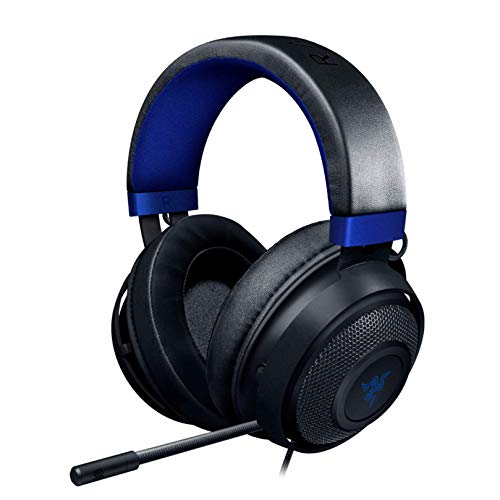
| Spec | HyperX Cloud Flight 2 | Razer Kraken Gaming |
|---|---|---|
| Type | Wireless over-ear gaming headset | Wired gaming headset |
| Driver | Angled 50mm drivers tuned by HyperX | Custom-tuned 50 mm drivers |
| Noise cancelling | Not published in listing | No active noise cancelling stated; microphone has noise isolation |
| Bluetooth and codecs | Bluetooth and 2.4GHz wireless; codecs not published in listing | No Bluetooth; wired 3.5 mm connection |
| Battery life | Up to 100 hours 2.4GHz, up to 150 hours Bluetooth with lighting off, up to 23 hours with RGB on | Not applicable (wired passive) |
| Wired option | Not published in listing | Yes, 3.5 mm headphone jack |
| Controls and app | Onboard earcup controls; HyperX NGENUITY software for RGB | In-line analog volume wheel and mic mute; software surround for Windows 10 64-bit only |
| Water resistance | Not published in listing | Not published in listing |
| Weight | Not published in listing | Not published in listing |
| Included accessories | USB-C 2.4GHz dongle, USB-C to USB-A adapter, detachable boom mic, removable earcup plates, ear pads, headband pad | Not published in listing |
Sound Quality
Both headsets use 50mm drivers, but the listings emphasize different tuning approaches. The Razer Kraken Gaming scores 25 out of 30 for sound quality, compared with 24 for the HyperX Cloud Flight 2. Razer describes its drivers as custom-tuned 50mm drivers with positional audio for gaming. HyperX uses angled 50mm drivers tuned by HyperX, which may direct sound toward the ear for a more natural soundstage.
The HyperX Cloud Flight 2 supports Bluetooth and 2.4GHz wireless, but the listing does not publish which Bluetooth codecs are supported. That leaves some uncertainty about wireless audio quality. The Razer Kraken Gaming has no Bluetooth, using a wired 3.5mm connection that sends an analog signal directly from the source device. This wired path avoids wireless compression and adds no latency.
On paper, the Razer's slightly higher sound score reflects its focus on positional cues for competitive gaming. HyperX counters with angled drivers and dual wireless modes that add flexibility for mixed use. Without published frequency response graphs or distortion measurements, the comparison relies on driver design and intended use. Buyers who want precise in-game spatial audio may favor Razer, while those who want wireless convenience may accept the small tradeoff.
Comfort and Fit
Both the HyperX Cloud Flight 2 and Razer Kraken Gaming score 17 out of 20 for comfort and fit. HyperX lists memory foam ear pads, rotating earcups, steel sliders, and a headband pad among its comfort features. Razer highlights a lightweight bauxite aluminum frame and cooling gel-infused ear cushions designed to reduce heat and pressure. Neither listing publishes a weight, so absolute heft cannot be compared.
HyperX also includes removable earcup plates, ear pads, and a headband pad, which may allow customization and replacement over time. Razer's cooling gel cushions target long gaming sessions where heat buildup is a common complaint. The bauxite aluminum frame is described as flexible and durable, which may improve fit on different head shapes. HyperX steel sliders also imply sturdy adjustment, but no clamping force details are provided.
Without published weight or clamping force measurements, the equal comfort scores are based on stated materials rather than direct comparison. Buyers who run warm during long sessions may prefer the Razer's gel-infused cushions. Buyers who like the feel of memory foam and the ability to rotate the earcups may prefer the HyperX. HyperX's included replacement pads give it a slight practical edge for longevity.
Noise Control and Features
The HyperX Cloud Flight 2 scores 12 out of 15 for features and noise control, while the Razer Kraken Gaming scores 10. HyperX offers a detachable boom microphone plus a built-in internal microphone, giving users two microphone options. It also has onboard earcup controls and HyperX NGENUITY software for RGB lighting customization. Razer counters with a retractable noise isolating microphone using a cardioid pattern, plus in-line analog volume wheel and mic mute.
Neither headset lists active noise cancelling for the ear cups. Razer's microphone is described as noise isolating, which helps reduce background noise for voice chat. HyperX does not publish microphone noise isolation details, but the detachable boom mic places the voice pickup closer to the mouth. Razer's inline controls work without software, while HyperX relies on earcup controls and uses software only for RGB adjustments.
HyperX's feature set is more extensive because it includes dual wireless modes, RGB, and swappable plates alongside the dual mics. Razer's software surround sound is limited to Windows 10 64-bit only, which restricts its usefulness on consoles and mobile. The Razer's analog controls are simple and reliable, but the HyperX offers more modern conveniences. The published scores reflect the HyperX's advantage in features, though both lack active noise cancelling.
Battery, Bluetooth and Connectivity
This category is the most one-sided. The HyperX Cloud Flight 2 earns a perfect 15 out of 15 for battery and connectivity, while the Razer Kraken Gaming earns only 8. HyperX offers dual wireless modes with a USB-C 2.4GHz dongle and Bluetooth. The listing reports up to 100 hours on 2.4GHz and up to 150 hours on Bluetooth with lighting off. Turning on RGB reduces battery life to 23 hours, which is still substantial but much shorter.
The Razer Kraken Gaming has no battery because it is a wired passive headset. Its 3.5mm connection requires no charging and works with PC, consoles, and mobile devices that have a headphone jack. This eliminates battery anxiety entirely but also means no wireless freedom at all. HyperX includes a USB-C to USB-A adapter for broader PC compatibility, but the listing does not mention a wired 3.5mm option for the HyperX.
In terms of platform support, HyperX's best_for listing mentions PC, PlayStation, Switch, and mobile, giving it wide flexibility through wireless modes. Razer's 3.5mm jack also works across those platforms but ties the user to the device. The HyperX listing does not publish Bluetooth codec support, which may affect audio quality over Bluetooth. For buyers who prioritize long battery life and wireless options, HyperX is the clear winner. Razer remains a good choice for those who never want to charge a headset.
Build, Design and Portability
The Razer Kraken Gaming edges the HyperX Cloud Flight 2 in build and portability with a score of 9 out of 10 versus 8. Razer uses a bauxite aluminum frame that the listing describes as lightweight, flexible, and durable. HyperX uses steel sliders and rotating earcups, and it adds tool-free removable earcup plates for aesthetic customization. Neither listing publishes a weight, so portability cannot be directly measured.
HyperX includes a detachable boom microphone, removable earcup plates, ear pads, and a headband pad, which may make it easier to pack and maintain. Razer's retractable microphone is built into the earcup, reducing the need to store a separate piece. The Razer wired design has no battery, so it may be simpler for travel, but the fixed cable cannot be removed as far as the listing states. HyperX's USB-C dongle and adapter add small accessories to carry.
Despite the Razer's higher score, both headsets are desktop-oriented gaming products, not travel headphones. The Razer's aluminum frame may feel more premium and durable, while HyperX's steel sliders and swappable plates prioritize customization. The lack of published weight for both models makes it impossible to say which is lighter. Buyers who value a rugged metal frame may prefer Razer, while those who like replaceable parts and RGB may prefer HyperX.
Call Quality and Daily Use
For call quality, the Razer Kraken Gaming has a clearer published advantage. It lists a retractable noise isolating microphone with a cardioid pattern, which is designed to capture the user's voice while rejecting off-axis sound. The HyperX Cloud Flight 2 includes a detachable boom microphone and a built-in internal microphone, but the listing does not describe the HyperX mic pickup pattern or noise isolation. Razer's specified cardioid and noise isolation give it an edge for voice clarity on paper.
In daily use, the HyperX offers wireless freedom with Bluetooth and 2.4GHz connections, allowing movement away from the source device. The onboard earcup controls handle volume and mic adjustments, and the dual mics let users switch between boom and internal options. Razer uses an in-line analog volume wheel and mic mute, which is simple and works without software. However, Razer's software surround sound is limited to Windows 10 64-bit, so console and mobile users get no virtual surround.
HyperX's long battery life means daily use requires recharging only occasionally, even with moderate RGB use. The detachable boom mic is convenient for gaming calls, and the internal mic allows casual listening without the boom attached. Razer's wired design means no battery to manage, but the user is tied to the cable. Neither listing mentions sidetone or mic monitoring. For a single headset that handles gaming, calls, and mobile music, HyperX is more versatile. Razer is better for those who prefer a fixed wired setup.
Who Should Buy It
Buy the HyperX Cloud Flight 2 if you want a wireless gaming headset with exceptional battery life and flexibility across PC, PlayStation, Switch, and mobile. The published 100 hour 2.4GHz and 150 hour Bluetooth battery figures are the standout features in this comparison. Gamers who like to customize the look with RGB lighting and removable earcup plates will appreciate the tool-free design. The detachable boom mic plus built-in internal mic also suits those who want one headset for gaming and casual listening.
Buy the Razer Kraken Gaming if you want a simple, durable wired headset with clear positional audio and a noise isolating mic. The bauxite aluminum frame and cooling gel ear cushions are designed for long gaming sessions. The 3.5mm connection works on PC, consoles, and mobile without charging or pairing. This is a good choice for buyers who prefer a reliable wired connection and do not need Bluetooth or active noise cancelling.
Both headsets target gamers but serve different needs. HyperX suits players who value battery life and wireless freedom, while Razer suits those who value build simplicity and a no-charge experience. The best choice depends on your platform habits and tolerance for cables. If you play on multiple devices and want one wireless headset, HyperX is likely the better fit. If you stay at a desk and want proven analog simplicity, Razer is a solid option.
The Deciding Question
The central question is whether you need wireless connectivity or are content with a wired setup. The HyperX Cloud Flight 2 offers dual wireless modes with up to 100 hours on 2.4GHz and 150 hours on Bluetooth with lighting off. The Razer Kraken Gaming has no wireless option and relies on a 3.5mm analog connection. If you hate charging headsets, Razer removes that concern entirely but also removes mobility.
A second question is around microphone and feature flexibility. HyperX provides a detachable boom mic and a built-in internal mic, plus RGB and swappable plates. Razer offers a retractable noise isolating mic and software surround only on Windows 10 64-bit. If you want features beyond basic audio, HyperX has more to offer. If you want just volume and mic mute without software, Razer's inline controls are simpler.
Ultimately the decision comes down to wireless versus wired tolerance and desired extras. The HyperX wins on battery and feature set, but the Razer wins on wired simplicity and published mic noise isolation. Buyers should weigh how often they move away from their desk, how long they play, and whether they need Bluetooth. The answer determines which headset fits your daily gaming and listening habits.
Who Should Buy Which
Choose the HyperX Cloud Flight 2 if you game on PC, PlayStation, Switch, and mobile and want a single wireless headset to handle all of them. The 100 hour 2.4GHz and 150 hour Bluetooth battery life with lighting off means you can go weeks between charges. The detachable boom mic and built-in internal mic give you options for chat and casual use. Customizable RGB and removable earcup plates are a bonus for players who like to personalize gear.
Choose the Razer Kraken Gaming if you primarily play at a desk and prefer a reliable wired connection with no battery to manage. The custom-tuned 50mm drivers are aimed at positional audio for competitive gaming, and the bauxite aluminum frame is built to flex. The cooling gel ear cushions target heat buildup during long sessions, and the retractable noise isolating mic provides clear voice with a cardioid pattern. The 3.5mm jack works with PC, consoles, and mobile.
If you need both wireless and active noise cancelling, neither headset fits perfectly because both lack ANC as published. If you want a wired backup option, the HyperX listing does not mention one, while Razer is wired only. The HyperX is the better all-around wireless pick, and the Razer is the better straightforward wired pick. Choose based on whether wireless endurance or wired simplicity matters more for your setup.
HyperX Cloud Flight 2
Pros
- Exceptional battery life up to 100 hours on 2.4GHz
- Dual wireless modes with 2.4GHz and Bluetooth
- Detachable boom mic plus built-in internal mic
- Angled 50mm HyperX-tuned drivers
- Customizable RGB and tool-free removable earcup plates
- Memory foam pads, rotating earcups and steel sliders
Cons
- No active noise cancelling listed
- No wired analog option published
- Bluetooth codec support not specified
- RGB lighting drops battery life to 23 hours
- Weight not published
Razer Kraken Gaming
Pros
- Custom-tuned 50 mm drivers deliver positional audio for gaming
- Lightweight bauxite aluminum frame is flexible and durable
- Cooling gel-infused ear cushions reduce heat and pressure
- Retractable noise isolating microphone with cardioid pattern
- In-line analog volume and mic mute controls
- Broad compatibility through 3.5 mm jack on PC, consoles, and mobile
Cons
- No active noise cancelling for the headphones
- Software surround sound limited to Windows 10 64-bit
- No Bluetooth or wireless option, wired only
- Weight and water resistance are not published
- Battery life is not applicable, but no wireless convenience
Who Should Buy Each
HyperX Cloud Flight 2
- Multi-platform gamers using PC, PS5, PS4, Switch and mobile
- Players who want multi-day battery life without frequent charging
- Streamers who like RGB customization and removable plates
- Users who want both a boom mic and an internal mic option
Razer Kraken Gaming
- PC and console gamers on a budget
- Streamers who need a retractable noise isolating mic
- Users who prefer a simple wired connection with no charging
- Gamers who want cooling gel cushions for long sessions
Quick Decision Guide
| If you want wireless freedom and long battery life | Choose HyperX Cloud Flight 2 |
| If you prefer a wired headset with no charging and broad 3.5mm compatibility | Choose Razer Kraken Gaming |
| If you need a detachable boom mic plus built-in internal mic and RGB customization | Choose HyperX Cloud Flight 2 |
| If you want a noise isolating cardioid microphone and software surround on Windows 10 64-bit | Choose Razer Kraken Gaming |
| If you want a headset for multiple platforms including Switch, PlayStation, PC and mobile with Bluetooth | Choose HyperX Cloud Flight 2 |
FAQ
About This Comparison
Mandrillis Team
The Mandrillis editorial team researches and compares audio and music gear using manufacturer documentation, verified specs and real buyer feedback, so you can make a confident purchase without wading through marketing claims.
Read our full research methodology.
We may earn a commission at no extra cost to you.