JBL Bar 300 vs Klipsch Flexus CORE 100
Quick Verdict
The JBL Bar 300 is the better choice for buyers who want built-in WiFi with AirPlay, Chromecast, and Alexa Multi-Room Music alongside a compact all-in-one Dolby Atmos bar. The Klipsch Flexus CORE 100 actually scores higher for raw sound quality and edges ahead on design and TV fit, backed by the well known Klipsch name and dual built-in subwoofers, though it relies on Bluetooth only with no WiFi streaming. The JBL scores 78 against the Klipsch's 77, a close result that masks real differences underneath. Choose the JBL for smart home streaming and app ecosystem reach, and choose the Klipsch for Klipsch's house sound and a future expansion path with matching surrounds.

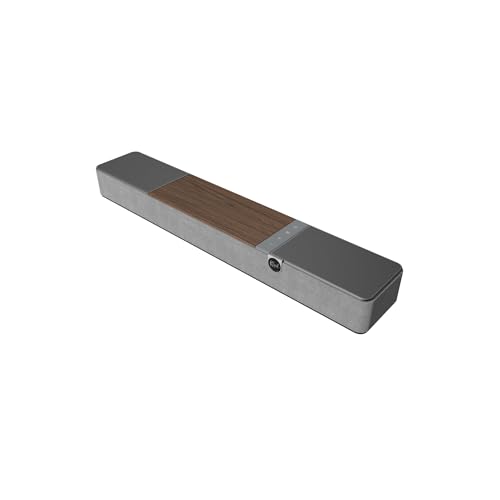
| Spec | JBL Bar 300 | Klipsch Flexus CORE 100 |
|---|---|---|
| Channels | 5.0-channel (as stated in listing title) | 2.1 |
| Drivers | Not published in listing | Two 2.25-inch ceramic drivers and dual 4-inch built-in subwoofers |
| Power | 260 watts total output | Not published in listing |
| Subwoofer | No separate subwoofer; built-in bass port | Dual 4-inch built-in subwoofers |
| Dolby Atmos and DTS | Dolby Atmos; DTS not stated in listing | Dolby Atmos processing, DTS not published in listing |
| HDMI eARC and inputs | Not published in listing | Not published in listing |
| Wireless and streaming | Built-in Wi-Fi with AirPlay, Alexa Multi-Room Music, and Chromecast built-in | Bluetooth |
| Dimensions | Not published in listing | 28-inch width, height and depth not published in listing |
| Remote and app | Not published in listing | Not published in listing |
| Included accessories | Not published in listing | Not published in listing |
Sound Quality
The Klipsch Flexus CORE 100 actually scores higher for sound quality in the supplied breakdown, earning 26 out of 30 against the JBL Bar 300's 23 out of 30, even though the JBL's overall score comes out one point higher. The Klipsch backs this with two ceramic drivers measured at 2 point 25 inches each, plus dual 4 inch built-in subwoofers, a specific driver layout that the listing names directly.
The JBL Bar 300 does not publish its driver configuration at all, leaving buyers to judge sound quality mainly from its 260 watt total output figure and its PureVoice dialogue enhancement feature. Both soundbars process Dolby Atmos, though the Klipsch explicitly frames its Atmos support as processing rather than true object-based height channels.
For raw sound quality on paper, the Klipsch's named driver layout and higher sound quality subscore suggest a more detailed listen overall. The JBL's PureVoice feature targets clearer dialogue specifically instead, which matters more to some viewers than general tonal detail across music and movies.
Drivers, Power and Room Fit
The JBL Bar 300 states 260 watts of total output and relies on a built-in bass port rather than a separate subwoofer module, which the listing frames as enough low end for the bar to stand alone. No individual driver sizes or count are published for the JBL.
The Klipsch Flexus CORE 100 does not publish a power figure. It does name its driver layout clearly, with two ceramic drivers at 2 point 25 inches each, plus dual 4 inch built-in subwoofers for bass, all inside a 2 point 1 channel design.
For room fit, the Klipsch states a 28 inch width, while height and depth are not published, and the JBL Bar 300 publishes no dimensions at all. Neither listing gives a buyer enough physical data to confirm it will clear a television stand or wall mount without measuring the actual unit.
Features and Connectivity
The JBL Bar 300 scores 12 out of 15 for both connectivity and for features and apps, ahead of the Klipsch Flexus CORE 100's 10 out of 15 for connectivity and 11 out of 15 for features and apps. The JBL's built-in WiFi brings AirPlay, Alexa Multi-Room Music, and Chromecast built-in, a genuinely broad smart home streaming set.
The Klipsch Flexus CORE 100 is limited to Bluetooth streaming, with no WiFi, AirPlay, or Chromecast mentioned in its listing, which narrows it to direct phone or tablet pairing rather than whole-home multi-room audio. Its expandability is a real counterpoint, since the listing names optional Flexus Surrounds and Flexus Subwoofers that can be added later.
Neither listing publishes HDMI eARC or physical input details, which is a real gap for both soundbars given how central that connection is to a modern television setup. Buyers planning around a specific eARC or optical requirement should confirm it directly before choosing either model, since neither listing states how many HDMI ports are present or whether a dedicated optical input is included.
Build, Design and Finish
The Klipsch Flexus CORE 100 scores 12 out of 15 for design and TV fit, ahead of the JBL Bar 300's 11 out of 15. The Klipsch carries the well known Klipsch brand name, developed in collaboration with Onkyo according to the listing, which may matter to buyers loyal to that house sound and design language.
The JBL Bar 300 is described as a compact, all-in-one design suited to smaller rooms, which lines up with its single-bar, no-subwoofer approach to bass. Neither listing publishes exact dimensions, so the specific size difference between the two bars is not confirmed in the supplied facts.
The Klipsch's 28 inch stated width gives at least a partial size reference that the JBL's listing does not offer at all. Buyers who want a documented footprint before measuring a television stand have slightly more to go on with the Klipsch, even though its height and depth remain unpublished alongside the JBL's complete lack of dimensions.
Setup and Placement
Setting up the JBL Bar 300 should be relatively simple given its single-bar, no-subwoofer design. Built-in WiFi handles the connection to a home network, and from there AirPlay, Chromecast, and Alexa Multi-Room Music become available without any extra hardware to position.
Setting up the Klipsch Flexus CORE 100 starts just as simply over Bluetooth, but the listing's expandability options mean setup could grow later into a larger system with Flexus Surrounds and Flexus Subwoofers added around the core bar. Neither listing describes a remote control or companion app in detail, so initial setup steps for either model are not fully confirmed from the stated facts.
Placement for both bars is likely to sit directly below or in front of a television, given the single-bar format of each. Buyers planning a wall mount should still confirm bracket compatibility separately, since neither listing states mounting hardware details.
Daily Use
Daily use of the JBL Bar 300 benefits from its WiFi based ecosystem. A household can start playback through Alexa Multi-Room Music or Chromecast without reaching for Bluetooth pairing every time a new device joins the room.
Daily use of the Klipsch Flexus CORE 100 depends on Bluetooth pairing from a phone or tablet, which is a familiar workflow but one that lacks the always-on network convenience of the JBL's WiFi features. Dolby Atmos processing still runs on the Klipsch for everyday television and movie watching, even without discrete rear channels.
Switching sources day to day is simpler on the JBL once the initial WiFi pairing is done, since multiple household members can connect without repeating a Bluetooth handshake. The Klipsch keeps things familiar for anyone used to pairing a phone directly, at the cost of that always-on network convenience.
Who Should Buy It
The JBL Bar 300 is best for buyers who want a compact single-bar Dolby Atmos soundbar with WiFi streaming and clear dialogue, without adding a separate subwoofer. Avoid it if you need a separate subwoofer, discrete rear channels, DTS decoding, or published HDMI input specs before buying.
The Klipsch Flexus CORE 100 is best for budget-minded buyers who want a compact Klipsch soundbar with Dolby Atmos processing and built-in bass without a separate subwoofer module. Avoid it if you need discrete surround channels, WiFi streaming, or a fully specified HDMI eARC connection, since the listing does not confirm those features.
Both best for and avoid if descriptions point to the same underlying tradeoff. The JBL trades brand pedigree and raw sound quality subscore for a wider streaming ecosystem, while the Klipsch trades WiFi convenience for its named brand and future expansion path.
The Deciding Question
The deciding question is whether smart home streaming reach or raw sound quality and brand pedigree matters more to you. If you want AirPlay, Chromecast, and Alexa Multi-Room Music built in, the JBL Bar 300's WiFi connectivity is the clear differentiator.
If you want the Klipsch name, a higher sound quality subscore, and a path to expand later with matching surrounds and subwoofers, the Flexus CORE 100 is the more relevant pick, even though it trails slightly in features and apps. The JBL edges ahead overall at 78 against 77, but that single point should not outweigh which streaming ecosystem and expansion path actually fits your room.
Think about how your household actually plays audio day to day. A multi-device WiFi household leans JBL, while a household happy pairing one phone over Bluetooth, and open to adding surrounds later, leans Klipsch.
Who Should Buy Which
Choose the JBL Bar 300 if you want one compact bar handling Dolby Atmos, built-in bass, and WiFi streaming through AirPlay, Chromecast, and Alexa Multi-Room Music. It suits a smaller room especially well, since a separate subwoofer is neither included nor really needed for its stated bass port approach.
Choose the Klipsch Flexus CORE 100 if you value the Klipsch brand, a higher sound quality subscore, and the option to expand later with Flexus Surrounds and Flexus Subwoofers, and you are comfortable relying on Bluetooth rather than WiFi streaming. Overall, the JBL's connectivity edge gives it the slightly higher score of 78 against the Klipsch's 77, though the right choice still depends on which features matter more in your room.
JBL Bar 300
Pros
- Dolby Atmos and MultiBeam virtual surround from a single bar
- 260 watts total output with built-in bass port, no separate subwoofer needed
- PureVoice dialogue enhancement
- Built-in Wi-Fi with AirPlay, Chromecast built-in, and Alexa Multi-Room Music
- Compact all-in-one design suits smaller rooms
- Lower mid-range price tier
Cons
- No dedicated subwoofer or rear surround speakers
- HDMI eARC and physical input details are not published
- DTS support is not stated
- Remote control and app details are not published
- Dimensions and driver configuration are not disclosed
Klipsch Flexus CORE 100
Pros
- Well-known Klipsch brand with Onkyo collaboration
- Dolby Atmos processing despite 2.1 channel design
- Built-in dual 4-inch subwoofers for bass without external module
- Expandable with Flexus Surrounds and Flexus Subwoofers
- Bluetooth streaming from phones and tablets
- Budget price tier lowers entry cost
Cons
- Listing does not publish HDMI eARC or input details
- No Wi-Fi, AirPlay, or Chromecast mentioned in the listing
- No remote or app information published
- 2.1 channels mean Atmos is virtualized, not true discrete surround
- No external subwoofer included despite built-in subs
Who Should Buy Each
JBL Bar 300
- Apartment and small room listeners who want Atmos effect from one bar
- Streamers who use AirPlay, Chromecast built-in, or Alexa multi-room audio
- Viewers who struggle with muddy dialogue and want PureVoice clarity
- Lower mid-range buyers who prefer a known audio brand
Klipsch Flexus CORE 100
- Shoppers who trust the Klipsch brand and want a lower-priced entry point
- People with limited space who do not want an external subwoofer cabinet
- Users who primarily stream music via Bluetooth from a phone or tablet
- Those who might later expand with Klipsch Flexus wireless surrounds and subwoofers
Quick Decision Guide
| If you want built-in WiFi with AirPlay, Chromecast, and Alexa Multi-Room Music | Choose JBL Bar 300 |
| If you want the higher sound quality subscore and the well known Klipsch name | Choose Klipsch Flexus CORE 100 |
| If you need a compact single-bar design with no separate subwoofer required | Choose JBL Bar 300 |
| If you want the option to expand later with matching surrounds and subwoofers | Choose Klipsch Flexus CORE 100 |
| If you want PureVoice style dialogue enhancement with WiFi rather than Bluetooth only streaming | Choose JBL Bar 300 |
FAQ
About This Comparison
Mandrillis Team
The Mandrillis editorial team researches and compares audio and music gear using manufacturer documentation, verified specs and real buyer feedback, so you can make a confident purchase without wading through marketing claims.
Read our full research methodology.
We may earn a commission at no extra cost to you.