Studio Gear Review
Mackie ProFX16v3 16-Channel Review: Mix the Room, Record the Tracks
The Mackie ProFX16v3 16-Channel is an analog mixer with a multi-track USB interface built in, Onyx preamps rated at 60 dB of gain and a 24-effect GigFX engine. This research review covers what the listing confirms for bands, churches and small venues, and points out the resolution, phantom power and output details that remain unpublished.
Our Verdict
Research Score 81/100The Mackie ProFX16v3 16-Channel is built around one promise, and the listing states it clearly: mix the room on an analog surface while the multi-track recording happens over USB with no extra hardware. Add Onyx preamps with 60 dB of gain on every mic channel and 24 GigFX effects, and the board covers the needs of most bands, churches and small venues at a mid-range price. The listing is thin on specifications that matter for a purchase, including USB resolution, phantom power, outputs and the mic channel count. Verify those and the ProFX16v3 is a sensible, no-learning-curve recommendation for live groups that record.
Editorial research score based on published specifications and documented features, not a customer rating or lab test.
Mackie
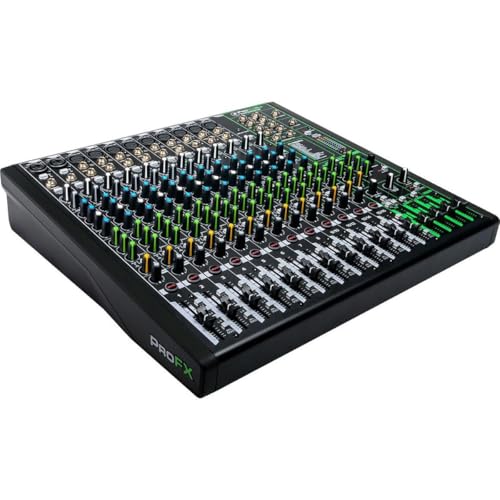
Mackie ProFX16v3 16-Channel
Best for: Bands, churches and small venues that want a familiar 16-channel analog board that also delivers a multi-track recording of every show or service.
Skip it if: You need SD card capture or Bluetooth playback on the board, because the listing does not describe either on this model.
Check Price on AmazonWe may earn a commission at no extra cost to you.
Listing verified: October 2026
Who Should Buy It
Buy it if
- Gigging bands that want a live multi-track for later mixing
- Churches recording sermons and worship sets each week
- Small venues that need a house desk a visiting engineer can run immediately
- Rehearsal spaces that want recording without extra hardware
Skip it if
- You want a digital mixer with scene recall and tablet control
- You need confirmed phantom power and output specifications before buying
- Your source count is small and a compact interface would do
Key Specifications
| Type | 16-channel analog mixer with built-in multi-track USB recording interface |
| Inputs | 16 channels (number of mic channels not published in listing) |
| Outputs | Not published in listing |
| Preamps | Onyx mic preamps with 60 dB of gain on every mic channel |
| Resolution | Not published in listing |
| Phantom power | Not published in listing |
| Connection | USB recording interface built in (connector type and channel count not published in listing) |
| Monitoring | Not published in listing |
| Bundled software | Not published in listing |
| Included accessories | Not published in listing |
Overview
The Mackie ProFX16v3 16-Channel is the third generation of Mackie's ProFX analog mixer, and the listing frames it as a board for bands, churches and small venues that need 16 channels without a digital learning curve. The defining feature is a built-in USB recording interface that captures multi-track audio while the operator mixes the room, so a show becomes a session without a separate recorder or interface.
The published feature set is short but focused. Onyx preamps deliver 60 dB of clean gain on every mic channel, a GigFX engine provides 24 built-in effects, and the USB interface requires no additional hardware. Those three claims cover the input stage, the effects and the recording path, which are the areas most buyers in this category care about first.
This is an editorial research review drawn from the product listing and general knowledge of the ProFX line. No direct use of the board is involved. The listing does not publish resolution, phantom power, output connectors or the number of mic channels, and those omissions are noted wherever they affect a buying decision.
Preamps and Sound Quality
Onyx preamps with 60 dB of gain on every mic channel is the most useful line in the listing. The phrase every mic channel matters, because some mixers quietly fit lesser preamps to the upper channels or to the stereo inputs. Sixty decibels gives operators enough range for low output dynamic microphones on quiet speakers, which is a common situation in churches and small rooms.
What is not published is the number of mic channels among the 16. ProFX boards traditionally combine mono mic channels with stereo line pairs, so the 16-channel label does not mean 16 microphones can be connected at once. Buyers with a full drum kit and several vocalists should confirm the count before committing.
The listing describes the gain as clean, and Mackie has used the Onyx name on its higher tier preamps for years, but no noise or distortion figures are published. The EQ section is not described at all in the listing for the Mackie ProFX16v3 16-Channel, which is unusual given how much a sweepable midrange or a high-pass filter contributes to live sound. Those features may well exist, but they cannot be confirmed from the published data.
Inputs, Outputs and Routing
Sixteen channels is the headline figure, and the multi-track USB stage is described as capturing those channels while the room is being mixed. For a live engineer this means the recording is independent of fader moves, since the capture point is typically before the fader. The listing does not state whether the USB send is pre or post EQ, which affects how much processing is baked into the recording.
Output details are missing. The listing does not name main output connectors, aux or monitor sends, group outputs or a headphone jack, so the routing picture for stage monitors cannot be confirmed. On a 16-channel board aimed at bands and venues, multiple aux sends are expected, but expectation is not a specification.
Routing from the computer back to the board is also undescribed. A stereo return for playback is standard, while a multi-channel return would allow click tracks and backing stems on separate channels. Bands that rely on tracks should treat this as an open question until they see the rear panel or the manual.
Features, Monitoring and Software
The GigFX engine provides 24 built-in effects according to the listing, which covers reverbs, delays and likely modulation and combination effects. The published description does not state whether parameters are adjustable or whether a tap tempo control is present, both of which separate a convenience effects engine from a performance tool. The v3 plus model in the same family lists tap tempo, which suggests the standard v3 may not include it.
The listing emphasizes that the board works without a digital learning curve, which is a feature in itself for venues with rotating volunteers. Every function is a physical knob or button, there are no menus to navigate, and a visiting engineer can walk up and mix. The tradeoff is the absence of scene recall, which digital mixers in the same price tier provide.
Monitoring and software are not covered in the listing. There is no mention of a headphone output, a control room section or a bundled DAW license, and no driver utility is named. Mackie has historically shipped software with ProFX boards, but this review can only report what the listing publishes, and it publishes nothing on that front.
- Multi-track USB recording while mixing live
- Onyx preamps with 60 dB of gain on each mic channel
- GigFX engine with 24 built-in effects
- Analog control surface with no menu navigation
- USB interface built in, no extra recording hardware required
Build, Design and Controls
Chassis material, weight and dimensions are not published for the Mackie ProFX16v3 16-Channel. Mackie's ProFX line has traditionally used a rugged construction aimed at gigging use, and the listing's target market of bands and small venues implies the board is meant to travel, but no construction specification is stated.
The control layout follows the analog convention the listing praises: per-channel gain, EQ, aux sends, pan and a fader, with a dedicated effects section and USB controls. The published data does not describe fader length, knob type or the presence of channel meters, so the tactile experience cannot be rated beyond noting that the design prioritizes immediacy over configurability.
Connectivity, Drivers and Latency
The built-in USB interface is the connectivity story, and the listing confirms multi-track recording without extra hardware. It does not publish bit depth, sample rate, connector type or the exact number of USB channels. A 16-channel board with multi-track capture typically sends each channel plus the main mix, but the specific count is not stated here.
Driver and latency information is absent. Mac users can generally expect class compliant operation from multi-channel mixers in this category, while Windows users typically need a manufacturer driver for stable low-latency multi-channel work. Because nothing is published, this review cannot rate round-trip latency, though for live recording the latency figure matters little since monitoring happens through the analog path.
There is no Bluetooth or SD card recording in the listing. Phone playback requires a cable into a line input, and recording always requires a computer. Buyers who want wireless playback or computer-free capture should look at the Mackie Onyx or the ProFX12v3 plus, both of which list those features.
Setup and Daily Use
Daily use is the strength of the design. Microphones and instruments plug in, gain is set per channel, effects are dialed from the GigFX section, and a single USB cable to a laptop captures the multi-track. There is no configuration layer between the operator and the sound, which is exactly what the listing means by no digital learning curve.
For a church or a venue, the recording path becomes routine once the DAW template is built. The engineer arms the tracks, presses record and mixes the room as usual, and the session is ready to remix later. The only setup friction is likely to be the Windows driver, which the listing does not describe, and confirming which USB channels correspond to which inputs.
Who Should Buy It
The Mackie ProFX16v3 16-Channel is aimed squarely at bands, churches and small venues, and the published feature set matches that audience. Groups that want a recording of every performance without a second device, and operators who prefer physical controls to tablet mixing, are the natural buyers. The 60 dB preamps on every mic channel help vocal heavy programs in particular.
Streamers and solo producers are a poorer fit because the 16-channel footprint is far larger than their source count, and a compact interface would serve them better. Groups that need wireless playback or standalone recording should also look at a sibling model, because those features are not listed here.
Alternatives Worth Considering
The Yamaha MG16XU 16-Input 6-Bus is the most direct rival. Its listing details discrete class-A D-PRE preamps, one-knob compressors, SPX effects and a powder-coated metal chassis, and it adds a six-bus layout. It does not describe multi-track recording, so the choice turns on whether per-channel capture or documented build quality matters more.
Mackie's own Onyx 16-channel board sits above the ProFX16v3 with 24-bit 96 kHz multi-track USB, SD card stereo recording, Bluetooth on a channel strip and a customizable effects engine. For groups that want computer-free capture or wireless playback, the step up is justified, while those who only need multi-track over USB can save with the ProFX.
A tablet-controlled digital mixer such as the Behringer X AIR XR18 offers per-channel USB recording plus scene recall and remote mixing, with no physical faders. The Mackie ProFX16v3 16-Channel wins for operators who value immediacy and a surface any volunteer can run, which is the exact case the listing makes.
Verdict
Judged on the published description, the Mackie ProFX16v3 16-Channel delivers the combination its target market asks for: a straightforward analog desk, respected preamps with a stated gain figure, a usable effects engine and multi-track recording with no extra gear. That is a strong mid-range proposition for live groups.
The gaps are specification gaps rather than feature gaps. Resolution, phantom power, outputs, mic channel count and software are all unpublished, and a buyer should confirm them before purchase. Once confirmed, the ProFX16v3 is an easy board to recommend to any band or church that wants to record what it mixes.
Strengths and Limitations
Strengths
- Records multi-track over USB while the operator mixes the room
- Onyx preamps with 60 dB of gain on every mic channel
- GigFX engine with 24 built-in effects
- Analog surface with no digital learning curve
- USB interface built in, so no separate recording hardware is needed
Limitations
- USB bit depth and sample rate are not published
- Phantom power and the output complement are not stated
- The number of mic channels among the 16 is not given
- No bundled DAW or accessories are named in the listing
How We Scored It
Scores reflect published specifications, documented features and value against the alternatives below. They are editorial research scores, not laboratory measurements.
Alternatives to Consider

Yamaha MG16 16-Input 6-Bus
Live sound operators who already own outboard effects and a recorder, and who want a tough analog desk with six buses and respected preamps at a lower price than the USB model.
Read the Yamaha MG16 16-Input 6-Bus review →
Yamaha MG16XU 16-Input 6-Bus
Bands, worship teams and small venues that want a durable analog desk with six buses, respected preamps and a simple USB path for stereo recording or playback.
Read the Yamaha MG16XU 16-Input 6-Bus review →
Mackie Onyx
Bands, small venues and houses of worship that want to mix a room and capture a multi-track recording from the same 16-channel analog board.
Read the Mackie Onyx review →Questions Buyers Ask
Mackie ProFX16v3 16-Channel
See the current listing, price and included accessories.
About This Review
Mandrillis Team
The Mandrillis editorial team researches and compares audio and music gear using manufacturer documentation, verified specs and real buyer feedback, so you can make a confident purchase without wading through marketing claims.
Read our full research methodology.