Studio Gear Review
PreSonus Quantum HD 2 x 24 Review: High-Gain Preamps and Re-Amp Outputs
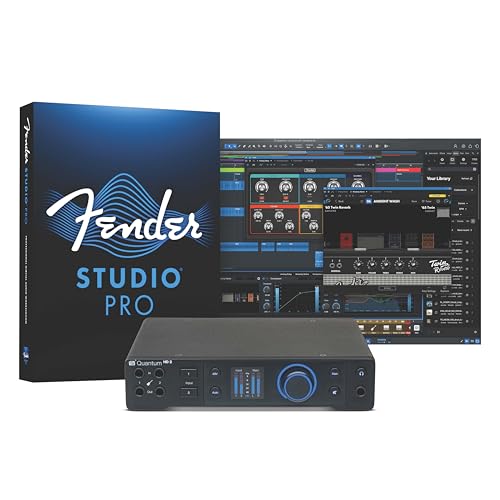
The PreSonus Quantum HD 2 x 24 is a 20-input, 24-output USB-C interface with two MAX-HD preamps offering +75 dB of gain, Auto Gain, 32-bit 192 kHz converters, a Fender co-developed instrument input, re-amp outputs, app control and a perpetual DAW license. This research review weighs the published specs against the gaps.
Our Verdict
Research Score 84/100The PreSonus Quantum HD 2 x 24 reads like a professional interface at a lower mid-range price. The listing documents two MAX-HD digitally controlled analog preamps with +75 dB of gain, an Auto Gain button, 32-bit and 192 kHz operation with high-performance converters, a Fender co-developed instrument input, re-amp outputs, a custom low-latency driver, the Universal Control app on mobile and desktop, and a perpetual Studio One Pro license. What it does not explain is how the 20 x 24 channel count is reached, how many physical outputs and headphone jacks exist, or why the title and feature list name different DAWs. Guitarists and expanding home studios should shortlist it; two-input beginners can spend less.
Editorial research score based on published specifications and documented features, not a customer rating or lab test.
PreSonus
PreSonus Quantum HD 2 x 24
Best for: Guitarists, bassists and growing home studios that want high-gain digitally controlled preamps, Auto Gain, re-amp outputs.
Skip it if: You only need two inputs with no expansion plans, or you must know the digital expansion format and headphone provision before buying.
Check Price on AmazonWe may earn a commission at no extra cost to you.
Listing verified: October 2026
Who Should Buy It
Buy it if
- Guitarists who want to re-amp DAW tracks through real amplifiers
- Home producers planning to expand beyond two analog inputs
- Engineers who value recallable gain and remote control from a tablet
- Anyone who wants a perpetual DAW license with the interface
Skip it if
- You need four or more analog mic preamps on the unit itself
- You want a simple class-compliant two-channel interface
- You cannot confirm the expansion and headphone details in the manual
Key Specifications
| Type | 20 x 24 USB-C audio interface |
| Inputs | 20 input channels including two MAX-HD mic preamps and a Fender co-developed instrument input (how the remaining channels are provided is not published in listing) |
| Outputs | 24 output channels including re-amp outputs (physical connector count not published in listing) |
| Preamps | Two MAX-HD digitally controlled analog mic preamps with +75 dB of gain |
| Resolution | 32-bit / 192 kHz |
| Phantom power | Yes, controllable from the front panel, Studio One or the Universal Control app (voltage not published in listing) |
| Connection | USB-C |
| Monitoring | Not published in listing |
| Bundled software | Studio One Pro perpetual license per the feature list (the listing title refers to Fender Studio Pro software); Universal Control app |
| Included accessories | Not published in listing |
Overview
The PreSonus Quantum HD 2 x 24 is a 20-input, 24-output USB-C audio interface that runs at 32-bit and 192 kHz, with two MAX-HD mic preamps offering +75 dB of gain, a Fender co-developed instrument input, re-amp outputs and a perpetual Studio One Pro license. On paper it sits a clear step above the two-channel desktop interfaces most home studios start with.
The listing data places it in the lower mid-range tier, which is modest for an interface with this channel count and resolution. The combination of digitally controlled analog preamps, an Auto Gain button and remote control from a phone or tablet positions it as a serious tracking tool for a guitarist, producer or small studio.
As with every review on this site, the analysis here is drawn from the published listing. The two preamps and the converter specification are documented in detail, but the listing does not explain how the remaining input and output channels are provided, nor does it describe headphone outputs or the physical connectors.
Preamps and Sound Quality
The MAX-HD preamps are the centerpiece. The listing describes them as newly designed, transparent, low-noise and digitally controlled analog, with +75 dB of gain. That gain figure is well above the range of typical entry-level interfaces and means low-output dynamic and ribbon microphones can be driven without an inline booster.
Digital control of an analog gain stage is what makes the Auto Gain feature possible. Press the button, and the interface sets the level for the connected microphone or instrument automatically, which the listing frames as a way to get a clean take every time. It also means gain settings can be recalled from software rather than re-dialed by hand.
The instrument input was co-developed with Fender engineers and designed specifically for guitar and bass, according to the listing. Paired with high-performance converters and 32-bit, 192 kHz operation, the front end is specified at a level that compares favorably with the Focusrite Scarlett 2i2 or Universal Audio Volt 2 class, though those units do not publish the same gain headroom.
Inputs, Outputs and Routing
The 20 x 24 channel count is far larger than the two analog preamps suggest. The listing does not state how the remaining channels are provided, whether through digital expansion ports, line inputs or virtual loopback channels, so buyers planning to expand with external preamps should confirm the digital input format in the manual.
Re-amp outputs are a confirmed and unusual inclusion. They let a dry guitar or bass track recorded in the DAW be sent back out to a real amplifier, pedalboard or different microphone placement and re-recorded, which the listing describes as a way to experiment with tones after the performance is captured. For guitarists that is a genuinely useful studio feature.
Physical output connectors, main monitor outputs and headphone outputs are not itemized in the listing. Twenty-four output channels imply a flexible routing matrix, but the number of balanced line outputs and headphone jacks on the chassis remains unpublished.
Features, Monitoring and Software
The Universal Control app works on mobile and desktop devices and gives access to preamp gain, phantom power and other critical functions from a phone, tablet or computer. The listing emphasizes that gain staging can be handled without looking away from the recording session, with the same controls mirrored inside Studio One.
Software is a strong point, though the listing is inconsistent: the feature list names a Studio One Pro perpetual license, while the title refers to Fender Studio Pro software. Either way, a perpetual DAW license at this tier is uncommon, and buyers should confirm which package ships with the current version.
Monitoring is the quiet gap. No headphone output count, direct monitoring mixer or zero-latency cue path is described in the listing, although the custom low-latency driver is positioned as the solution for monitoring through the DAW instead.
- Auto Gain button sets preamp level automatically
- Universal Control app for mobile and desktop
- Phantom power and gain controllable from the front panel or software
- Re-amp outputs for sending DAW tracks to a real amplifier
- Studio One Pro perpetual license listed in the features
Build, Design and Controls
The listing refers to a flexible front panel that carries preamp gain, phantom power and related functions, but it does not describe the chassis material, dimensions, weight or whether the unit is rack-mountable. For an interface with 20 inputs and 24 outputs, a rack-friendly form factor would be expected, but that is not confirmed.
Digitally controlled preamps usually mean encoders rather than analog pots, which allows settings to be recalled and displayed on screen. The listing's description of front-panel control alongside app control fits that design, though display type and metering are not published.
Without published build specifications, the design assessment rests on the feature set alone. The presence of re-amp outputs, Auto Gain and remote control suggests a unit intended for a fixed studio position rather than a backpack.
Connectivity, Drivers and Latency
USB-C is the host connection, and the listing credits a custom low-latency driver with exceptionally low audio latencies when recording. A dedicated driver is a meaningful advantage over class-compliant operation for tracking through plugins or amp simulators, because buffer sizes can be pushed lower with stability.
Operating system support, specific latency figures and whether the driver is required on every platform are not published. The 32-bit, 192 kHz specification is the headline, and it means the converters will not be the bottleneck in a modern production chain.
The Universal Control app's mobile compatibility hints at some form of network or wireless control, though the listing does not describe how a phone connects to the interface. Buyers who plan to adjust gain from a tablet should check the connection method in the documentation.
Setup and Daily Use
A typical session starts by connecting the interface over USB-C, installing the driver and Universal Control, authorizing the DAW license, and then using Auto Gain to set levels for the microphone and the instrument. From there, the listing's premise is that gain and phantom power never require reaching for the hardware.
Guitarists get a specific daily workflow: record dry through the Fender co-developed input, audition amp sims in the DAW, and later send the track out through the re-amp outputs to a real amplifier when the arrangement is settled. That is a professional technique made simple by having the outputs on the interface.
The daily friction points are the unknowns around monitoring and expansion. If the headphone provision turns out to be a single output, a duo tracking together will need a headphone amplifier, and if the extra channels require specific digital preamps, expansion costs add up.
Who Should Buy It
Guitarists and bassists who record seriously at home are the clearest audience, since the Fender co-developed input, re-amp outputs, high gain and Auto Gain address the exact problems they face when tracking alone. No other interface in this group is as guitar-focused.
Producers and small studios that expect to grow into more channels will value the 20 x 24 count and the 32-bit, 192 kHz converters, provided the expansion path in the manual matches their plans. Podcasters with two hosts also get transparent preamps and software control, though a console-style device may suit them better.
Beginners who only need two inputs and never plan to expand will pay for channels and features they will not use. A Focusrite Scarlett 2i2 or MOTU M2 is the more proportionate purchase for them.
Alternatives Worth Considering
The MOTU M2 and Focusrite Scarlett 2i2 are the default two-input desktop interfaces, both with published specifications and software bundles. Neither offers re-amp outputs, +75 dB of preamp gain or a 20 x 24 channel count.
The Universal Audio Volt 2 brings a vintage preamp mode and its own plugin bundle at a similar size, aimed more at character than at expansion. Buyers who want color over transparency may prefer it.
Within the same family, the PreSonus Quantum ES 4 offers four MAX-HD preamps at 24-bit, 192 kHz with top-panel controls, which suits anyone who needs more analog mic inputs rather than digital expansion. It drops the re-amp outputs, though.
Verdict
The PreSonus Quantum HD 2 x 24 is specified like a professional interface and priced in a lower mid-range tier, which is a rare combination. Two MAX-HD preamps with +75 dB of gain, Auto Gain, 32-bit and 192 kHz converters, re-amp outputs, app control and a perpetual DAW license are all confirmed in the listing.
The unknowns are the expansion method behind the 20 x 24 count, the physical output and headphone complement, and which DAW package ships in the box given the inconsistent naming. Those should be checked before buying.
For guitarists and growing home studios it is one of the strongest options on paper in this group. For a basic two-input need, it is more interface than necessary.
Strengths and Limitations
Strengths
- Two MAX-HD preamps with +75 dB of gain
- 32-bit, 192 kHz operation with high-performance converters
- Auto Gain button and digitally controlled preamps
- Re-amp outputs for guitar and bass
- Universal Control app on mobile and desktop
- Perpetual DAW license included
Limitations
- How the 20 x 24 channels are provided is not published
- Headphone and physical output details are missing
- Listing names two different bundled DAWs
- Only two analog mic preamps
How We Scored It
Scores reflect published specifications, documented features and value against the alternatives below. They are editorial research scores, not laboratory measurements.
Alternatives to Consider

Rode RØDECaster Pro
Podcasters and live streamers with two to four in-room hosts and remote guests who want preamps, call-in channels, sound pads.
Read the Rode RØDECaster Pro review →
Fender Quantum Complete Recording
Guitarists, singer-songwriters and beginner podcasters who want a complete first studio with a guitar-focused interface, a condenser mic, monitors.
Read the Fender Quantum Complete Recording review →
PreSonus Quantum ES 4 x 4
Small bands, duos and multi-host podcasts that want four transparent, high-gain, recallable preamps with Auto Gain, 24-bit 192 kHz converters and app control at a lower mid-range price.
Read the PreSonus Quantum ES 4 x 4 review →Questions Buyers Ask
PreSonus Quantum HD 2 x 24
See the current listing, price and included accessories.
About This Review
Mandrillis Team
The Mandrillis editorial team researches and compares audio and music gear using manufacturer documentation, verified specs and real buyer feedback, so you can make a confident purchase without wading through marketing claims.
Read our full research methodology.