
Guides
Difference Between Phono and Line on a Turntable (Explained)
The small PHONO and LINE switch on the back of many turntables decides whether the built-in preamp is on or off. Picking the wrong side causes quiet, thin sound or loud distortion. This guide explains both settings in plain words and shows which one to use for each connection.
Quick Answer
The difference between phono and line on a turntable is whether the built-in preamp is used. PHONO sends the raw, very weak cartridge signal out, for a receiver PHONO input or an external preamp. LINE turns on the built-in preamp and sends a stronger signal, for AUX inputs, powered speakers and soundbars.
How this guide was put together
This guide is based on manufacturer manuals, published specifications and widely used audio reference standards. Mandrillis does not run hands-on tests for these guides, so treat figures as typical values and check the manual for your own gear before changing settings.
What the Switch Actually Does
Many turntables have a phono preamp built inside. The PHONO and LINE switch turns that preamp on or off. Nothing else about the turntable changes.
Set to LINE, the built-in preamp is on and boosts the signal. Set to PHONO, the preamp is bypassed and the weak cartridge signal goes straight out through the RCA cables.
- LINE: built-in preamp on, strong signal out.
- PHONO: built-in preamp off, weak signal out.
- No switch at all: usually no built-in preamp, so the output is always phono level.
Phono Level vs. Line Level in Numbers
The two signals are very different in strength. A typical moving magnet cartridge produces about 5 millivolts. A moving coil cartridge can produce under 0.5 millivolts.
Line level for home audio is usually around 0.3 to 2 volts, depending on the gear. That is hundreds of times stronger than phono level, which is why the boost matters so much.
Why Phono Signal Sounds Thin Without a Preamp
Records are cut with the bass turned down and the treble turned up. This standard is called the RIAA curve. It lets more music fit on the record and lowers surface noise.
A phono preamp boosts the signal and also reverses that curve. Without it, you hear a very quiet sound with almost no bass and harsh treble.
Which Setting Should You Use?
Match the switch to the input you plug into. The rule is simple: only one preamp should be active in the chain.
Use LINE for These Connections
Choose LINE when the device you plug into expects a normal audio signal, like a phone or CD player would send. These inputs do not have their own phono preamp.
- AUX, LINE IN, CD or TAPE inputs on an amplifier or receiver.
- Powered bookshelf speakers with an AUX or LINE input.
- Soundbars with an analog input.
- Computer audio interfaces and line inputs on mixers.
Use PHONO for These Connections
Choose PHONO when the device you plug into already has a phono preamp. Turning off the turntable's own preamp avoids boosting the signal twice.
- A receiver or amplifier input labeled PHONO.
- An external phono preamp box.
- Powered speakers with a PHONO input or a PHONO input setting.
- DJ mixers with PHONO inputs.
What Happens With the Wrong Setting
The wrong setting does not damage anything, but it sounds clearly wrong. Here is how to recognize each mistake.
PHONO Into an AUX Input
No preamp is working. The music is very quiet, so you have to turn the volume almost all the way up. It sounds thin and tinny, with little bass.
Switch the turntable to LINE, or add an external phono preamp.
LINE Into a PHONO Input
Two preamps are boosting the signal. The sound is loud even at low volume, harsh and distorted, with too much bass.
Switch the turntable to PHONO so only the receiver's preamp works. Turn the volume down before you flip the switch.
Is the Built-In Preamp Good Enough?
Built-in preamps in beginner turntables are designed to be compact and affordable. For casual listening, many sound perfectly fine.
An external phono preamp often has cleaner power and better parts, and it sits farther from the motor. Many people hear lower background noise and more detail after switching to PHONO and adding one.
- Keep LINE if you are happy with the sound and want a simple setup.
- Try PHONO with an external preamp if you hear hum or hiss.
- Use an external preamp if you upgrade to a moving coil cartridge.
Turntables Without a PHONO and LINE Switch
Many hi-fi and DJ turntables have no switch and no built-in preamp. Their output is always phono level.
That is not a weakness. It lets you choose your own phono preamp and keeps extra electronics away from the delicate cartridge signal. You just need a PHONO input or an external preamp before the amplifier.
How to Tell If Yours Has a Preamp
Check the back panel and the manual. A switch, a power supply plugged into the turntable and a USB port are all signs of a built-in preamp.
A turntable with only RCA cables, a ground wire and a power cord for the motor usually has no preamp inside.
- Switch labeled PHONO and LINE: built-in preamp.
- USB output: built-in preamp, used for recording.
- Bluetooth: built-in preamp.
- Only RCA and a ground wire: no preamp, always PHONO.
Recording Vinyl to a Computer
To record records on a computer through an audio interface, set the turntable to LINE, or use a phono preamp first. Most interface inputs expect line or instrument level.
A USB turntable sends the boosted signal straight to the computer, so the switch only affects the RCA outputs.
How to Switch Safely
Flipping the switch while music plays at high volume can cause a loud jump in level. A few seconds of care protects your ears and speakers.
- Turn the amplifier or speaker volume all the way down.
- Stop the record and lift the tonearm.
- Flip the PHONO and LINE switch.
- Check that the input on the amplifier or speakers matches.
- Play a record and raise the volume slowly.
PHONO vs LINE at a Glance
What each setting does.
| Setting | Built-in preamp | Use with |
|---|---|---|
| PHONO | Off | Receiver PHONO input or external preamp |
| LINE | On | AUX, powered speakers, soundbars |
| No switch | Usually none | PHONO input or external preamp |
| USB output | Always on | Computer recording |
Quick Reference
Use this list whenever you connect your turntable to something new. It covers almost every home setup.
- AUX, LINE, CD or TAPE input: LINE.
- PHONO input on a receiver: PHONO.
- External phono preamp: PHONO.
- Powered speakers with AUX only: LINE.
- Bluetooth: the setting does not affect the wireless signal.
Turntables and Phono Preamps From Our Reviews
A turntable with a switchable built-in preamp, and two external preamps for setups that use the PHONO setting.
Audio-Technica AT-LP60XBT
Mentioned
Who Should Buy It
- Beginners who want a plug-and-play vinyl setup
- Desktop users needing compact powered monitors with balanced inputs
- Listeners who value automatic tonearm operation and Bluetooth streaming
- Those building a small room system with future upgrade potential
Skip It If
- You require a remote control for volume and track selection
- You have limited space without checking exact dimensions first
- You already own a receiver and passive speakers that would be underused
We may earn a commission at no extra cost to you.
Last verified: October 2026

Pro-Ject Phono Box S3 B
Mentioned
Who Should Buy It
- Turntable owners wanting a dedicated, high-end phono preamp
- Buyers with both MM and MC cartridges wanting loading flexibility
- Audiophiles with a balanced-input amplifier downstream
- Listeners wanting European handmade build quality
Skip It If
- You want an all-in-one receiver with built-in phono
- You do not have a balanced-input amplifier to take advantage of the balanced output
- You want a stated weight or dimensions before buying
We may earn a commission at no extra cost to you.
Last verified: November 2026
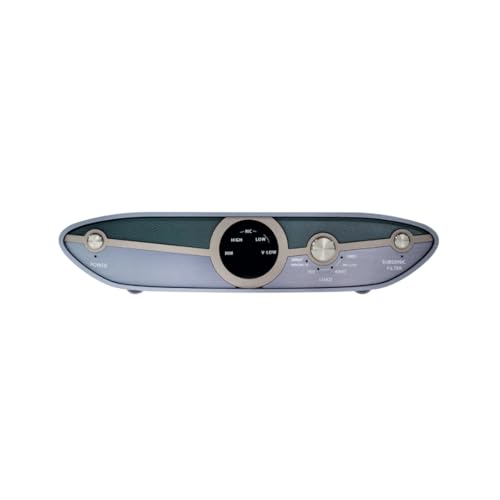
iFi Zen Phono 3
Mentioned
Who Should Buy It
- Turntable owners using low output moving coil cartridges
- Listeners who want to adjust loading and gain independently
- Users dealing with turntable rumble or low frequency noise
- Budget conscious vinyl enthusiasts upgrading from a built in phono stage
Skip It If
- You only use a moving magnet cartridge with fixed loading needs
- You need wireless streaming or digital conversion
- You require detailed physical specifications and included accessories before buying
We may earn a commission at no extra cost to you.
Last verified: October 2026
Keep Reading
Related guides and picks on Mandrillis:
- Do I Need a Preamp for My Turntable? : find out if you already have one
- Can You Connect a Turntable to a Soundbar? : which setting to use with a soundbar
- Best Phono Preamps : external preamps for the PHONO setting
FAQs
About This Guide
Mandrillis Team
The Mandrillis editorial team researches and compares audio and music gear using manufacturer documentation, verified specs and real buyer feedback, so you can make a confident purchase without wading through marketing claims.
Read our full research methodology.