Instruments Review
Behringer X-TOUCH Universal Surface Review: Nine Faders and Ethernet
The Behringer X-TOUCH Universal Surface is a DAW control surface with nine touch-sensitive 100 mm motorized faders, eight dynamic LCD Scribble Strips, HUI and Mackie Control support and an Ethernet port for RTP MIDI. This editorial review assesses the published listing, its connectivity advantages and the control details it leaves unstated.
Our Verdict
Research Score 79/100The Behringer X-TOUCH Universal Surface offers more connectivity than most surfaces at its price. Nine fully automated, touch-sensitive 100 mm motorized faders and eight dynamic LCD Scribble Strips cover tactile mixing, HUI and Mackie Control support brings nearly every DAW along, and the Ethernet port adds RTP MIDI networking with future Behringer X32 remote control on the roadmap. USB and MIDI interfaces round out the connections. The listing does not publish encoder or button counts, a jog wheel, power, weight or any software bundle, and there are no keys or pads. For studios that want protocol-based fader control with room to grow, it scores 79 out of 100.
Editorial research score based on published specifications and documented features, not a customer rating or lab test.

Behringer
Behringer X-TOUCH Universal Surface
Best for: Home and project studios that want nine motorized faders and protocol-based control across DAWs, with Ethernet connectivity as a bonus.
Skip it if: You need keys or pads, expect a bundled DAW, or must confirm encoder count and power before buying.
Check Price on AmazonWe may earn a commission at no extra cost to you.
Listing verified: October 2026
Who Should Buy It
Buy it if
- Studios that switch between DAWs
- Engineers who want a dedicated master fader
- Users planning to control a Behringer X32 from the same surface
- Mixers who want faders in a separate room over Ethernet
Skip it if
- You need keys or drum pads
- You want a bundled DAW in the box
- You need every control counted in the listing before purchase
Key Specifications
| Keys | None, this is a DAW control surface |
| Key type | Not applicable, no keys |
| Pads | Not published in listing |
| Knobs and faders | 9 touch-sensitive 100 mm motorized faders; rotary encoder and button counts not published in listing |
| DAW integration | HUI and Mackie Control protocols for compatible music production software |
| Bundled software | Not published in listing |
| Connectivity | Ethernet for RTP MIDI and future Behringer X32 remote control, USB, MIDI |
| Power | Not published in listing |
| Weight | Not published in listing |
| Included accessories | Not published in listing |
Overview
The Behringer X-TOUCH Universal Surface is a DAW control surface with nine motorized faders, built to stand in for the hardware remote of a studio console. It sits in the lower mid-range price tier for motorized surfaces and competes directly with the PreSonus FaderPort 8 DAW. The nine-fader layout is the first thing that separates it from the eight-fader norm at this price.
The published specification lists 9 fully automated, touch-sensitive 100 mm motorized faders, 8 dynamic LCD Scribble Strips, support for HUI and Mackie Control protocols, and an Ethernet interface for RTP MIDI alongside USB and MIDI connections. Behringer positions it as a universal remote for studio and live applications.
This review is an editorial reading of the listing. Encoder count, transport layout, jog wheel, power, weight and software bundle are not published, and those gaps are called out rather than filled with assumptions from product photos.
Keys, Pads and Feel
There are no keys or pads, so the faders are the surface under review. Nine 100 mm motorized faders give eight channel faders plus a ninth that is usually assigned as a master, which is a layout many engineers prefer over an eight-fader surface that borrows a channel fader for master duties. A fixed master fader also reduces banking errors, since the stereo bus never moves out from under your hand.
The faders are touch-sensitive and fully automated, which the listing emphasizes. Touch sensing allows automation to be written by grabbing a fader, and the motors return each fader to the session position when banking or recalling, so what you see matches what the DAW holds. Fully automated is the listing's phrase for that motorized recall.
Because the surface has no pads, it cannot program drums or trigger clips, and a producer who needs that will pair it with a controller such as the Akai MPK Mini MK3. The X-TOUCH is a mixing tool, and the listing frames it that way.
Knobs, Faders and DAW Integration
The listing does not publish the number of rotary encoders, buttons or whether a jog wheel is present, which is a notable omission for a universal control surface. Buyers should confirm the full control complement from the manual, since those details determine how much of a session can be run without a mouse.
Eight dynamic LCD Scribble Strips sit above the channel faders and show track names and parameters, so the operator can bank through a large session without losing track of which fader belongs to which channel. Dynamic means they update as parameters change. Eight strips for nine faders is consistent with the ninth fader serving as master.
DAW integration relies on HUI and Mackie Control, the two protocols that the listing says provide seamless integration with every compatible music production software. In practice that covers the major DAWs on macOS and Windows, though the depth of integration varies by application. Some applications expose plug-in control through these protocols, while others limit the surface to levels, pans and transport.
Software, Sounds and Features
No software bundle is published in the listing, and the surface makes no sound of its own. Its features are about control: motorized faders, Scribble Strips, protocol support and connectivity. Buyers coming from the FaderPort 16 listing will notice the absence of a bundled DAW. That is fair at the price, but it means the total cost includes a DAW the buyer already owns or must purchase.
The Ethernet interface is the distinctive feature. It supports RTP MIDI, which carries MIDI over a network, and the listing describes future remote control of the Behringer X32 digital mixer, making the X-TOUCH a potential physical surface for that console as well as for a DAW. Networked MIDI also avoids the cable-length limits of USB.
The universal designation reflects a design that is not tied to one DAW, in contrast to surfaces built around a single vendor's software. For studios that switch between applications, protocol-based control is a practical advantage, provided each DAW's HUI or Mackie Control mapping is configured correctly.
- HUI and Mackie Control protocol support
- 8 dynamic LCD Scribble Strips
- Ethernet for RTP MIDI networking
- Planned Behringer X32 remote control
- USB and MIDI interfaces
Build, Design and Portability
A nine-fader surface with eight displays occupies a similar desk footprint to the FaderPort 8 DAW, and the motorized mechanisms make it denser than a flat controller. Weight and dimensions are not published in the listing, so plan the desk space from the manual. Nine motors and eight displays also mean a unit that stays put once positioned.
The listing does not describe chassis materials or fader construction, so no claim is made about build beyond the stated motorized, touch-sensitive faders. Studio and live applications are both named as intended uses, which implies the unit is expected to travel occasionally.
Motorized faders and LCDs are precision parts, and buyers who take the surface to gigs should budget for a hard case. On a desk a dust cover protects the fader slots.
Connectivity and Power
Connectivity is broader than on most surfaces at this tier. The title names Ethernet, USB and MIDI interfaces, and the listing specifies the Ethernet port for RTP MIDI and future X32 remote control. USB handles the standard computer link, and the MIDI interface allows connection to hardware or older setups. Having all three on one surface is uncommon at this tier.
RTP MIDI over Ethernet lets the surface sit away from the computer, connected through a network, which suits control rooms where the machine lives in another space. The listing does not detail the MIDI connector type or whether the USB port also passes MIDI through to other devices.
Power requirements are not published in the listing. Nine motorized faders and eight LCDs exceed what a USB port can supply, so an external power supply is the common approach, but the voltage, connector and inclusion of an adapter are not stated.
Setup and Daily Use
Setup involves connecting USB or Ethernet, choosing the protocol mode that matches the DAW, and configuring the surface in the DAW's control-surface preferences as a HUI or Mackie Control device. The step is familiar to anyone who has used a protocol-based surface.
Daily use is fader-centric mixing: ride levels, write automation by touch, read track names on the Scribble Strips and bank through the session. The ninth fader for master level is a convenience that keeps the stereo bus under a finger at all times. Scribble Strips update as you bank, so there is no need to count faders from the left.
Buyers report that universal surfaces reward time spent learning each DAW's mapping, since HUI and Mackie Control expose different functions in different applications. The listing's promise of seamless integration should be read with that caveat.
Who Should Buy It
The Behringer X-TOUCH Universal Surface is for home and project studios that want nine motorized faders and a protocol-based surface that works across DAWs. It also makes sense for engineers who value Ethernet connectivity or plan to control a Behringer X32 mixer from the same hardware.
It also suits users of DAWs that lack a native surface, since HUI and Mackie Control are supported almost everywhere, and mixers who prefer a dedicated master fader. The lower mid-range price keeps it competitive with eight-fader rivals.
It is not for buyers who need keys or pads, who expect a software bundle, or who need encoder count, power and weight confirmed from the listing before purchase. Those details should be checked in the manual first.
Alternatives Worth Considering
The PreSonus FaderPort 8 DAW is the closest rival, with eight motorized faders, eight Scribble Strips and native Studio One support plus HUI and Mackie Control emulation over USB. It lacks the ninth fader and Ethernet port. Price tiers are close, so the decision rests on fader count and connectivity rather than cost.
The PreSonus FaderPort 16 DAW doubles the fader count and includes a software bundle, for buyers whose sessions justify the size and cost. Its listing also confirms a footswitch jack.
Producers who want faders alongside keys and pads should consider an M-Audio Oxygen Pro or Nektar Impact LX, which include non-motorized sliders and transport buttons. They cannot match motorized fader precision but cover writing and mixing in one device.
Verdict
On paper the Behringer X-TOUCH Universal Surface is a strong lower mid-range mixing surface. Nine touch-sensitive 100 mm motorized faders, eight dynamic LCD Scribble Strips, HUI and Mackie Control support and an Ethernet port for RTP MIDI and future X32 control give it a broader connectivity story than its direct rivals.
Encoder count, transport details, power, weight and any software bundle are not published, and there are no keys or pads. For studios wanting protocol-based fader control it scores 79 out of 100. Buyers who confirm the control layout from the manual will know exactly what they are getting.
Strengths and Limitations
Strengths
- Nine touch-sensitive 100 mm motorized faders
- Eight dynamic LCD Scribble Strips
- HUI and Mackie Control support across DAWs
- Ethernet port for RTP MIDI and future X32 control
- USB and MIDI interfaces in one unit
Limitations
- Encoder, button and jog wheel details not published
- No software bundle listed
- Weight and power not published
- No keys or pads
How We Scored It
Scores reflect published specifications, documented features and value against the alternatives below. They are editorial research scores, not laboratory measurements.
Alternatives to Consider

Roland GO:KEYS 3
Beginners and casual creators who want a 61-key keyboard with onboard sounds, backing styles and speakers that can also send MIDI to a tablet or computer over Bluetooth.
Read the Roland GO:KEYS 3 review →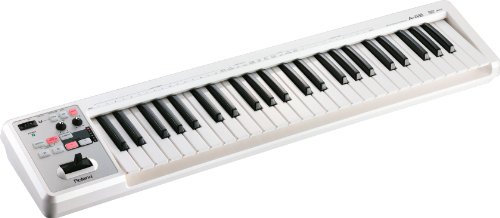
Roland A-49-WH 49-Key MIDI
Players who want a slim, bus-powered 49-key controller with proper full-size keys for playing parts rather than a pad and fader surface for mixing.
Read the Roland A-49-WH 49-Key MIDI review →
Behringer XENYX QX2442USB 24-Input 4/2-Bus
Bands, rehearsal rooms and small venues that want many inputs, confirmed phantom power, one-knob compression and a tap tempo effects processor with a USB connection at a lower mid-range.
Read the Behringer XENYX QX2442USB 24-Input 4/2-Bus review →Questions Buyers Ask
Behringer X-TOUCH Universal Surface
See the current listing, price and included accessories.
About This Review
Mandrillis Team
The Mandrillis editorial team researches and compares audio and music gear using manufacturer documentation, verified specs and real buyer feedback, so you can make a confident purchase without wading through marketing claims.
Read our full research methodology.