Instruments Review
Native Instruments Maschine Mikro Mk3 Review: Four Modes, One Pad Grid
The Native Instruments Maschine Mikro Mk3 offers 16 pads with Pad, Keyboard, Chord and Step modes, plus deep DAW integration and a bundled sample library. This research review covers what the listing confirms and the knobs and weight details it leaves unstated.
Our Verdict
Research Score 70/100The Native Instruments Maschine Mikro Mk3 packs real versatility into a compact pad controller, with 16 pads switching between drumming, a Keyboard mode for melodies, Chord mode for progressions, and classic Step mode sequencing, all without any piano-style keys. It works standalone or as a VST, Audio Unit or AAX plug-in across Ableton Live, Pro Tools, Logic Pro and FL Studio, backed by a substantial 1.6GB bundled sample and instrument library. USB 2.0 powers the unit directly, with no separate power supply needed. The listing does not state knobs, faders or weight. At a lower mid-range price tier, this is a strong, flexible choice for beatmakers who do not need dedicated keys.
Editorial research score based on published specifications and documented features, not a customer rating or lab test.

Native Instruments
Native Instruments Maschine Mikro Mk3
Best for: Beatmakers and producers who want a compact pad controller with four distinct input modes and deep integration into major DAWs, standalone or as a plug-in.
Skip it if: You specifically need piano-style keys for a more traditional keyboard feel, or dedicated knobs and faders for in-person mixing.
Check Price on AmazonWe may earn a commission at no extra cost to you.
Listing verified: November 2026
Who Should Buy It
Buy it if
- Beatmakers who want 16 pads with switchable drum, melody, chord and step sequencing modes
- Producers who want to use the same hardware standalone or as a plug-in across Ableton Live, Pro Tools, Logic Pro or FL Studio
- Buyers who want a substantial bundled sample and instrument library included
- Buyers who want a compact, USB powered controller without extra cables or a power adapter
Skip it if
- You need piano-style keys rather than a pad-based Keyboard mode
- You need dedicated knobs or faders for in-person mixing
- You need confirmed weight and dimension figures before purchase
Key Specifications
| Keys | No piano-style keys; melodic input is handled through a Keyboard mode on the 16 pads instead |
| Key type | Not applicable; pads substitute for piano keys in Keyboard mode |
| Pads | 16 pads offering 4 input modes: Pad mode for drumming, Keyboard mode for melodies, Chord mode for chord progressions, and Step mode for classic step sequencing |
| Knobs and faders | Not published in listing |
| DAW integration | Usable standalone or as a VST, Audio Unit, or AAX plug-in in all major DAWs, including Ableton Live, Pro Tools, Logic Pro and FL Studio |
| Bundled software | A 1.6GB MASCHINE Factory Selection with samples, one-shots, loops, sample instruments, presets, patterns, drum kits and songs, plus Massive, Monark and Reaktor Prism per the listed system requirements |
| Connectivity | USB 2.0 |
| Power | Powered via USB 2.0, with no separate power supply mentioned |
| Weight | Not published in listing |
| Included accessories | Not published in listing beyond the bundled software |
Overview
The Native Instruments Maschine Mikro Mk3 is described in its listing as a compact music production instrument that integrates powerful software with tactile, responsive hardware, positioning this unit as a bridge between a dedicated hardware controller and a deeply software-connected production tool.
The core identity of this controller is its 16 pads, which the listing confirms support 4 distinct input modes, Pad mode for drumming, Keyboard mode for melodies, Chord mode for chord progressions, and Step mode for classic step-sequencer style programming, giving buyers a single input surface that adapts to very different creative tasks.
This versatility is a genuine differentiator from a simpler, single-purpose pad controller, since a producer can switch between drum programming and melodic composition on the same 16 pads without needing separate hardware for each task.
The listing also confirms broad DAW compatibility, usable standalone or as a VST, Audio Unit or AAX plug-in across Ableton Live, Pro Tools, Logic Pro and FL Studio, which is a meaningfully wide net of supported software environments.
Keys, Pads and Feel
This controller has no piano-style keys at all, relying entirely on its 16 pad grid for every input method, including melodic playing through the confirmed Keyboard mode, which maps a chromatic or scaled note layout onto the pads rather than a traditional keyboard.
Pad mode is the most conventional use case, letting a user drum directly on the pads with velocity sensitivity implied by the general Maschine product category, though the listing does not state a specific velocity sensitivity figure for this model.
Chord mode and Step mode add further creative range, with Chord mode letting a user trigger full chord voicings from single pad presses, and Step mode recreating a classic hardware step sequencer workflow directly on the pad grid.
Buyers accustomed to playing melodies on piano-style keys should expect a real adjustment period using Keyboard mode on pads instead, since the tactile feel and spatial layout differ meaningfully from a traditional keybed.
Knobs, Faders and DAW Integration
No knobs or faders are mentioned anywhere in this listing, which is a notable gap for buyers who want in-person mixing or parameter control beyond the pad grid itself.
DAW integration is instead the primary control feature emphasized in this listing, with the unit usable standalone, running its own software independently, or loaded directly as a VST, Audio Unit or AAX plug-in inside a connected DAW.
That plug-in compatibility across Ableton Live, Pro Tools, Logic Pro and FL Studio is a genuinely broad range, meaning this controller should integrate into most established production setups regardless of which of those specific DAWs a buyer already uses.
Buyers who specifically want physical knobs for mixing or sound design parameter control should treat this as a real limitation of this particular model within the broader Maschine product line, which includes larger units with more extensive physical controls.
Software, Sounds and Features
The bundled 1.6GB MASCHINE Factory Selection is a substantial software inclusion, containing samples, one-shots, loops, sample instruments, presets, patterns, drum kits and even full songs, giving a buyer genuine content to start producing immediately rather than an empty controller requiring separate sample purchases.
The listed system requirements additionally reference Massive, Monark and Reaktor Prism, suggesting these synthesizer plug-ins are also included or accessible as part of the broader Maschine software ecosystem bundled with this purchase.
Running this software requires a reasonably modest computer specification according to the listing, an Intel Core i5 or equivalent processor with 4GB of RAM on both Mac and Windows, which should be achievable on most computers purchased within the last several years.
The four input modes themselves, Pad, Keyboard, Chord and Step, function as core software-driven features rather than purely hardware functions, meaning updates to the Maschine software could potentially expand or refine these modes over time.
- 16 pads, 4 input modes: Pad, Keyboard, Chord, Step
- Standalone or VST/AU/AAX plug-in
- 1.6GB MASCHINE Factory Selection bundled
- Massive, Monark, Reaktor Prism referenced
- USB 2.0 powered
Build, Design and Portability
The listing describes this unit as compact, consistent with the Mikro naming within the broader Maschine product line, which typically denotes a smaller, more portable version compared with the full-sized Maschine controllers.
No specific weight or dimension figures are published in this listing, so buyers planning to travel with this controller or fit it into a specific bag should confirm those details with Native Instruments' own product documentation.
The listing emphasizes tactile, responsive hardware as a design goal, suggesting the pads themselves are engineered for a satisfying physical feel despite the compact overall footprint.
Being powered entirely via USB 2.0, this controller should require minimal additional hardware to set up, needing only a single USB cable connection rather than a separate power adapter and cable.
Connectivity and Power
The listing confirms USB 2.0 as this controller's sole connectivity method, which is an older but still widely supported standard across virtually all current computers, whether Mac or Windows.
Power is drawn directly through this USB 2.0 connection, meaning no separate power supply or battery is needed, simplifying setup to a single cable between the controller and a connected computer.
Because USB 2.0 is specified rather than a newer USB 3.0 or USB-C standard, buyers with only newer USB-C only computers should confirm they have a compatible adapter or cable to connect this controller.
The listed system requirements confirm a USB 2.0 port is needed on the host computer, along with sufficient free disk space, at least 3GB for the core Maschine Essentials software and Factory Selection, plus additional space for the referenced synthesizer plug-ins.
Setup and Daily Use
Setting up this controller involves installing the Maschine software, connecting the single USB 2.0 cable, and choosing whether to run the software standalone or load it as a plug-in within an existing DAW project.
Daily use benefits from the four switchable pad modes, letting a producer move fluidly between programming a drum pattern in Pad mode, sketching a melody in Keyboard mode, and building a chord progression in Chord mode, all without picking up a different piece of hardware.
Step mode specifically suits producers who prefer visually programming a pattern grid rather than playing it in real time, which can be particularly useful for precise, repeatable electronic music patterns.
Because there are no dedicated knobs or faders, daily mixing and parameter adjustment will likely rely more heavily on mouse and keyboard interaction within the connected software than it would on a larger Maschine model with a full physical control surface.
Who Should Buy It
This controller suits beatmakers and producers who want a compact, versatile pad grid capable of switching between drumming, melody, chords and step sequencing, along with deep plug-in integration across major DAWs.
It is a weaker fit for buyers who specifically want piano-style keys for melodic playing, or dedicated knobs and faders for in-person mixing control.
Producers working across multiple DAWs on different projects will find the broad plug-in compatibility, spanning Ableton Live, Pro Tools, Logic Pro and FL Studio, particularly valuable for a consistent workflow.
Buyers who want a substantial bundled sample and instrument library to start producing immediately, without separate sample pack purchases, will find real value in the included 1.6GB Factory Selection.
Alternatives Worth Considering
Buyers who need piano-style keys for melodic playing should look at a keyboard controller instead of this pad-only design.
Buyers who want dedicated knobs and faders for in-person mixing should look at a larger Maschine model or a different controller with a more extensive physical control surface.
Buyers who need confirmed weight and dimension figures before purchase should check Native Instruments' own specification sheet for this model.
Buyers on a tighter budget who do not need all four pad modes might consider a simpler, single-purpose pad controller instead.
Verdict
The Native Instruments Maschine Mikro Mk3 delivers genuine versatility from a single 16-pad grid, switching between drumming, melody, chords and step sequencing, backed by broad DAW plug-in compatibility and a substantial bundled sample library.
The absence of knobs, faders and published weight figures are the main gaps buyers should weigh, particularly if in-person mixing control matters to their workflow.
For beatmakers and producers who do not need piano-style keys and want a compact, software-integrated pad controller, this is a solid, well featured choice at its lower mid-range price tier.
Buyers who need a more extensive physical control surface with knobs and faders should look at a larger model within the same product family instead.
Strengths and Limitations
Strengths
- 16 pads with 4 distinct input modes: Pad, Keyboard, Chord and Step
- Usable standalone or as a VST, Audio Unit or AAX plug-in in all major DAWs
- A 1.6GB MASCHINE Factory Selection sample and instrument library bundled
- Compact, tactile hardware design
- USB powered, with no separate power supply needed
Limitations
- No piano-style keys; melodic input relies on a pad-based Keyboard mode
- No stated knobs or faders
- No stated weight
- No stated included accessories beyond the bundled software
How We Scored It
Scores reflect published specifications, documented features and value against the alternatives below. They are editorial research scores, not laboratory measurements.
Alternatives to Consider

Yamaha Montage M6 61-Key
Professional synth players and producers who want a flagship 61-key instrument with massive polyphony, analog style synthesis and a matching software plugin.
Read the Yamaha Montage M6 61-Key review →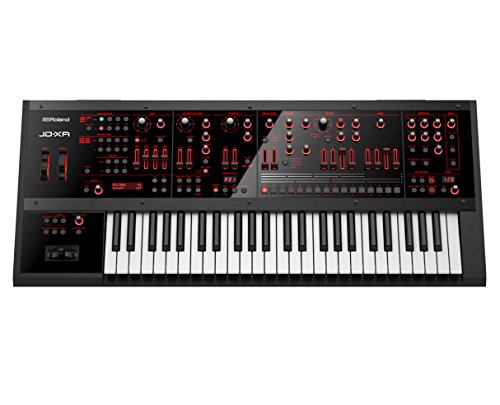
Roland JD-XA 49-Key
Synthesists who want genuine discrete analog voices and a digital engine in one 49-key crossover instrument with deep real time filter control.
Read the Roland JD-XA 49-Key review →
Pioneer DJ DDJ-FLX10 4-Channel
Mobile and open-format DJs who want a 4-channel club style controller with live stem separation and lighting control from one unit.
Read the Pioneer DJ DDJ-FLX10 4-Channel review →Questions Buyers Ask
Native Instruments Maschine Mikro Mk3
See the current listing, price and included accessories.
About This Review
Mandrillis Team
The Mandrillis editorial team researches and compares audio and music gear using manufacturer documentation, verified specs and real buyer feedback, so you can make a confident purchase without wading through marketing claims.
Read our full research methodology.