Speakers Review
Logitech G560 Review: RGB Gaming Sound with DTS:X
The Logitech G560 is a powered 2.1 gaming speaker system with 240 watts peak power, DTS:X Ultra virtual surround, USB and Bluetooth, and four zone LIGHTSYNC RGB lighting. Its driver sizes and dimensions are not published, so buyers should focus on the gaming features.
Our Verdict
Research Score 68/100The Logitech G560 is a budget friendly desktop audio package that puts gaming features ahead of acoustic documentation. The published highlights are strong on paper: 240 watts peak power, a 97 dB maximum SPL, DTS:X Ultra virtual surround, and four zone LIGHTSYNC RGB with 16.8 million colors. USB and Bluetooth cover most PC and mobile needs. The main limitation is the missing detail, as driver sizes, frequency response, dimensions and weight are not published. Mac users lose DTS:X entirely. For Windows gamers who want an immersive and colorful desk setup with real low-end support, the G560 is worth consideration. Buyers who need transparent specs or Mac surround support should look elsewhere.
Editorial research score based on published specifications and documented features, not a customer rating or lab test.

Logitech
Logitech G560
Best for: Windows PC gamers who want an RGB lit gaming speaker system with a subwoofer and virtual surround on a budget.
Skip it if: You need detailed acoustic specifications or DTS:X surround on a Mac.
Check Price on AmazonWe may earn a commission at no extra cost to you.
Listing verified: October 2026
Who Should Buy It
Buy it if
- Windows PC gamers wanting game driven lighting and virtual surround
- Users who want a single powered system with a subwoofer for a desk
- Buyers who like RGB color customization across four lighting zones
- Anyone looking for Bluetooth streaming from a phone or tablet at a desk
Skip it if
- You use a Mac as your primary computer and want DTS:X
- You need published driver sizes and frequency response before buying
- You prefer a minimal audio setup without RGB lighting
Key Specifications
| Type | Powered 2.1 PC gaming speaker system with two satellites and a subwoofer |
| Drivers | Not published in listing |
| Power or sensitivity | 240 Watts Peak; SPL Max 97 dB @426B |
| Frequency response | Not published in listing |
| Inputs and connectivity | USB and Bluetooth; no other inputs published in listing |
| Bluetooth and streaming | Bluetooth to Windows PCs, smartphones and tablets; DTS:X not supported on Mac OS X |
| Dimensions | Not published in listing |
| Weight | Not published in listing |
| Finish | Black |
| Included accessories | Not published in listing |
Overview
The Logitech G560 is a powered 2.1 PC gaming speaker system that combines two satellite speakers with a separate subwoofer. The product listing positions it around immersive gaming audio, with DTS:X Ultra virtual surround and LIGHTSYNC RGB lighting. It is listed at a budget price tier, which makes it accessible for desktop setups where space and cost are primary concerns. The listing does not publish physical dimensions or driver sizes, so buyers should treat this as a feature first rather than spec first speaker system.
On paper, the G560 targets Windows PC users who also want Bluetooth flexibility for phones and tablets. The published specification points to 240 watts peak power and a maximum sound pressure level of 97 dB, which suggests it can play loud enough for a desk or small room. The included subwoofer is responsible for low-frequency weight, but the listing does not provide its driver size or cabinet volume. Buyers who prioritize RGB lighting and DTS:X positional audio may find this package more interesting than traditional monitor speakers.
Sound Quality
The listing focuses on DTS:X Ultra surround sound, a virtual surround format designed to render positional cues in games. On paper, this feature should help separate footsteps, gunfire and ambient effects across a wider soundstage than a basic stereo pair. The listing does not publish a frequency response curve, so any assessment of tonal balance remains limited to the stated features and buyer reports. Buyers should expect a sculpted, game-forward sound rather than a flat studio monitor presentation.
The 240 watts peak power spec suggests the system can deliver energetic dynamics for explosions and in-game music. The separate subwoofer should provide more low-end punch than the satellites alone, but its actual bass extension is not published. Users who listen to music on the same desktop may find the default tuning exciting, though the lack of detailed driver information makes it hard to predict how natural vocals and acoustic instruments will sound. The 97 dB maximum SPL points to respectable loudness for nearfield gaming, but without a measured distortion figure that number only tells part of the story.
Drivers, Power and Room Fit
The G560 is a 2.1 system with two satellite speakers and one subwoofer, but the listing does not publish the size or composition of the drivers. The unique driver design mentioned in the feature bullets is not explained further, so buyers cannot evaluate cone materials, excursion or dispersion. In a desktop setup the satellites are likely to be small and easy to place, but without dimensions the exact footprint is unknown.
With 240 watts peak power and a 97 dB max SPL, the G560 has enough on-paper output for a small room or a desk at arm’s length. The subwoofer adds low-frequency support, which helps in games and movies where impact matters. For larger living rooms, the system may run out of headroom, especially if buyers expect reference-level playback. Room fit is best considered as nearfield or small-room use, with the subwoofer placed on the floor near the desk.
Features and Connectivity
Connectivity centers on USB and Bluetooth. The listing states the G560 works with Windows PCs and Bluetooth-enabled devices including computers, smartphones and tablets. This means a straightforward wired connection to a gaming PC is possible over USB, and wireless streaming can be added when switching to a phone. The listing does not mention an analog 3.5mm auxiliary input or an optical input, so buyers with older devices may need to rely on Bluetooth only.
The standout feature is LIGHTSYNC RGB lighting. The software lets users customize four lighting zones for front and rear light projection, with a palette of 16.8 million colors. Game-driven lighting effects are activated by audio in supported popular games, which can add to immersion. Buyers who do not want RGB can likely disable it, but the feature is a core part of the product identity.
- USB input for Windows PC connection
- Bluetooth for phones and tablets
- DTS:X Ultra virtual surround
- LIGHTSYNC RGB with four zones
- 16.8 million color customization
- Logitech Family Software control
Build, Design and Finish
The product listing does not give physical dimensions or weight, which makes it difficult to assess build density or material quality. The finish is black based on the listing title, and the design appears to be a gaming aesthetic with RGB lighting zones on the satellite speakers. Without in-person inspection, buyers cannot verify cabinet rigidity or whether the satellites use metal or plastic grilles.
Logitech generally positions its G-series products as gaming peripherals with durable plastic housings, but this specific model’s build quality is not documented in the listing. The subwoofer enclosure is likely to be a rectangular box made to sit under a desk, again with no published dimensions. Buyers who care about furniture-grade speaker cabinets may find the lack of detail frustrating, while gamers who prioritize lighting and compact footprint may overlook it.
Setup and Placement
Setup appears straightforward on paper. A USB connection to a Windows PC should be recognized as an audio device, and Bluetooth pairing is standard for mobile sources. The Logitech Family Software allows control of the RGB lighting, but the listing does not say whether the software is required for DTS:X processing or whether that runs automatically. Mac users should note that DTS:X is not supported on Mac OS X, which limits the surround feature on Apple computers.
Placement is flexible in a desktop scenario because the satellites are likely small, though their exact size is not published. The subwoofer typically sits on the floor near the desk, and its cable length is not specified. Buyers should plan for a spot that allows the subwoofer to be somewhat hidden while keeping the satellites angled toward the listening position. The four lighting zones can project light onto a wall or desk surface, so leaving some clearance behind the satellites may enhance the RGB effect.
Daily Use
In daily use, the G560 is a convenient all-in-one audio hub for a PC desk. The USB connection keeps a stable digital signal, and Bluetooth makes it easy to switch to a phone for music or podcasts. The separate subwoofer means the satellites can stay small and unobtrusive, but users should expect to manage one extra cable and floor box. The listing does not mention a headphone output or additional inputs, which may limit some desktop workflows.
The RGB lighting can be a daily highlight for streamers or gamers who enjoy a visually coordinated setup. The software supports game-driven effects, so lighting can react to in-game events without manual setup in some titles. Buyers who prefer a minimalist desk may want to turn the lighting down or off, which is presumably possible but not explicitly described. The listing does not publish power consumption or standby behavior, so daily energy use is an unknown.
Who Should Buy It
The G560 is best for Windows PC gamers who want a single speaker system that handles both game audio and Bluetooth music. It suits buyers who value RGB lighting as part of the desk aesthetic and are willing to trade some audio transparency for a feature-rich package. The 2.1 format gives more bass weight than typical monitor speakers in this price tier, which is useful for action games and movie playback.
Users who need positional audio for competitive gaming may be drawn to the DTS:X Ultra branding, though they should not expect the same precision as a true multi-speaker surround system. Budget-conscious buyers who want a known brand, a subwoofer, and lighting in one purchase will likely find the G560 practical. It is less suited to Mac-centric desks because of the DTS:X limitation, and it is not a fit for critical music listening where driver details and frequency response are important.
Alternatives Worth Considering
Buyers who want a more traditional powered bookshelf pair for music may consider the Edifier R1280DB, which focuses on analog and digital inputs in a wood-look cabinet and skips RGB lighting. For a compact portable Bluetooth option, the JBL Flip 6 or Bose SoundLink Flex provides music on the go without a subwoofer, but neither offers the same desktop gaming integration or virtual surround format. The Klipsch R-51M or ELAC Debut 2.0 B5.2 are passive bookshelf speakers that require a separate amplifier, which may appeal to listeners who prefer building a component system over a plug and play gaming kit.
If deep home theater bass is the priority, the SVS SB-1000 Pro is a dedicated powered subwoofer that would need to be paired with speakers, and it sits in a different product category. The Polk Audio T50 is a floorstanding tower speaker that demands amplification and is not a desktop solution, but it may offer a larger room-filling presentation for buyers who can accommodate towers. For the same desktop gaming use case with RGB lighting, few direct competitors combine light projection with DTS:X in a 2.1 package, so the G560 occupies a fairly specific niche.
Verdict
The Logitech G560 succeeds as a feature-forward gaming speaker system. Its published strengths are clear: 240 watts peak power, a 97 dB maximum SPL, DTS:X Ultra virtual surround, USB and Bluetooth, and four-zone LIGHTSYNC RGB lighting. The 2.1 format with a dedicated subwoofer gives it more low-end presence than a pair of basic desktop speakers. For Windows gamers who want an immersive desk setup, the package is easy to recommend on paper.
The main tradeoff is the lack of acoustic detail. Driver sizes, frequency response, dimensions and weight are not published, which makes it difficult to judge how the system will perform in a specific room or against a known reference. Mac users also lose DTS:X, and buyers who do not want RGB may be paying for a feature they will ignore. Overall, the G560 is best understood as a gaming lifestyle product with real audio power rather than a purist speaker purchase.
Strengths and Limitations
Strengths
- 240 watts peak power with a separate subwoofer
- DTS:X Ultra virtual surround for positional gaming
- LIGHTSYNC RGB with four zones and 16.8 million colors
- USB and Bluetooth cover PC and mobile sources
- Compact 2.1 design suits desktop setups
Limitations
- Driver sizes and frequency response are not published
- DTS:X not supported on Mac OS X
- No published dimensions or weight complicates placement
- No extra inputs beyond USB and Bluetooth listed
- RGB lighting may be unnecessary for audio-only buyers
How We Scored It
Scores reflect published specifications, documented features and value against the alternatives below. They are editorial research scores, not laboratory measurements.
Alternatives to Consider

KEF Muo Speaker
Listeners who want a premium portable Bluetooth speaker with weather resistance, long battery life, and high quality wireless codec support.
Read the KEF Muo Speaker review →
Kanto SUB8VMB
Small room or desktop listeners who want a compact sealed subwoofer with basic integration controls and a space saving matte black cabinet.
Read the Kanto SUB8VMB review →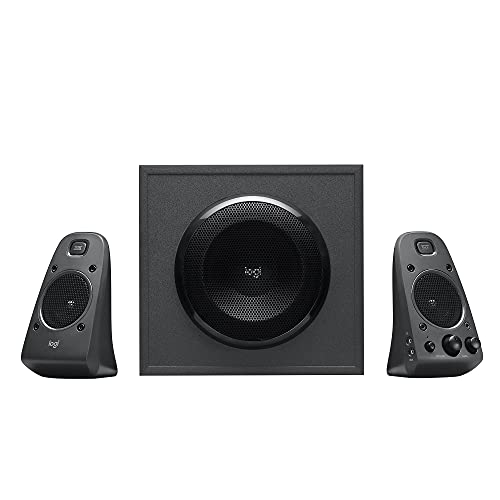
Logitech Z625 THX®
Buyers who want a powerful budget 2.1 speaker system with optical input for a TV, console, or computer.
Read the Logitech Z625 THX® review →Questions Buyers Ask
Logitech G560
See the current listing, price and included accessories.
About This Review
Mandrillis Team
The Mandrillis editorial team researches and compares audio and music gear using manufacturer documentation, verified specs and real buyer feedback, so you can make a confident purchase without wading through marketing claims.
Read our full research methodology.