Guides
Why Is My Sustain Pedal Working Backwards? (5 Easy Fixes)
A sustain pedal that works backwards holds notes when your foot is off and cuts them when you press down. It is a very common problem and almost never means the pedal is broken. This guide explains why it happens, how pedal polarity works, and five simple fixes that usually solve it in under a minute.
Quick Answer
A sustain pedal usually works backwards because its polarity does not match your keyboard, or because the pedal was pressed or unplugged when the keyboard turned on. Turn the keyboard off, plug the pedal in, keep your foot off it, then turn the keyboard back on. If that fails, flip the pedal's polarity switch.
How this guide was put together
This guide is based on manufacturer manuals, published specifications and widely used audio reference standards. Mandrillis does not run hands-on tests for these guides, so treat figures as typical values and check the manual for your own gear before changing settings.
What Backwards Sustain Looks Like
With a normal sustain pedal, notes ring on while you press the pedal down and stop when you lift your foot. When the pedal works backwards, the opposite happens.
Notes keep ringing when your foot is off, and they cut short when you press down. It feels as if the pedal is always on until you touch it.
- Notes blur together with no pedal pressed.
- Pressing the pedal makes notes stop sooner.
- Half pedaling feels strange or does nothing.
- The problem may start after moving or unplugging gear.
Why It Happens: Pedal Polarity
A sustain pedal is a simple switch. Some pedals are normally open, which means the switch closes when pressed. Others are normally closed, which means the switch opens when pressed.
Keyboard makers do not all use the same type. If your keyboard expects one type and the pedal is the other, the pedal works in reverse.
Normally Open vs Normally Closed
You do not need to know the electronics. Just remember that a mismatch between the pedal and the keyboard flips the action.
- Normally open: circuit closes when you press.
- Normally closed: circuit opens when you press.
- Some brands use one type, some use the other.
- Universal pedals have a switch to choose either.
Why Startup Timing Matters
Many keyboards check the pedal only once, at the moment they power on. Whatever position the pedal is in at that moment becomes the off position.
So if the pedal was unplugged, or your foot was resting on it at startup, the keyboard learns the wrong state. From then on, it reads the pedal backwards until you restart it correctly.
Causes and Fixes at a Glance
Match what you notice to the most likely cause.
| What you notice | Likely cause | Fix |
|---|---|---|
| Backwards after plugging in the pedal | Pedal connected after power on | Restart with the pedal connected |
| Backwards every time you turn on | Polarity mismatch | Flip the pedal's polarity switch |
| Backwards on one keyboard only | Brand uses the other polarity | Use the keyboard's pedal setting |
| Works, then flips randomly | Loose plug or worn cable | Reseat or replace the pedal cable |
| Backwards in music software | MIDI pedal setting reversed | Invert the pedal in the app |
Fix 1: Restart With the Pedal Plugged In
This is the fastest fix and works on most keyboards. It resets the keyboard's idea of which position is off.
Steps
Take your time with the order. The key is having the pedal connected and untouched when the keyboard starts.
- Turn the keyboard off.
- Plug the pedal firmly into the sustain or damper jack.
- Move your foot completely away from the pedal.
- Turn the keyboard on and wait for it to finish starting.
- Play a few notes and press the pedal to check.
Fix 2: Flip the Polarity Switch
Many universal sustain pedals have a small switch on the bottom or side. It may be marked with a plus and minus sign, or with two brand names.
Turn the keyboard off, flip the switch, then restart the keyboard with your foot off the pedal. The pedal should now work the right way.
Fix 3: Change the Keyboard's Pedal Setting
Some keyboards and digital pianos let you set pedal polarity in a menu. Look in the manual for a setting called pedal type, polarity or damper reverse.
This is useful if your pedal has no switch. Set it once and the keyboard remembers it on many models.
Fix 4: Check the Plug and Cable
A pedal that flips between working and backwards can point to a loose connection. Push the plug fully into the jack until it seats firmly.
Check that it is in the sustain or damper jack, not an expression or assignable pedal jack. If the problem continues, a worn cable inside the pedal may need replacing.
- Look for labels such as Sustain, Damper or Pedal.
- Do not use the Expression jack for a sustain pedal.
- Wiggle the cable gently while holding a note to check for drops.
- Try a different pedal to rule out a fault.
Fix 5: Fix the Setting in Music Software
If the pedal works on the keyboard but reverses in an app or recording software, the problem is in the MIDI settings. The pedal sends a control message, often called CC64.
Look for an invert or reverse option for the sustain pedal in the app or virtual instrument. Some apps also learn the pedal state when they first open, so restart the app with your foot off the pedal.
Choosing a Sustain Pedal That Avoids the Problem
If you are buying a new pedal, a universal model with a polarity switch works with almost any keyboard. That makes it a safe choice if you change keyboards later.
Piano style pedals with a metal base feel more like an acoustic piano than small box pedals. Some also support half pedaling, if your keyboard can use it.
- Look for a polarity switch.
- Check that the plug is a standard 1/4 inch jack.
- Choose a non slip base so it does not slide on hard floors.
- Check whether your keyboard supports half pedaling.
A Quick Safety Tip
Turn the keyboard off before plugging or unplugging the pedal, and keep the volume low when you restart. Some keyboards make a click or a burst of sustained notes as they start.
Keep the pedal cable out of walkways so nobody trips on it and it does not get pulled out mid practice.
The Bottom Line
A backwards sustain pedal is usually a polarity mismatch or a startup timing issue, not a broken pedal. Restart the keyboard with the pedal plugged in and your foot off it.
If that does not work, flip the pedal's polarity switch or change the keyboard's pedal setting. In music software, use the invert option for the sustain pedal.
Digital Pianos From Our Reviews
Popular portable digital pianos that use a standard sustain pedal jack.
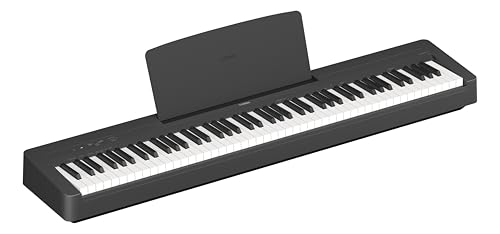
Yamaha P-145
Mentioned
Who Should Buy It
- You are buying a first piano and want the newest entry-level Yamaha
- Space is tight and you need a shallow, light instrument
- You practice with play-along tracks from a phone
Skip It If
- You already play intermediate repertoire with heavy pedaling
- You need line outs for stage or recording use
- You want more than ten sounds
We may earn a commission at no extra cost to you.
Last verified: October 2026

Roland FP-30X
Mentioned
Who Should Buy It
- You want the best action under the FP-60X without compromise elsewhere
- You stream backing tracks over Bluetooth and record over USB
- You gig and need line outs plus two headphone jacks
Skip It If
- Weight and depth are the constraint; the PX-S1100 is lighter and slimmer
- You prefer the Kawai sound signature
- You never leave the house and want a console with three pedals built in
We may earn a commission at no extra cost to you.
Last verified: October 2026

Casio CDP-S160
Mentioned
Who Should Buy It
- You need to carry the piano regularly or store it upright
- You want battery operation for busking, school or outdoor use
- A first piano on a tight budget with a real hammer action
Skip It If
- You play pedal-heavy pieces that need more than 64 notes
- You want Bluetooth or app control over a wireless link
- You need quarter-inch outputs for a PA
We may earn a commission at no extra cost to you.
Last verified: October 2026
Keep Reading
Related guides and picks on Mandrillis:
- Best Digital Pianos for Beginners : pianos that include a pedal
- How to Connect a Digital Piano to a Laptop : pedals in music software
- Weighted vs Semi Weighted Keys for Beginners : pick the right key feel
FAQs
About This Guide
Mandrillis Team
The Mandrillis editorial team researches and compares audio and music gear using manufacturer documentation, verified specs and real buyer feedback, so you can make a confident purchase without wading through marketing claims.
Read our full research methodology.