Instruments Review
Novation Launchpad Pro MK3 Review: Deep Ableton Grid
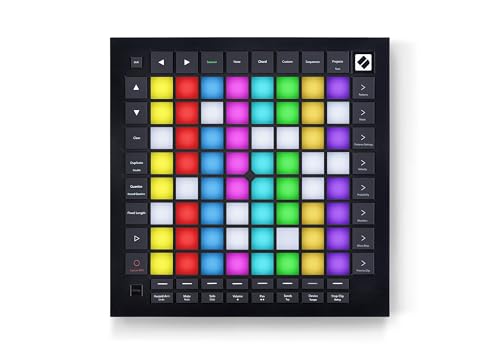
The Novation Launchpad Pro MK3 MIDI combines 64 RGB velocity and pressure sensitive pads with deep Ableton Live integration, a four-track sequencer and Dynamic Note and Scale Modes. Bundled Ableton Live Lite and MIDI In, Out and Thru ports round out a feature-dense grid controller.
Our Verdict
Research Score 85/100The Novation Launchpad Pro MK3 MIDI earns its reputation as one of the more capable grid controllers available, built around 64 RGB velocity and pressure sensitive pads and genuinely deep Ableton Live integration covering clips, scenes, mixer, device and transport control. The onboard sequencer, with eight-note polyphony and pattern chaining, lets it function as a standalone composition tool, not just a clip launcher, while Dynamic Note and Scale Modes make in-key playing accessible directly from the grid. Custom Modes and a full set of MIDI ports extend its reach to hardware and non-Ableton software alike. Weight and power details are not published, and non-Ableton users get less of the deepest integration, but for performers and producers centered on Live, this is a strong, well-rounded controller.
Editorial research score based on published specifications and documented features, not a customer rating or lab test.
Novation
Novation Launchpad Pro MK3 MIDI
Best for: Ableton Live users and grid-based performers who want deep clip launching, a built-in sequencer and expressive RGB pads in one controller.
Skip it if: You need a traditional piano-style keyboard, physical knobs and faders, or deep native integration with a DAW other than Ableton Live.
Check Price on AmazonWe may earn a commission at no extra cost to you.
Listing verified: November 2026
Who Should Buy It
Buy it if
- Ableton Live users who want direct clip, scene, mixer and transport control
- Performers who build sets around a sequencer, drum racks and Note and Scale Modes
- Producers who want Custom Modes to control other MIDI hardware or software
- Buyers who want a bundled, working DAW included with their controller
Skip it if
- You need a piano-style keyboard rather than a pad grid
- You require physical knobs and faders for mixing
- You use a DAW other than Ableton Live and need deep native integration
Key Specifications
| Keys | Not applicable; this is a grid pad controller with no piano-style keyboard |
| Key type | Not applicable |
| Pads | 64 RGB velocity and pressure sensitive pads |
| Knobs and faders | Not published in listing; no knobs or faders are mentioned |
| DAW integration | Deep Ableton Live integration with clip and scene launching, mixer, device and transport control, quantize, duplicate, double and Capture MIDI; color matching with Logic Pro sessions |
| Bundled software | Ableton Live Lite |
| Connectivity | USB, MIDI In, MIDI Out and MIDI Out 2 or Thru ports |
| Power | Not published in listing |
| Weight | Not published in listing |
| Included accessories | Not published in listing |
Overview
The Novation Launchpad Pro MK3 is a grid-based MIDI controller built around a dense array of RGB pads rather than a keyboard, positioned as a performance and production tool for clip launching, sequencing and hardware control. The listing describes it as offering the deepest Ableton Live integration in the Launchpad range.
At the center of that integration is direct access to clips and scenes, along with mixer, device and transport controls, quantize, duplicate, double and a Capture MIDI function that preserves played ideas automatically. That level of DAW specific control is more extensive than most general purpose grid controllers attempt.
Beyond the Ableton focus, the Launchpad Pro MK3 also includes an onboard four-track sequencer, Dynamic Note and Scale Modes, and Custom Modes for controlling other hardware or software, which together make it useful even outside an Ableton Live session. That breadth is part of why the model sits near the top of Novation's grid controller range rather than functioning as a narrow accessory for one piece of software.
Keys, Pads and Feel
There is no piano-style keyboard on the Launchpad Pro MK3. Instead, the listing confirms 64 RGB pads that are both velocity and pressure sensitive, giving each pad a dynamic range closer to what a drum pad controller offers than a simple on-off trigger grid.
Pressure sensitivity in particular allows continuous expression after a pad is struck, which matters for Dynamic Note and Scale Modes, where a player is using the grid to perform in-key basslines, melodies, chords and leads rather than only launching fixed clips.
It is also worth noting that the grid recognizes drumming patterns and will display a drum rack layout automatically when appropriate, which suggests the pad surface adapts contextually depending on what kind of material is loaded into the connected software. That contextual switching is a small but meaningful convenience, since it removes a manual step a performer would otherwise need to handle between songs or sections of a set.
Knobs, Faders and DAW Integration
No knobs or faders are mentioned in the listing, and the design is clearly built around the pad grid rather than a traditional mixer style control surface. Parameter control, where it exists, happens through the pads and their modes rather than dedicated rotary or slider hardware.
DAW integration is the standout feature here. The listing specifically calls this the deepest Ableton Live integration in the product line, giving direct access to clips and scenes, mixer and device parameters, and transport controls, all without needing to touch a mouse during a session.
Quantize, duplicate and double functions let a performer correct timing or extend a pattern directly from the hardware, while Capture MIDI is described as preventing lost ideas by recording played material even if recording was not actively engaged beforehand. Non-Ableton users get color matching with Logic Pro sessions, but the deepest integration features are tied specifically to Ableton Live, so the practical benefit of this section depends heavily on which DAW a buyer actually uses day to day.
Software, Sounds and Features
Ableton Live Lite is bundled with the Launchpad Pro MK3, giving a new buyer a working DAW without an additional purchase. That pairing makes sense given how tightly the hardware integrates with Ableton Live's clip and scene based workflow.
The onboard four-track, 32-step sequencer is a significant feature in its own right, supporting eight-note polyphony, pattern chaining and scenes for building longer arrangements directly on the hardware. Probability and mutation features let patterns evolve over a performance rather than repeating identically every loop.
Dynamic Note and Scale Modes round out the feature set by making the grid genuinely playable as an instrument, not just a launcher. A player can stay within a chosen scale while improvising basslines, melodies, chords or leads directly on the pad grid.
- Deepest Ableton Live integration with clips, scenes, mixer and transport control
- 64 RGB velocity and pressure sensitive pads
- Four-track, 32-step sequencer with eight-note polyphony
- Dynamic Note and Scale Modes for in-key performance
- Custom Modes plus MIDI In, Out and Out 2 or Thru for hardware control
Build, Design and Portability
The listing does not publish weight, dimensions or chassis material for the Launchpad Pro MK3, so this review cannot describe its physical build in specific terms. A grid controller of this pad count is likely to have a moderate footprint, comparable to other professional grid launchers in its class.
Given the RGB pad array and the number of ports described, the rear panel is likely reasonably dense with connections, which is typical for a controller designed to anchor both a software session and a hardware MIDI setup simultaneously.
Without published weight or dimensions, performers planning to travel with the Launchpad Pro MK3 for live sets should confirm those figures directly with Novation before finalizing a case or bag choice.
Connectivity and Power
The listing confirms USB connectivity alongside MIDI In, MIDI Out and MIDI Out 2 or Thru ports, which is a relatively complete connectivity set for a controller in this category. The dual MIDI output arrangement supports hooking the Launchpad Pro MK3 into an all-hardware rig alongside software use.
That combination of USB and standard MIDI ports means the controller can sit at the center of a hybrid setup, sending data to a computer over USB while simultaneously feeding external hardware synths or drum machines through its MIDI outputs.
Power requirements are not published in the listing, so buyers planning a specific cabling or power setup should confirm whether the unit draws power entirely over USB or requires a separate supply before relying on that assumption. A performer building a minimal travel rig around USB bus power alone should verify that assumption with Novation before a show rather than discovering a gap on site.
Setup and Daily Use
For an Ableton Live user, setup should be close to immediate given the depth of integration described, with clips, scenes, mixer and transport controls available as soon as the unit connects. Capture MIDI adds a safety net for ideas played before recording was formally started.
Daily use would likely move between live performance, using the pad grid for clip launching and Note and Scale Modes for improvising, and composition, using the onboard sequencer to build and chain patterns without needing a laptop open at all.
Producers who also run external hardware can use Custom Modes and the MIDI Out 2 or Thru port to fold synths or drum machines into the same workflow, which reduces the need to switch controllers between software and hardware focused sessions.
Who Should Buy It
This is a strong match for Ableton Live users who want direct, hands-free access to clips, scenes and mixer controls without constantly reaching for a mouse, especially performers who build sets around live clip triggering.
Producers who want a capable onboard sequencer and a genuinely playable pad grid, rather than a simple clip launcher, will also find real value here, particularly given the inclusion of Dynamic Note and Scale Modes.
Buyers who specifically need physical knobs and faders, a piano-style keyboard, or deep native integration with a DAW other than Ableton Live should look elsewhere, since this controller's standout features are concentrated around the pad grid and the Ableton Live workflow.
Alternatives Worth Considering
Producers who do not use Ableton Live and want a DAW-agnostic grid controller should weigh how much value they would actually get from a controller whose deepest integration is tied to one specific piece of software.
Buyers who want keys alongside pads, rather than a dedicated grid controller, should look at a hybrid keyboard and pad controller instead, since the Launchpad Pro MK3 has no keybed of its own.
Those who mainly want a simpler clip launcher without a built-in sequencer or Note and Scale Modes could consider a smaller, less expensive grid controller in the same product family, trading some of this model's depth for a lower price. That tradeoff makes sense for a buyer who only ever needs basic clip triggering and has no interest in the sequencing or scale-aware performance features that define the Pro model.
Verdict
The Launchpad Pro MK3 earns its place as a flagship style grid controller by combining an expressive 64-pad RGB surface with genuinely deep Ableton Live integration rather than a shallow set of clip triggers.
The onboard sequencer and Dynamic Note and Scale Modes push it beyond a simple launcher into something closer to a standalone instrument, while Custom Modes and full MIDI I/O keep it relevant for hardware based setups as well.
For an Ableton Live centered performer or producer, this is one of the stronger grid controllers available, with the main caveat being that users of other DAWs will not see the same depth of integration.
Strengths and Limitations
Strengths
- 64 RGB velocity and pressure sensitive pads for dynamic, colorful performance
- Deep Ableton Live integration covering clips, scenes, mixer, device and transport control
- A four-track, 32-step sequencer with eight-note polyphony and pattern chaining
- Dynamic Note and Scale Modes for playing in-key basslines, melodies, chords and leads
- Custom Modes plus MIDI In, Out and Out 2 or Thru ports for hardware or software control
- Includes Ableton Live Lite, giving new users a working DAW right away
Limitations
- No knobs or faders are included, since this is a pad-first grid controller
- No piano-style keyboard, so melodic input depends entirely on the pad grid or external keys
- Weight, dimensions and power requirements are not published in the listing
- Deepest DAW integration is tied specifically to Ableton Live, with Logic Pro support limited to color matching
How We Scored It
Scores reflect published specifications, documented features and value against the alternatives below. They are editorial research scores, not laboratory measurements.
Alternatives to Consider

Yamaha Montage M6 61-Key
Professional synth players and producers who want a flagship 61-key instrument with massive polyphony, analog style synthesis and a matching software plugin.
Read the Yamaha Montage M6 61-Key review →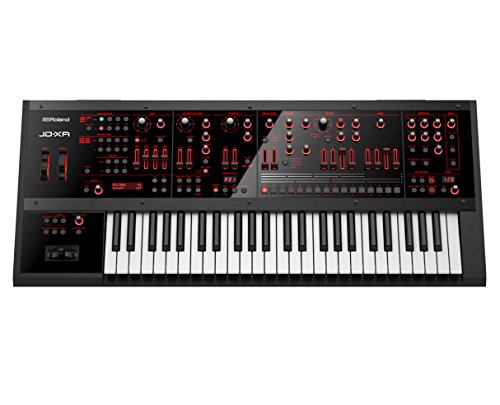
Roland JD-XA 49-Key
Synthesists who want genuine discrete analog voices and a digital engine in one 49-key crossover instrument with deep real time filter control.
Read the Roland JD-XA 49-Key review →
Pioneer DJ DDJ-FLX10 4-Channel
Mobile and open-format DJs who want a 4-channel club style controller with live stem separation and lighting control from one unit.
Read the Pioneer DJ DDJ-FLX10 4-Channel review →Questions Buyers Ask
Novation Launchpad Pro MK3 MIDI
See the current listing, price and included accessories.
About This Review
Mandrillis Team
The Mandrillis editorial team researches and compares audio and music gear using manufacturer documentation, verified specs and real buyer feedback, so you can make a confident purchase without wading through marketing claims.
Read our full research methodology.