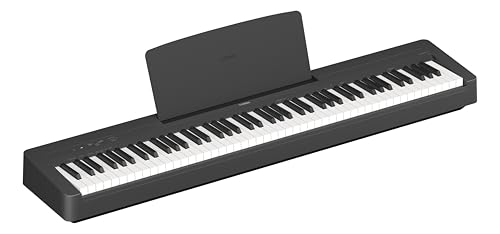
Guides
How to Record Digital Piano Audio to Phone (4 Easy Ways)
Recording your piano on a phone is great for tracking progress, sharing with a teacher or posting a performance. Holding the phone near the speakers works, but a direct cable connection sounds much cleaner. This guide covers four ways to record, the cables and adapters you need, and the settings that avoid noise and distortion.
Quick Answer
The cleanest way to record digital piano audio to a phone is a direct cable from the piano's headphone or line out to the phone, using a TRRS adapter or a small audio interface. Many newer pianos also send audio over USB to a phone. For quick clips, the phone's microphone about 2 feet from the speakers works too.
How this guide was put together
This guide is based on manufacturer manuals, published specifications and widely used audio reference standards. Mandrillis does not run hands-on tests for these guides, so treat figures as typical values and check the manual for your own gear before changing settings.
Why Direct Recording Sounds Better
When you record with the phone's microphone, it also picks up room echo, traffic, key noise and the small size of the piano's speakers.
A direct cable records the piano's sound straight from its electronics. The result is clearer, quieter and closer to what you hear in headphones.
- No room echo or background noise.
- Full range, including deep bass notes.
- No key clatter in the recording.
- Consistent sound every time you record.
Four Ways to Record Piano Audio to a Phone
Compare the options by sound quality and what you need.
| Method | What you need | Sound quality |
|---|---|---|
| Phone microphone | Just the phone and a stand | Fair, includes room sound |
| Cable with TRRS adapter | Headphone cable plus phone adapter | Good, some risk of noise |
| Small audio interface | Interface, cables and phone adapter | Very good and clean |
| USB audio from the piano | Piano with USB audio, phone cable | Very good, fully digital |
Method 1: Use the Phone's Microphone
This is the fastest way and needs no extra gear. It works well for practice notes and quick videos.
Tips for Better Mic Recordings
A few small changes make a big difference.
- Place the phone on a stand about 2 feet from the speakers.
- Point the phone's microphone toward the piano, not the keys.
- Lower the piano volume to about half to avoid distortion.
- Record in a quiet room with soft furnishings.
- Turn on airplane mode so calls do not interrupt.
Method 2: Record With a Cable and Adapter
Most digital pianos have a headphone jack, often a 1/4 inch or 3.5 mm socket. You can run that output into a phone using the right adapter.
Phones use a TRRS input, which carries a microphone signal. A plain headphone cable will not work on its own, so you need a TRRS adapter made for recording.
What You Need
Check your phone's port first, since many phones have no headphone jack.
- A cable from the piano's headphone jack to 3.5 mm.
- A TRS to TRRS adapter designed for phone recording.
- A USB-C or Lightning to 3.5 mm adapter if your phone has no jack.
- A recording app on the phone.
Watch the Level
Phone inputs expect a weak microphone signal. A piano's headphone output is much stronger and can distort easily.
Start with the piano volume very low, around a quarter, and raise it slowly until the recording sounds clear without crackling. Some adapters include a volume pad to reduce the level.
Method 3: Use a Small Audio Interface
An audio interface converts the piano's signal into clean digital audio. Many small interfaces work with phones using a USB-C or Lightning adapter.
This gives you proper level controls and very low noise. It is the best option if you plan to record often or share performances.
- Connect the piano's line out or headphone out to the interface inputs.
- Use two cables for stereo, left and right.
- Connect the interface to the phone with the correct adapter.
- Some interfaces need extra power when used with phones.
- Set the input gain so loud passages stay out of the red.
Method 4: USB Audio Straight From the Piano
Some newer digital pianos can send audio over their USB to Host port, not just MIDI. Check your manual for USB audio support.
If yours supports it, connect a USB cable to the phone with the right adapter. The phone sees the piano as an audio device, and recording apps can capture the sound digitally.
Choosing a Recording App
Your phone's built-in voice recorder can work, but it may compress the sound. A music recording app usually gives better quality and more control.
Look for an app that lets you choose the input source, see a level meter and save in a high quality format.
- Shows input level with a meter.
- Records in WAV or high quality formats.
- Lets you pick an external input.
- Supports trimming and simple fades.
Recording Video With Good Sound
Many players want video for social media or a teacher. The phone's camera app may still use its own microphone even with a cable connected.
Some camera apps let you choose an external audio input. Another option is to record audio and video separately, then line them up in a video editing app using a clap at the start.
Fixing Common Problems
Most recording problems come from levels or the wrong adapter. Check these first.
- Distorted sound: lower the piano volume or use a pad.
- No sound recorded: use a TRRS adapter, not a plain cable.
- Only one side recorded: the phone input may be mono, which is normal.
- Buzz or hum: unplug the phone charger and try again.
- Piano speakers turn off: this is normal when the headphone jack is used.
Protect Your Hearing and Gear
Turn the piano volume down before plugging or unplugging cables. This avoids loud pops in headphones and protects inputs.
If you monitor with headphones while recording, keep the level comfortable. Long sessions at high volume can damage hearing over time.
Using the Piano's Built-in Recorder
Many digital pianos have a built-in recorder, and some save audio files to a USB flash drive. You can then move the file to your phone.
This avoids cables and level problems entirely. Check your manual for a USB audio recorder or song recorder feature.
Getting the Best Sound Before You Press Record
Good recordings start with the piano itself. Choose a clean piano sound, turn off extra effects you do not need, and set the reverb low so the recording does not sound washed out.
Do a short test recording first and listen back on headphones. Check that the loudest notes do not crackle and the softest notes are still clear, then adjust the volume before the real take.
- Pick the main grand piano sound.
- Keep reverb low or off.
- Turn off metronome sound unless you want it recorded.
- Record a 20 second test and listen back.
The Bottom Line
For quick clips, the phone's microphone about 2 feet from the speakers is fine. For clean recordings, use a direct cable with a TRRS adapter, a small audio interface or USB audio.
Start with low piano volume, watch the level meter and record in a high quality format.
Digital Pianos From Our Reviews
Portable digital pianos with headphone outputs that work well for phone recording.
Yamaha P-145
Mentioned
Who Should Buy It
- You are buying a first piano and want the newest entry-level Yamaha
- Space is tight and you need a shallow, light instrument
- You practice with play-along tracks from a phone
Skip It If
- You already play intermediate repertoire with heavy pedaling
- You need line outs for stage or recording use
- You want more than ten sounds
We may earn a commission at no extra cost to you.
Last verified: October 2026

Roland FP-30X
Mentioned
Who Should Buy It
- You want the best action under the FP-60X without compromise elsewhere
- You stream backing tracks over Bluetooth and record over USB
- You gig and need line outs plus two headphone jacks
Skip It If
- Weight and depth are the constraint; the PX-S1100 is lighter and slimmer
- You prefer the Kawai sound signature
- You never leave the house and want a console with three pedals built in
We may earn a commission at no extra cost to you.
Last verified: October 2026

Casio CDP-S160
Mentioned
Who Should Buy It
- You need to carry the piano regularly or store it upright
- You want battery operation for busking, school or outdoor use
- A first piano on a tight budget with a real hammer action
Skip It If
- You play pedal-heavy pieces that need more than 64 notes
- You want Bluetooth or app control over a wireless link
- You need quarter-inch outputs for a PA
We may earn a commission at no extra cost to you.
Last verified: October 2026
Keep Reading
Related guides and picks on Mandrillis:
- Best Audio Interfaces : clean recording to phone or computer
- How to Connect a Digital Piano to a Laptop : record on a computer instead
- Best Digital Pianos for Beginners : pianos with useful outputs
FAQs
About This Guide
Mandrillis Team
The Mandrillis editorial team researches and compares audio and music gear using manufacturer documentation, verified specs and real buyer feedback, so you can make a confident purchase without wading through marketing claims.
Read our full research methodology.