
Guides
Why Does One Speaker Sound Quieter Than the Other?
When one speaker sounds quieter, the problem is rarely the speaker itself. Balance settings, room placement, loose connections and a few settings on powered speakers cause most cases. This guide shows a quick swap test to find the cause, then walks through the fixes in order.
Quick Answer
One speaker usually sounds quieter because the balance control is off center, the speakers sit at different distances from you or the walls, or a wire or plug is loose. On powered speakers, the volume knob on each speaker may differ. Swap the left and right cables to see whether the problem moves with the source or stays with the speaker.
How this guide was put together
This guide is based on manufacturer manuals, published specifications and widely used audio reference standards. Mandrillis does not run hands-on tests for these guides, so treat figures as typical values and check the manual for your own gear before changing settings.
Is It the Speaker, the Source or the Room?
A speaker can sound quieter for three broad reasons. The sound sent to it may be lower, the speaker may be faulty, or the room may be shaping what you hear.
Room causes are more common than people expect. A speaker near a wall or corner can sound louder and fuller than one in open space, even when both are working perfectly.
- Source or setting: balance, channel levels, app settings.
- Connection: loose wire, bad cable, worn jack.
- Room: different distances, walls, furniture.
- Speaker: damaged driver or faulty internal part.
The Swap Test
This test separates source problems from speaker problems in a few minutes. Turn the volume down first.
How to Do It
Swap the left and right connections at the amplifier or source. For passive speakers, swap the speaker wires at the amp terminals. For powered speakers, swap the input cables.
Play the same mono or centered track and listen again from your seat.
- The quiet side moves to the other speaker: the source, cable or amp channel is the cause.
- The same speaker stays quiet: the speaker or its own settings are the cause.
- Both now sound equal: a connection was loose and is now seated.
Common Causes and Fixes
Match your result to the most likely cause.
| Cause | How to spot it | Fix |
|---|---|---|
| Balance off center | Balance knob or setting moved | Set balance to center |
| Different speaker distances | One speaker closer to you | Make distances equal |
| One speaker near a wall | That side sounds fuller | Match wall distances |
| Loose wire or plug | Sound changes when touched | Reseat or redo the connection |
| Powered speaker volume mismatch | Separate knobs on each speaker | Match both knobs |
| Damaged driver | Same speaker quiet after swap | Repair or replace |
Fix 1: Check the Balance Control
Amplifiers, receivers, phones and computers all have a balance setting. If it has drifted even slightly to one side, that speaker gets more volume.
Set it to the exact center. On receivers, also check the channel level menu, where each speaker can have its own level.
Fix 2: Match Your Distance to Each Speaker
If you sit closer to one speaker, it sounds louder. Moving just a couple of feet off center can make one side clearly dominant.
Measure from your ears to each speaker. Aim for the same distance, forming an equal triangle between you and both speakers.
Fix 3: Match Wall and Corner Distances
A speaker near a wall or corner gets extra bass from reflections. It sounds louder and fuller than one in open space.
Try to keep both speakers the same distance from their side walls and the back wall. Move the louder one out a few inches at a time.
Fix 4: Check Every Connection
Loose speaker wire is a common cause, especially when a single strand of copper is barely touching the terminal.
Turn off the amplifier, strip a fresh half inch of wire, twist it tight and clamp it firmly. Check both ends of both wires.
- Make sure no stray strands touch the other terminal.
- Tighten binding posts by hand until snug.
- Reseat RCA plugs and twist them slightly as you push in.
- Try a new cable if one side still sounds weak.
Fix 5: Check Polarity
If one speaker's wires are reversed, positive to negative, the speakers push against each other. Bass and center vocals sound thin, and one side can seem weaker.
Check that positive connects to positive at both the amp and the speaker, for both speakers.
Fix 6: Match Powered Speaker Settings
Some powered speaker pairs have a volume or gain knob on each speaker, or on the back of one. If the two are set differently, one side plays louder.
Also check any tone, room or boundary switches on the back. They should usually match on both speakers unless one sits much closer to a wall.
Fix 7: Look for a Damaged Driver
If the same speaker stays quiet after the swap test, inspect it. Gently remove the grille and look at the cones.
Tears, dents or a rattling sound point to a damaged driver. Play quiet music and put your ear near each driver to check that both the woofer and tweeter are working.
Fix 8: Test With a Mono Signal
Some recordings put more sound in one channel on purpose. That can make one speaker seem quieter on certain songs.
Use a mono test track, or switch your source to mono, to check balance fairly. A voice should then sound centered between the speakers.
Fix 9: Check the Amplifier Channel
If the quiet side moved during the swap test, the cause sits before the speakers. That could be the source device, the cable or one channel of the amplifier.
Try a different source, such as a phone in place of a TV. If the problem stays on the same amp output with every source, one amplifier channel may be weak or faulty.
Narrow It Down Step by Step
Change one thing at a time and listen after each change. That way you know exactly which part fixed the problem.
- Swap the input cables between the left and right inputs.
- Try a different input on the amplifier or receiver.
- Connect a different source device.
- If one output stays weak with everything, contact the maker or a repair shop.
When Hearing Plays a Part
Sometimes the speakers are fine and the difference is in how we hear. Many people hear slightly better in one ear than the other, and a blocked ear can make one side seem quieter.
Turn your chair around and face the other way. If the quieter side now switches, the cause may be your hearing rather than the system. A hearing check with a professional is a good idea if this happens often.
The Bottom Line
Most quiet speaker problems come from balance settings, uneven placement or a loose connection. Run the swap test first to find out which side of the system is at fault.
If the same speaker stays quiet no matter what, the speaker itself likely needs repair or replacement.
Speakers and an Amplifier From Our Reviews
A passive bookshelf pair with a matching stereo amplifier, and a powered pair with built-in amplification.
ELAC Debut B6.2
Mentioned
Who Should Buy It
- Listeners building a two-channel music system around a stereo receiver or integrated amplifier
- People who value aramid-fiber woofer technology and a cloth dome tweeter
- Buyers who prefer front-ported cabinets for near-wall or shelf placement
- Those stepping up from entry-level bookshelf speakers to a recognized name in hi fi
Skip It If
- You want a powered speaker with Bluetooth and streaming built in
- You require published dimensions, weight, and sensitivity specs before ordering
- You need a speaker with known low-frequency extension for bass-heavy genres
We may earn a commission at no extra cost to you.
Last verified: October 2026
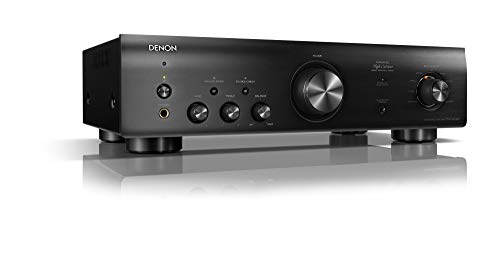
Denon PMA-600NE
Mentioned
Who Should Buy It
- Vinyl listeners who want a built in phono input rather than an external phono preamp
- Buyers who specifically want an analog only listening mode that disengages digital circuits and Bluetooth
- Anyone connecting a CD player, Blu-ray player or similar source through optical or coaxial digital inputs
- Buyers who prioritize a simple, focused stereo amplifier over wireless streaming breadth
Skip It If
- You need Wi-Fi based multi-room streaming or an app
- You need a confirmed 8 ohm power rating or distortion figure before buying
- You need published dimensions and weight ahead of a tight shelf installation
We may earn a commission at no extra cost to you.
Last verified: November 2026

Kanto YU4MB
Mentioned
Who Should Buy It
- Listeners building a compact stereo or desktop system with a turntable
- Those who want a powered speaker with a remote and auto standby
- Buyers who prefer a simple matte black aesthetic
- Users who value lower mid-range pricing with brand recognition
Skip It If
- You require detailed driver and frequency response data for critical listening decisions
- You need multiple analog and digital inputs beyond Bluetooth and phono
- You want floorstanding or high-output speakers for a large room
We may earn a commission at no extra cost to you.
Last verified: October 2026
Keep Reading
Related guides and picks on Mandrillis:
- Best Stereo Amplifiers : amps with clear balance controls
- How Far Should Bookshelf Speakers Be From the Wall? : match placement for even sound
- What Gauge Speaker Wire Do I Need for Home Theater? : wire and polarity basics
FAQs
About This Guide
Mandrillis Team
The Mandrillis editorial team researches and compares audio and music gear using manufacturer documentation, verified specs and real buyer feedback, so you can make a confident purchase without wading through marketing claims.
Read our full research methodology.