Guides
What Is Phantom Power and When to Use It? (Simple Guide)
The 48V or phantom power button on an audio interface confuses many beginners. This guide explains what phantom power is in plain words, which microphones and devices need it, which ones do not, when it can cause problems, and the safe way to switch it on and off.
Quick Answer
Phantom power is a small DC voltage, usually 48 volts, sent from an audio interface or mixer through an XLR cable to power a microphone or device. Turn it on for condenser microphones, active DI boxes and inline boosters. Dynamic mics do not need it. Take care with ribbon mics and always switch it with your monitors turned down.
How this guide was put together
This guide is based on manufacturer manuals, published specifications and widely used audio reference standards. Mandrillis does not run hands-on tests for these guides, so treat figures as typical values and check the manual for your own gear before changing settings.
What Phantom Power Is
Phantom power is electricity sent up the same XLR cable that carries the audio. It is called phantom because it travels invisibly, without a separate power cable.
Most interfaces and mixers supply 48 volts, which is why the button is often labeled 48V. The current is very small, so it is safe for people and for most gear.
- Usually 48 volts, sometimes listed as P48.
- Carried on the same XLR cable as the audio.
- Supplied by interfaces, mixers and some preamps.
- Often switched per input or for a group of inputs.
Why Some Mics Need It
Condenser microphones have a charged plate and a small built-in amplifier. Both need power to work. Without phantom power, a condenser makes little or no sound.
Dynamic microphones create their own signal from a moving coil and magnet. They need no power at all.
How Phantom Power Travels on an XLR Cable
An XLR cable has three pins. Two carry the audio signal, and one is the ground or shield. Phantom power sends the same voltage on both audio pins and returns through the ground.
Because the voltage is equal on both audio pins, a balanced input does not hear it as sound. That is how power and audio share one cable without getting in each other's way.
Why This Matters for You
This design is why a good XLR cable matters. If a cable is damaged and one audio pin loses contact, the mic can lose power or start to crackle.
It also explains why unbalanced adapters can cause trouble. They connect pins in a way that may send the voltage where it does not belong.
- Use real XLR to XLR cables for condensers.
- Avoid cheap adapters between an XLR input and line gear.
- Replace cables that crackle when moved.
- Keep connectors clean and fully pushed in.
Voltage Variations
Most gear uses 48 volts, but some battery or small devices supply lower phantom voltages. Many condenser mics still work on less, but some lose headroom or sound weaker.
Check your mic's manual for its phantom power range if you use a portable recorder.
Which Gear Needs Phantom Power?
A quick guide before you press the 48V button.
| Gear | Needs phantom power? | Notes |
|---|---|---|
| Condenser microphone | Yes | Most need 48 volts |
| Dynamic microphone | No | Usually unharmed if it is on |
| Inline booster | Yes | Uses it to add clean gain |
| Active DI box | Often | Check the manual |
| Modern ribbon mic | Some do | Only active ribbons need it |
| Vintage ribbon mic | No | Can be damaged in rare cases |
When to Turn Phantom Power On
Turn it on only when something connected to that input needs it. Leaving it on for no reason is not usually harmful, but it is a good habit to switch it on with purpose.
- You plug in a condenser microphone.
- You use an inline booster with a low output dynamic mic.
- You use an active DI box for guitar or keyboard.
- The mic's manual says it needs phantom power.
When to Leave It Off
Some gear does not need phantom power, and a few items can be harmed by it in specific situations.
Dynamic Microphones
A properly wired dynamic mic on a balanced XLR cable ignores phantom power. It is safe, but it adds nothing.
Leave it off unless you are using an inline booster.
Vintage Ribbon Microphones
Old passive ribbon mics have a very thin, delicate ribbon. With correctly wired cables, phantom power rarely harms them, but a faulty cable or patch bay can send voltage the wrong way.
Keep phantom power off for vintage ribbons unless the maker says it is safe.
Unbalanced Gear
Devices connected with unbalanced cables or adapters may not handle phantom power. Turn it off before connecting synths, mixers or other line-level gear with adapters.
How to Use Phantom Power Safely
Switching phantom power causes a loud pop through speakers and headphones. A simple order of steps prevents damage and protects your ears.
Turning It On
Follow the same order every time. It quickly becomes a habit.
- Turn monitors and headphones down.
- Connect the XLR cable to the mic and interface.
- Switch phantom power on.
- Wait a few seconds for the mic to settle.
- Raise gain and monitor volume slowly.
Turning It Off
Reverse the order when you finish. Unplugging a condenser with phantom power still on can cause a loud pop.
- Turn monitors and headphones down.
- Switch phantom power off.
- Wait about 10 to 20 seconds for the voltage to drain.
- Unplug the XLR cable.
Interfaces With Grouped Phantom Power
Some interfaces have one 48V switch for several inputs at once. Turning it on sends power to every input in that group.
This is fine with condensers and dynamic mics. Be careful if you plug a vintage ribbon mic or unbalanced gear into a grouped input while it is on.
Common Phantom Power Problems
If a condenser seems dead or noisy, phantom power is often the cause. Check these points.
- Condenser makes no sound: phantom power is off or on the wrong input.
- Crackling: a damaged XLR cable is interrupting the power.
- Loud pop when switching: monitors were not turned down.
- Weak signal from a USB-powered interface: some draw too little power for demanding mics.
Do USB Mics Need Phantom Power?
No. USB microphones get their power from the USB connection. They have no XLR input for phantom power.
Hybrid mics with both USB and XLR outputs usually work like dynamic mics on the XLR side, but check the manual to be sure.
The Bottom Line
Phantom power is the small voltage that runs condenser mics and some other studio gear. Turn it on for condensers, inline boosters and active DI boxes.
Leave it off for vintage ribbons and unbalanced gear, and always switch it with your monitors turned down.
Gear That Uses Phantom Power
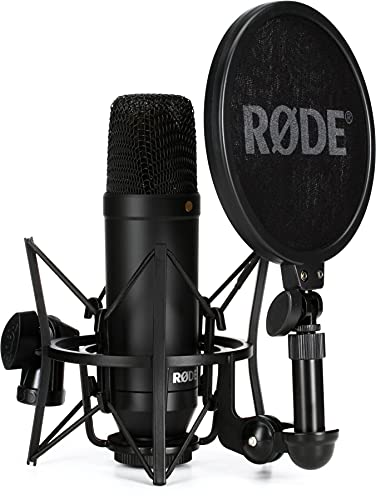
A studio condenser that needs phantom power, an inline booster powered by it, and an interface that supplies it.
Rode NT1
Mentioned
Who Should Buy It
- Singers and rappers recording one voice at a time in a quiet room
- Voice-over artists and audiobook narrators who need a very low noise floor
- Home producers upgrading from an entry-level condenser
- Buyers who want the shock mount and pop screen bundled rather than bought separately
Skip It If
- You do not own an audio interface or mixer with a microphone preamp
- You stream from an untreated room with keyboard and fan noise
- You need omnidirectional or figure-eight patterns
We may earn a commission at no extra cost to you.
Last verified: October 2026

sE Electronics DM2 Active Inline Preamp
Mentioned
Who Should Buy It
- Podcasters and voiceover artists with dynamic mics like the Shure SM7B
- Recording engineers who use passive ribbon microphones
- Live sound techs needing a compact gain boost on stage
- Home studio owners wanting lower noise from their interface preamps
Skip It If
- You primarily use condenser microphones
- You want a desktop audio interface with built-in DSP
- You need published dimensions and weight before buying
We may earn a commission at no extra cost to you.
Last verified: October 2026

Behringer U-PHORIA UMC204HD USB Audio Interface
Mentioned
Who Should Buy It
- Solo singer-songwriters tracking vocals and one instrument at a time
- Podcasters or streamers who want two phantom-powered combo inputs
- Musicians who want MIDI In and Out without a separate interface
- Buyers who want a straightforward budget interface from an established name
Skip It If
- You need four or more simultaneous inputs
- You require a confirmed software bundle before buying
- You need a dedicated high-impedance instrument input and none is stated
We may earn a commission at no extra cost to you.
Last verified: November 2026
Keep Reading
Related guides and picks on Mandrillis:
- Best Condenser Microphones : studio condensers that need phantom power
- Why Is My XLR Microphone So Quiet? : missing phantom power is a common cause
- Do You Need a Cloudlifter for Dynamic Mics? : inline boosters run on phantom power
FAQs
About This Guide
Mandrillis Team
The Mandrillis editorial team researches and compares audio and music gear using manufacturer documentation, verified specs and real buyer feedback, so you can make a confident purchase without wading through marketing claims.
Read our full research methodology.