Guides
Why Is My XLR Microphone So Quiet? (9 Fixes That Work)
A quiet XLR microphone is one of the most common home studio problems. Usually nothing is broken. The cause is low gain, a low output mic, the wrong input or a missing setting. This guide walks through nine fixes in order, from the simplest checks to inline boosters and new gear.
Quick Answer
An XLR microphone is usually quiet because the interface gain is too low, the mic has low output, you are too far away, or a condenser has no phantom power. Raise the gain, move to about 1 to 3 inches for a dynamic mic, and turn on 48 volt phantom power for condensers.
How this guide was put together
This guide is based on manufacturer manuals, published specifications and widely used audio reference standards. Mandrillis does not run hands-on tests for these guides, so treat figures as typical values and check the manual for your own gear before changing settings.
First, Check Where the Sound Is Quiet
There are two places a mic can seem quiet: in the recording, or only in your headphones. They have different fixes, so check which one you have.
Look at the input meter in your recording app while you speak. If the meter barely moves, the recording level is low. If the meter moves well but you hear yourself quietly, the headphone or monitor level is the issue.
- Meter barely moves: gain, mic, distance or phantom power problem.
- Meter looks good but headphones are quiet: raise headphone or monitor volume.
- Quiet in one app only: check that app's input selection and level.
Quiet XLR Mic Causes and Fixes
Match your setup to the most likely cause.
| Cause | How to tell | Fix |
|---|---|---|
| Gain too low | Knob turned down | Raise gain until peaks reach minus 12 dB |
| No phantom power | Condenser mic, almost no signal | Turn on 48 volt phantom power |
| Low output dynamic mic | Gain near max, still quiet | Inline booster or higher gain interface |
| Too far from the mic | Voice sounds distant | Move to 1 to 3 inches for dynamics |
| Wrong input selected | Meter on a different channel moves | Select the right input in the app |
| Line or instrument mode | Switch set to line or inst | Set the input to mic |
9 Fixes for a Quiet XLR Microphone
Work through these in order. Turn your headphones down before changing phantom power or gain, so a sudden jump does not hurt your ears.
1. Turn Up the Gain on the Interface
The gain knob sets how much the interface boosts the mic. New users often leave it low.
Speak at your normal level and raise gain until your loudest parts reach about minus 12 to minus 6 dB. Many dynamic mics need the knob well past halfway.
2. Turn On Phantom Power for Condensers
Condenser mics need 48 volt phantom power, often labeled 48V. Without it, they make almost no sound.
Switch it on with the headphones down. Dynamic mics do not need it, and most are not harmed by it, but ribbon mics can be, so check first.
3. Move Closer to the Mic
Distance has a huge effect on level. Doubling the distance can drop the level by about 6 dB.
For dynamic mics, work about 1 to 3 inches away. For condensers, about 6 to 12 inches. Use a pop filter when close.
4. Check the Input Type Setting
Many interfaces have a switch for mic, line or instrument on each input. In line or instrument mode, a mic sounds very weak.
Set the switch to mic, or make sure the XLR cable is in the XLR part of the combo jack.
5. Select the Right Input in Your Software
Recording apps let you choose which interface input to record. If the mic is in input 1 but the app records input 2, you will hear almost nothing.
Check the input setting on the track and in the computer's sound settings.
6. Talk Into the Correct Side of the Mic
Some mics are end-address, picked up from the top, and some are side-address, picked up from the side. Speaking into the wrong side makes the mic sound quiet and thin.
Check the manual or look for a logo or dot that marks the front.
7. Try Another XLR Cable
A damaged cable can make one of the signal wires fail, which drops the level sharply. Swap in a known good cable to test.
Wiggle the cable near each plug while speaking to find a loose connection.
8. Add an Inline Booster
Some broadcast dynamic mics have very low output. On budget interfaces they may need nearly full gain, which adds hiss.
An inline booster uses phantom power to add clean gain before the interface. It is a common fix for low output mics.
9. Consider a Higher Gain Interface
Interfaces list a maximum preamp gain in their specs. Low output mics usually work best with 60 dB or more of clean gain.
If you plan to use a low output mic long term, a higher gain interface solves the problem for every mic.
Do Not Fix Low Level by Boosting Later
It is tempting to record quietly and turn it up in software afterward. That also raises background hiss and room noise.
Getting a healthy level at the source, through gain and distance, gives a much cleaner result.
Software gain or normalizing after recording is fine for small tweaks of a few decibels. If you need to add 15 or 20 dB afterward, the recording level was too low to begin with, and the next session should fix it at the interface.
Safety Tips When Changing Settings
Gain and phantom power changes can cause loud pops. Protect your ears and speakers.
- Turn headphones and monitors down first.
- Plug and unplug XLR cables with phantom power off.
- Raise gain slowly while speaking, not in one jump.
- Watch for the red clip light and back off if it flashes.
How to Know the Level Is Right
A good level gives space for loud moments without clipping, while keeping your voice well above the noise.
- Normal speech peaks around minus 18 to minus 12 dB.
- Loud parts peak no higher than about minus 6 dB.
- No red clip lights on the interface.
- Silence between words sounds quiet and clean on playback.
The Bottom Line
Most quiet XLR mics are fixed by more gain, closer distance and the right input settings. Condensers also need phantom power.
If a low output dynamic mic still needs near maximum gain, add an inline booster or move to a higher gain interface.
Gear That Fixes a Quiet Mic
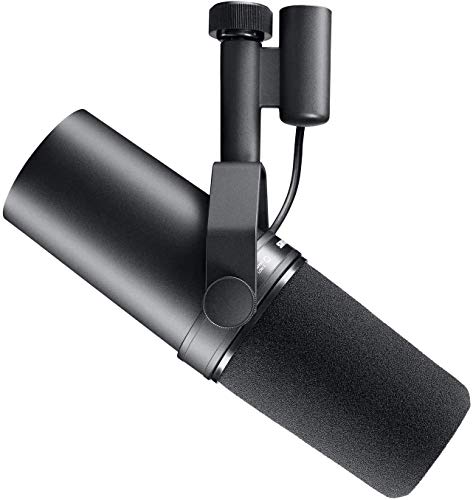
A popular low output dynamic mic, an inline booster that adds clean gain, and a budget interface with phantom power.
Shure SM7B
Mentioned
Who Should Buy It
- You want a broadcast-quality voice for podcasting or streaming
- You record in an untreated room and need strong noise rejection
- You have or plan to add a clean-gain boost like a Cloudlifter
Skip It If
- Your interface or preamp can't provide enough clean gain
- You want the most affordable entry point into XLR microphones
We may earn a commission at no extra cost to you.
Last verified: September 2026

sE Electronics DM2 Active Inline Preamp
Mentioned
Who Should Buy It
- Podcasters and voiceover artists with dynamic mics like the Shure SM7B
- Recording engineers who use passive ribbon microphones
- Live sound techs needing a compact gain boost on stage
- Home studio owners wanting lower noise from their interface preamps
Skip It If
- You primarily use condenser microphones
- You want a desktop audio interface with built-in DSP
- You need published dimensions and weight before buying
We may earn a commission at no extra cost to you.
Last verified: October 2026

Behringer U-PHORIA UMC204HD USB Audio Interface
Mentioned
Who Should Buy It
- Solo singer-songwriters tracking vocals and one instrument at a time
- Podcasters or streamers who want two phantom-powered combo inputs
- Musicians who want MIDI In and Out without a separate interface
- Buyers who want a straightforward budget interface from an established name
Skip It If
- You need four or more simultaneous inputs
- You require a confirmed software bundle before buying
- You need a dedicated high-impedance instrument input and none is stated
We may earn a commission at no extra cost to you.
Last verified: November 2026
Keep Reading
Related guides and picks on Mandrillis:
- Do You Need a Cloudlifter for Dynamic Mics? : when an inline booster helps
- Best Audio Interfaces for Home Recording : interfaces with strong preamps
- XLR vs USB Microphone for Beginners : setup basics for XLR mics
FAQs
About This Guide
Mandrillis Team
The Mandrillis editorial team researches and compares audio and music gear using manufacturer documentation, verified specs and real buyer feedback, so you can make a confident purchase without wading through marketing claims.
Read our full research methodology.