Guides
Do You Need a Cloudlifter for Dynamic Mics? (Simple Answer)
Inline boosters like the Cloudlifter are often sold as a must-have for dynamic mics. Sometimes they are, and sometimes they add nothing. This guide explains what an inline booster does, which mics and interfaces need one, how to check your own setup in minutes, and the alternatives.
Quick Answer
You need a Cloudlifter or similar inline booster only if your dynamic mic is a low output model and your interface has to run near maximum gain, causing hiss. Many modern interfaces have enough clean gain for common dynamic mics. Test your setup first: if your voice peaks around minus 12 dB without hiss, you do not need one.
How this guide was put together
This guide is based on manufacturer manuals, published specifications and widely used audio reference standards. Mandrillis does not run hands-on tests for these guides, so treat figures as typical values and check the manual for your own gear before changing settings.
What a Cloudlifter Actually Does
A Cloudlifter is a small inline booster, also called an inline preamp or mic activator. It sits between your dynamic mic and your audio interface.
It uses the interface's 48 volt phantom power to add about 25 dB of clean gain before the signal reaches the interface preamp. Your interface then needs less of its own gain, which is where hiss usually comes from.
- Plugs inline with a standard XLR cable.
- Powered by phantom power, no batteries.
- Adds gain, so the interface knob can stay lower.
- Does not change the mic's character much on its own.
Why Some Dynamic Mics Are So Quiet
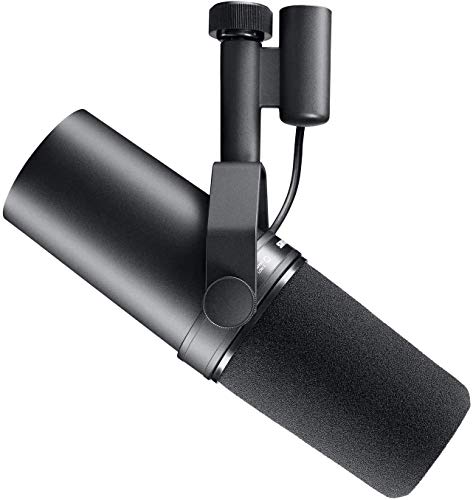
Dynamic mics turn sound into a very small electrical signal. Some broadcast style models, such as the Shure SM7B, produce even less output than typical stage mics.
Low output is part of why these mics reject room noise so well. The trade-off is that they need a lot of gain to reach a good recording level.
- Stage dynamics like the Shure SM58 are low output but often fine on most interfaces.
- Broadcast dynamics like the SM7B and many podcast mics often need more gain.
- Quiet speakers need more gain than loud singers.
- Speaking farther from the mic means you need even more gain.
Do You Need an Inline Booster?
Find your situation in the left column.
| Your situation | Booster needed? | Why |
|---|---|---|
| Peaks reach minus 12 dB with gain below max | No | Enough clean gain already |
| Gain near max and you hear hiss | Yes, likely | Interface preamp is straining |
| Quiet podcast voice on a low output mic | Often yes | Very low signal level |
| Loud singing or close-miked guitar amp | Usually no | Source is loud enough |
| Interface with very high gain preamps | Usually no | Built-in gain covers it |
How to Check Your Own Setup
This five minute test tells you whether a booster will help. Do it before you buy anything.
The Gain Test
Plug the mic straight into the interface. Speak or sing at your normal level, at your normal distance, about 1 to 3 inches for most dynamic mics.
Turn the gain up until your loudest parts reach about minus 12 to minus 6 dB in your recording software.
- If you reach that level with the knob below about three quarters, you do not need a booster.
- If the knob is almost at maximum and you still cannot reach it, you likely need one.
- If you reach the level but hear hiss in quiet parts, a booster can help.
Listen for Hiss
Record 20 seconds of silence at your working gain, then raise the playback volume and listen with headphones. A steady hiss means the preamp is near its limit.
If the silence is clean, extra gain will not improve your recording.
Understanding Gain in Simple Terms
Gain is how much the interface boosts the mic's signal before recording. Think of it like the volume knob for your microphone, not for your speakers.
Every preamp has a limit. Near the top of its range, many budget preamps add more background hiss along with your voice. Running the knob in the middle of its range usually gives the cleanest sound.
- Low gain: clean but may be too quiet.
- Middle gain: usually the cleanest working range.
- Maximum gain: loudest, but often noisiest.
- Clipping: gain so high that loud parts distort, which cannot be fixed later.
When a Booster Really Helps
Inline boosters help most with low output mics on budget interfaces. Many budget preamps get noisier near the top of their range.
By adding clean gain first, the booster lets the interface run in its quieter middle range. The result is lower hiss and more headroom.
- Podcasting with a soft speaking voice.
- Using a broadcast dynamic on an entry-level interface.
- Recording quiet acoustic sources with a dynamic mic.
- Long cable runs where some signal is lost.
When It Will Not Help
A booster does not fix every problem. In some setups it adds cost and nothing else.
- Your interface already has plenty of clean gain.
- The hiss comes from the room, a fan or a computer, not the preamp.
- You record loud sources like guitar amps or drums.
- You use a condenser mic, which has its own internal electronics.
Important Safety Notes
Inline boosters need phantom power, but your dynamic mic does not. The booster blocks phantom power from reaching the mic, so it is safe with standard dynamic mics.
Never use an inline booster with a condenser mic or ribbon mic unless the maker says it is designed for that. Condensers already need phantom power directly.
- Turn phantom power on only after connecting the booster.
- Turn monitor volume down before switching phantom power.
- Check that your interface supplies 48 volt phantom power.
Alternatives to an Inline Booster
You have other options if you do not want an extra box in your signal chain.
An Interface With More Gain
Some interfaces offer very high, clean gain, often listed as 60 dB or more. Check the gain range in the specs before buying.
This solves the problem once for every mic you plug in.
Better Mic Technique
Moving closer to the mic raises the level a lot. Speaking from 1 inch instead of 4 inches can add several decibels.
Using a pop filter or foam windscreen lets you work close without plosives.
The Bottom Line
You do not automatically need a Cloudlifter for a dynamic mic. Run the gain test with your own voice and interface first.
If your gain is near maximum and you hear hiss, an inline booster is a simple, effective fix. If not, save the money.
Dynamic Mics and an Inline Booster From Our Reviews
Two popular low output dynamic mics and one inline preamp that adds clean gain.
Shure SM7B
Mentioned
Who Should Buy It
- You want a broadcast-quality voice for podcasting or streaming
- You record in an untreated room and need strong noise rejection
- You have or plan to add a clean-gain boost like a Cloudlifter
Skip It If
- Your interface or preamp can't provide enough clean gain
- You want the most affordable entry point into XLR microphones
We may earn a commission at no extra cost to you.
Last verified: September 2026

sE Electronics DM2 Active Inline Preamp
Mentioned
Who Should Buy It
- Podcasters and voiceover artists with dynamic mics like the Shure SM7B
- Recording engineers who use passive ribbon microphones
- Live sound techs needing a compact gain boost on stage
- Home studio owners wanting lower noise from their interface preamps
Skip It If
- You primarily use condenser microphones
- You want a desktop audio interface with built-in DSP
- You need published dimensions and weight before buying
We may earn a commission at no extra cost to you.
Last verified: October 2026

Rode PodMic Dynamic Podcasting
Mentioned
Who Should Buy It
- Co-hosted podcasts setting up a permanent two-seat studio
- Interview shows that need a guest position ready at all times
- Streamers moving from a USB microphone to an XLR dynamic on a boom
- Small offices and schools building a simple voice recording room
Skip It If
- You are a solo podcaster who only needs one microphone
- You do not own an interface or mixer with XLR inputs
- You prefer a USB microphone with no additional gear
We may earn a commission at no extra cost to you.
Last verified: October 2026
Keep Reading
Related guides and picks on Mandrillis:
- Best Dynamic Microphones : low and standard output picks
- Best Audio Interfaces for Home Recording : interfaces with strong preamps
- Dynamic vs Condenser Mic for an Untreated Room : why dynamics suit home rooms
FAQs
About This Guide
Mandrillis Team
The Mandrillis editorial team researches and compares audio and music gear using manufacturer documentation, verified specs and real buyer feedback, so you can make a confident purchase without wading through marketing claims.
Read our full research methodology.