Instruments Review
Novation Launchpad Pro 64 Review: Grid Control, Not Keys
The Novation Launchpad Pro 64 is an 8 by 8 RGB pad grid built for Ableton Live clip launching, finger drumming and chord play, not a piano style keyboard. This review covers its pad feel, bundled software and playing modes, and explains why several keyboard specific criteria in this profile do not apply to a grid controller like this one.
Our Verdict
Research Score 47/100The Novation Launchpad Pro 64 succeeds at its real job, turning an 8 by 8 grid of color matched pads into a fast way to launch clips and finger drum inside Ableton Live. Scale Mode and four other playing modes give it more musical range than a plain grid, and the bundled Lite DAW, two instruments and a large sample library add real starting value. The limitation is that it has no keys, so melodic playing by hand needs a separate controller. Connectivity, power and weight are also left unpublished. As a dedicated Ableton performance grid, it does its one job well.
Editorial research score based on published specifications and documented features, not a customer rating or lab test.

Novation
Novation Launchpad Pro 64
Best for: Best for an Ableton Live user who wants a dedicated pad grid for clip launching, finger drumming and chord experimentation rather than a traditional keyboard.
Skip it if: Avoid it if you need a keybed for playing melodies, chords or basslines by hand in a conventional keyboard layout.
Check Price on AmazonWe may earn a commission at no extra cost to you.
Listing verified: November 2026
Who Should Buy It
Buy it if
- Ableton Live performers who want a dedicated grid for clip launching and finger drumming
- Producers who prefer color coded pads over a keybed for sketching chords and rhythms
- Buyers who want a self contained creative tool bundled with Lite production software
- Players curious about scale locked pad layouts who do not want to worry about hitting a wrong note
Skip it if
- You need a keybed for melodic playing in a traditional layout
- You use a DAW other than Ableton Live and want guaranteed deep color matched integration
- You need published specs on connectivity, power or weight before you commit to a purchase
Key Specifications
| Keys | Not applicable, this is an 8x8 pad grid controller with no piano style keybed |
| Key type | Not applicable |
| Pads | 8x8 grid of RGB backlit pads, 64 pads total, that light up to match clip colors in Ableton Live |
| Knobs and faders | Not published in listing |
| DAW integration | Built around direct integration with Ableton Live, where pad colors mirror clip colors, plus five playing modes including Scale Mode; the listing also states it can connect to Logic Pro and be played like an instrument, though no further detail on that mode is given |
| Bundled software | Ableton Live Lite, XLN Audio Addictive Keys, Novation Bass Station and V Station virtual instruments, and over 4GB of Loopmasters samples |
| Connectivity | Not published in listing beyond stated compatibility with Mac and PC for the bundled software; no port type, MIDI DIN or wireless capability is listed |
| Power | Not published in listing |
| Weight | Not published in listing |
| Included accessories | Access to Launchpad Arcade, an interactive demo usable with or without the unit, plus a user manual the listing tells buyers to read before use |
Overview
The Novation Launchpad Pro 64 is a performance grid controller built around an 8 by 8 array of RGB pads, not a set of piano style keys. Its purpose, per the listing, is giving a performer direct control of clips and tracks through five modes, one of which is Scale Mode for locking pads to a scale. That focus puts it in a different category from the keyboard controllers this profile usually covers.
A keyboard controller lives or dies on key feel. This unit lives or dies on pad layout, color feedback and how well it fits a clip based workflow. The listing leans on Ableton Live as the reference DAW, with pads that light up to match clip colors, and it also mentions Logic Pro compatibility in a single line with no further detail.
Buyers coming from a keyboard background should reset their expectations here. This is not a lesser keyboard controller, it is a different tool, and the sections below score it honestly against criteria that do not always apply to a pad grid.
Keys, Pads and Feel
There are no keys on this unit, and the listing describes no keybed or ribbon controller of any kind. Every interaction runs through the 8 by 8 pad grid, made of RGB backlit pads that take on the color of whatever clip they are mapped to. That color coding is the main point of the layout, letting a performer read the grid at a glance.
The listing describes the pads as capable of dynamic beat making and mid performance effect triggering, such as reverb or filters, but it publishes no velocity sensitivity figure or pad material detail. Buyers expecting an exact aftertouch number from a keyboard spec sheet will not find one here. On paper, the pads read as a performance surface first and a measured instrument second.
For finger drumming, 64 pads give far more room than the compact pad sections on most keyboard controllers. The tradeoff is that none of that space goes to a keybed, so playing melodies by hand sits outside this product entirely.
Knobs, Faders and DAW Integration
No physical knobs or faders appear anywhere in the listing for this unit, a clear difference from mixer style keyboard controllers that typically carry eight or nine of each. All tactile control runs through the pad grid, using the five modes to reassign what it does instead of dedicated hardware for levels.
DAW integration gets most of the listing's attention, and Ableton Live is the clear target. Pad colors mirroring clip colors is the headline feature, framed around triggering and combining loops without losing focus. Scale Mode is also described as a way to control effects or instruments mid performance while staying musically safe.
The Logic Pro mention, where the unit can supposedly be played like an instrument, stays thin. No detail is given on how that mode differs from the Ableton Live mode, or whether any other DAW is supported at all, so buyers outside Ableton Live should treat this integration as unconfirmed.
Software, Sounds and Features
The bundled software is substantial for a pad controller at this tier. It includes Ableton Live Lite, XLN Audio Addictive Keys, and both the Novation Bass Station and V Station virtual instruments, giving a new user several sound sources immediately. The listing also states more than 4GB of Loopmasters samples are included for a sample based workflow.
Launchpad Arcade, an interactive demo usable with or without the unit, is pitched as an easy way to start playing right away. The listing gives no detail on what Arcade actually teaches or how long it lasts, so it reads as a friendly extra rather than a core feature.
Nothing in the listing describes an onboard sound engine, standalone sampling, or effects processing independent of a computer. This is a controller in the strict sense, so sound generation depends entirely on software running on a connected Mac or PC.
- Ableton Live Lite
- XLN Audio Addictive Keys
- Novation Bass Station virtual instrument
- Novation V Station virtual instrument
- Over 4GB of Loopmasters samples
- Launchpad Arcade interactive demo
Build, Design and Portability
Build quality is one of the weaker spots in the available information, since no chassis material, dimensions or weight figure is published for this unit. What can be inferred is a flat, grid first design meant to sit on a desk or stand in front of a performer.
Novation states a 3 year warranty applies to this and other Novation products, a reasonable signal of brand confidence even without hard build specifications behind it. For a tool that may take repeated heavy pad hits during live sets, that warranty window is a meaningful detail on its own.
Portability is not addressed directly, though a single pad grid without a keybed is generally easier to carry than a full size keyboard controller. Buyers needing exact case dimensions or a precise weight for travel planning will need to look past this listing.
Connectivity and Power
Connectivity details stay thin here. The listing confirms Mac and PC software compatibility, which implies a USB connection, but it never states the port type, cable length, or whether a MIDI DIN output exists for hardware synth use.
Power requirements are also unpublished. Many grid controllers in this class draw power over the same connection used for data, but since the listing never confirms that directly, it would be inaccurate to present it as settled fact. Buyers needing confirmation of bus powered operation should seek it elsewhere.
Wireless connectivity is not mentioned anywhere in the feature list, so this should be treated as a wired controller until documentation says otherwise. That matches most pad grid controllers in its class, though the listing stops short of confirming it outright.
Setup and Daily Use
Daily use of this controller centers entirely on Ableton Live, based on how the listing frames it. A performer maps clips, lets pad colors follow the software's own clip coloring automatically, then moves between the five modes to launch loops, drum on pads, or trigger chords through Scale Mode.
Switching into Logic Pro for the instrument playing mode the listing mentions would presumably change that routine somewhat. Without more detail it is hard to say how smooth that transition is, so buyers splitting time between the two DAWs should confirm feature parity themselves first.
For a live set, color coded feedback cuts down on screen glancing, and reaching effects mid performance keeps a performer focused on the grid instead of a mouse. Away from the stage, the same grid still suits finger drumming and chord sketching in a calmer studio setting.
Who Should Buy It
The clearest buyer is an Ableton Live user who performs live or produces in a clip based way and wants a large, dedicated surface for it. Finger drummers wanting more pad space than a compact controller offers will also find the 64 pad grid appealing.
Producers intimidated by music theory may like Scale Mode specifically, since it locks the grid to a chosen scale and removes the risk of a wrong note while improvising. Paired with the bundled instruments and samples, that makes this a reasonable all in one starting point for a first sample based project.
It is a poor fit for anyone whose main need is playing basslines or melodies by hand. It is also not the strongest pick for someone committed to a DAW other than Ableton Live, since the listing's integration claims are framed almost entirely around that one piece of software.
Alternatives Worth Considering
Buyers who want a grid controller but a smaller footprint should look at the smaller Launchpad models in Novation's own lineup. They trade pad count for a lower price tier and easier travel.
Anyone who needs a keybed alongside pad control should instead consider a hybrid keyboard controller such as a Novation Launchkey or an Akai MPK style unit. Both pair a smaller pad section with piano style keys, so melodic playing and pad triggering share one controller.
Ableton Live users chasing the deepest session view integration sometimes compare grid controllers like this one to Ableton's own hardware line, built in house for that DAW. Since exact specifications for any of these alternatives are not detailed in this listing, treat this as a starting point for further comparison rather than a final answer.
Verdict
This controller succeeds at its real job, turning an 8 by 8 grid of color matched pads into a fast, visual way to launch clips and finger drum inside Ableton Live. Scale Mode and the other four playing modes add more musical range than a plain grid would offer, and the bundled Lite DAW, two instruments and a large sample library add real starting value.
The honest limitation is the absence of keys, so anyone wanting to play basslines or melodies by hand needs a separate controller alongside it. Connectivity, power and weight are also left to assumption rather than published fact. As a dedicated Ableton performance grid, though, it does its one job well.
Strengths and Limitations
Strengths
- Large 8x8 RGB pad grid gives plenty of room for clip launching and finger drumming
- Pad colors mirror Ableton Live clip colors for fast visual feedback during a set
- Five playing modes, including Scale Mode, help with chord and melody experimentation without hitting wrong notes
- Software bundle includes a Lite DAW, two virtual instruments and a large sample library
- Listing states a 3 year warranty from Novation
Limitations
- No piano style keys, so it cannot substitute for a keyboard controller when melodic lines need to be played by hand
- Listing publishes nothing about knobs, faders, physical connectivity, power draw or weight
- The deepest integration described, clip color mirroring, is tied specifically to Ableton Live
- The claim that it can be played like an instrument in Logic Pro is mentioned only in passing with no explanation
How We Scored It
Scores reflect published specifications, documented features and value against the alternatives below. They are editorial research scores, not laboratory measurements.
Alternatives to Consider

Yamaha Montage M6 61-Key
Professional synth players and producers who want a flagship 61-key instrument with massive polyphony, analog style synthesis and a matching software plugin.
Read the Yamaha Montage M6 61-Key review →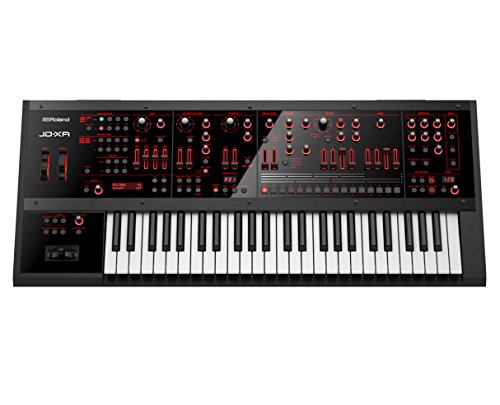
Roland JD-XA 49-Key
Synthesists who want genuine discrete analog voices and a digital engine in one 49-key crossover instrument with deep real time filter control.
Read the Roland JD-XA 49-Key review →
Pioneer DJ DDJ-FLX10 4-Channel
Mobile and open-format DJs who want a 4-channel club style controller with live stem separation and lighting control from one unit.
Read the Pioneer DJ DDJ-FLX10 4-Channel review →Questions Buyers Ask
Novation Launchpad Pro 64
See the current listing, price and included accessories.
About This Review
Mandrillis Team
The Mandrillis editorial team researches and compares audio and music gear using manufacturer documentation, verified specs and real buyer feedback, so you can make a confident purchase without wading through marketing claims.
Read our full research methodology.