Studio Gear Review
Mackie EM 91CU Review: Budget USB Podcast Mic
The Mackie EM 91CU is a budget USB condenser microphone with a cardioid pattern and zero-latency headphone monitoring. It connects via USB-A and includes a desk stand. The listing omits key specs like frequency response and sensitivity, so buyers must accept those unknowns at this price.
Our Verdict
Research Score 68/100The Mackie EM 91CU USB Condenser Microphone is a budget-friendly, no-frills option for podcasters, streamers, and home recorders. Its cardioid pattern and zero-latency headphone monitoring cover the essentials, and the included desk stand gets you started quickly. The USB-A connection is fine for most computers but adds friction for USB-C only devices. The biggest limitation is the lack of published specifications such as frequency response, sensitivity, and max SPL, which makes objective evaluation difficult. If you can accept those unknowns and want an inexpensive USB mic from a recognized brand, it is a reasonable entry point. Buyers who need detailed measurements or physical controls should spend more elsewhere.
Editorial research score based on published specifications and documented features, not a customer rating or lab test.
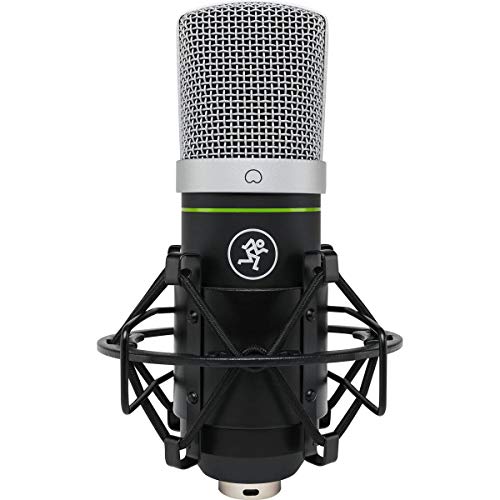
Mackie
Mackie EM 91CU USB Condenser Microphone
Best for: Budget-conscious creators who need a simple USB microphone for podcasting, streaming or computer voice recording without an audio interface.
Skip it if: You use a USB-C only laptop or phone and want to avoid buying a separate adapter or cable.
Check Price on AmazonWe may earn a commission at no extra cost to you.
Listing verified: October 2026
Who Should Buy It
Buy it if
- Beginner podcasters and streamers
- Home office video call users who want better sound than a built-in mic
- Musicians recording demo ideas on a computer
- Anyone wanting a plug and play USB mic with monitoring
Skip it if
- You need detailed published specifications before buying
- You use USB-C only devices and do not want extra dongles
- You require onboard gain or mute controls
Key Specifications
| Type | USB condenser microphone |
| Polar pattern | Cardioid |
| Frequency response | Not published in listing |
| Connection | USB-A (USB-C devices require adapter, sold separately) |
| Phantom power | Not required (USB powered) |
| Max SPL or sensitivity | Not published in listing |
| Controls | Not published in listing |
| Mount and stand | Desk stand included |
| Weight | Not published in listing |
| Included accessories | USB-A cable, desk stand, microphone |
Overview
The Mackie EM 91CU USB Condenser Microphone is a budget USB microphone designed for podcasting, streaming, and computer-based voice recording. The listing positions it as a simple way to get podcast-ready vocal sound without an audio interface. It uses a USB-A connection and includes a cardioid polar pattern, a desk stand, and an onboard headphone output for zero-latency monitoring. The product is part of Mackie's EM series, which includes USB condenser microphones aimed at entry-level creators.
Mackie is a well-known audio brand, but this specific model keeps its published specifications minimal. The listing does not state frequency response, sensitivity, maximum SPL, or weight. Buyers who want detailed acoustic measurements before purchasing will need to look elsewhere. For everyone else, the EM 91CU offers a straightforward feature set at a budget price. The main compatibility note is that USB-C only devices need an adapter or cable, sold separately.
Sound Quality
The listing does not publish a frequency response curve or sensitivity figure for the EM 91CU, so it is impossible to describe its tonal balance with precision. The marketing copy says the microphone delivers podcast-ready vocal sound with zero interface required. That suggests a voicing intended to flatter spoken word, but without published measurements, any specific claims about bass warmth or high-frequency presence would be speculation. Buyers who rely on published specifications to judge sound will find this model underdocumented.
What can be inferred is that as a USB condenser microphone, the EM 91CU likely provides more detail than a typical built-in laptop microphone. The cardioid capsule should capture the user in front of the mic while reducing room reflections from the sides and rear. This characteristic is common among podcast and streaming microphones in the budget class. However, because maximum SPL is not listed, it is hard to know how the microphone will behave with very loud sources such as close-miked guitar cabinets or percussion. General knowledge about similar USB condensers suggests the EM 91CU is best suited to speech and moderate-level vocals rather than high-SPL instruments.
The onboard headphone output with zero-latency monitoring is a useful feature for hearing yourself while recording. Since there is no published latency specification, the claim of zero latency should be understood as direct monitoring of the input signal before it travels through the computer. The listing does not describe any audio processing, EQ modes, or built-in effects, so the sound should be considered a clean, uncolored starting point. Overall, the EM 91CU appears to be a no-frills USB microphone that prioritizes ease of use over detailed sound shaping.
Pickup Pattern and Noise Handling
The EM 91CU uses a cardioid polar pattern. Cardioid microphones are most sensitive to sound arriving from the front and less sensitive to sound from the sides and rear. This design helps isolate a single speaker or singer from moderate room noise and untreated spaces. The listing's bullet point says the cardioid pattern hears you, not the room, which is a standard benefit for podcasting and streaming. It does not claim to eliminate all background noise, and no noise cancellation processing is mentioned.
No equivalent noise level or self-noise specification is published. The listing also does not mention an internal pop filter or foam windscreen. Buyers who record plosive-heavy speech may want to add an external pop filter, which is not included. The lack of shockmount information means the included desk stand may transfer vibrations from the desk into the microphone. Users can mitigate this with a boom arm or isolation mount, but those are separate purchases not mentioned in the listing.
Build Quality
The listing does not specify the materials used for the EM 91CU's body or grille. It is common for budget USB microphones to use a combination of plastic and metal, but that cannot be confirmed here. The product is described as an EM-series USB condenser microphone, and Mackie's brand reputation suggests basic quality control, but without in-person verification, the actual durability remains unknown. The included desk stand is likely functional for simple desk setups, but the listing does not describe its construction or adjustability.
Because weight is not published, it is hard to assess how substantial the microphone feels or how stable the desk stand will be during use. The included USB-A cable is a practical extra, but no cable length or shielding information is given. The lack of a shockmount and pop filter in the box means the out-of-box experience covers the bare minimum for speech. Buyers who want a more robust mounting solution or plosive protection should budget for additional accessories.
- Construction material not published in listing
- Desk stand included but no shockmount listed
- Weight not published
- USB-A cable included but length not stated
- No pop filter or windscreen included
Connectivity and Setup
The EM 91CU connects directly to a computer via a USB-A port. The listing states that USB-C only phones and laptops need a USB-C adapter or cable, sold separately. This is an important compatibility note for modern laptops, tablets, and smartphones. The microphone does not require an audio interface, which simplifies setup. Users only need to connect the USB cable and select the EM 91CU as the input device in their operating system, although the listing does not mention driver installation or class compliance.
The onboard headphone output provides zero-latency monitoring, letting you hear the microphone signal without the echo of software monitoring. However, the listing does not specify the headphone jack size or whether there is a volume control for that output. Users may need to adjust monitoring volume through the computer or recording software. The lack of a physical gain knob or mute button means you will typically control input level through your computer's system settings or recording application.
Features, Controls and Extras
The headline feature is the onboard headphone output. Zero-latency monitoring is valuable for podcasters and streamers who need to hear themselves in real time. The listing does not mention any other controls such as gain, mute, or polar pattern switching. This keeps the EM 91CU simple but also limits on-the-fly adjustments. The included desk stand and USB cable are the only accessories listed. No carrying case, pop filter, or shockmount is mentioned.
The USB-A connection is a core feature, but the required adapter for USB-C devices is sold separately. That means users with current-generation MacBooks, iPads, or Android phones must factor in an extra cost. The cardioid pattern and headphone monitoring round out the functional feature set. For a budget microphone, the EM 91CU covers the essentials without extra software or DSP modes. The listing does not mention any companion software for EQ or processing.
Use Cases: Vocals, Streaming, Podcasting and Instruments
The EM 91CU is primarily aimed at spoken-word applications such as podcasting, streaming, and voiceovers. Its cardioid pattern suits a single person speaking directly into the front of the microphone. The included desk stand allows immediate use on a flat surface, though a boom arm would improve positioning. For video calls, the USB connection and plug-and-play nature make it a step up from built-in laptop microphones.
For vocal recording, the EM 91CU should work for demos, practice recordings, and casual music production. Without published SPL or sensitivity figures, it is hard to recommend for critical studio vocals or very dynamic singers. The lack of a shockmount means foot taps and desk bumps may translate into low-frequency noise. Close-miking acoustic instruments such as acoustic guitar or ukulele is possible, but the cardioid pattern and unknown max SPL make loud electric guitar amps less predictable.
The microphone is not designed for multi-person interviews or room capture because the cardioid pattern intentionally rejects sound from the sides and rear. For those scenarios, an omnidirectional or multi-pattern microphone would be more flexible. Similarly, it is not a stereo microphone, so it will not capture a wide soundstage for music ensembles. The EM 91CU is best treated as a single-source USB microphone for speech and moderate-level singing.
Who Should Buy It
The Mackie EM 91CU suits beginners who want an affordable USB microphone for podcasting, streaming, or voice calls. It requires no audio interface or external power and includes the basic accessories to start recording. Users who already own a USB-A computer and need only a single cardioid mic will find it convenient. The zero-latency headphone monitoring is a meaningful benefit for those who need to hear themselves clearly.
This microphone is also suitable for content creators who value simplicity over advanced controls. If you prefer to set input levels in software and do not need physical gain or mute buttons, the EM 91CU's minimal design is fine. Musicians recording demo ideas or scratch vocals may appreciate the plug-and-play nature. However, buyers who demand detailed published specifications should look at competing models that document frequency response and sensitivity.
Alternatives Worth Considering
A well-known alternative in the USB microphone space is the Shure MV7, which offers both USB and XLR connections and includes more detailed specifications. It sits in a higher price tier but adds onboard controls and software features. The Audio-Technica AT2020USB is another popular option with a published frequency response and a proven reputation for voice work. Both are more expensive than the EM 91CU but offer more documentation and control.
For those who want the flexibility of USB and XLR but at a lower price, the Samson Q2U is a frequently recommended dynamic microphone. It is a dynamic rather than condenser design, which may reject room noise differently. The Rode NT1 is a studio condenser that requires an interface but has a much more complete spec sheet. If USB-C compatibility without an adapter is a priority, some newer USB microphones include USB-C cables. The EM 91CU's main drawback is its limited published data and USB-A only connection.
Verdict
The Mackie EM 91CU USB Condenser Microphone is a budget-friendly, no-frills option for podcasters, streamers, and home recorders. Its cardioid pattern and zero-latency headphone monitoring cover the essentials, and the included desk stand gets you started quickly. The USB-A connection is fine for most computers but adds friction for USB-C only devices.
The biggest limitation is the lack of published specifications such as frequency response, sensitivity, and max SPL, which makes objective evaluation difficult. If you can accept those unknowns and want an inexpensive USB mic from a recognized brand, it is a reasonable entry point. Buyers who need detailed measurements or physical controls should spend more elsewhere.
Strengths and Limitations
Strengths
- USB-A connection works with most computers without an audio interface
- Cardioid pattern focuses on the source in front of the mic
- Onboard headphone output provides zero-latency monitoring
- Comes with desk stand and USB cable for immediate use
- Budget tier makes it accessible for beginners
Limitations
- USB-C only devices need an adapter or cable that is sold separately
- Frequency response, sensitivity and max SPL are not published
- No mention of gain, mute or headphone volume controls
- No shockmount, pop filter or carrying case listed
How We Scored It
Scores reflect published specifications, documented features and value against the alternatives below. They are editorial research scores, not laboratory measurements.
Alternatives to Consider

Shure MOTIV MV51 USB Condenser Microphone
Existing Shure MOTIV MV51 owners who need a replacement MicroB to USB-C cable and do not require microphone specifications.
Read the Shure MOTIV MV51 USB Condenser Microphone review →
Behringer CB100 GUITAR Condenser Microphone for
Acoustic guitar players who need a budget clip-on condenser microphone for instrument amplification or recording.
Read the Behringer CB100 GUITAR Condenser Microphone for review →Questions Buyers Ask
Mackie EM 91CU USB Condenser Microphone
See the current listing, price and included accessories.
About This Review
Mandrillis Team
The Mandrillis editorial team researches and compares audio and music gear using manufacturer documentation, verified specs and real buyer feedback, so you can make a confident purchase without wading through marketing claims.
Read our full research methodology.