
Guides
How to Fix Buzzing Sound From Powered Speakers (9 Fixes)
A buzz or hum from powered speakers is one of the most common desk and studio annoyances. The speakers themselves are rarely broken. This guide shows how to find the source with quick unplug tests, then walks through nine safe fixes, from power strips to balanced cables.
Quick Answer
Powered speakers usually buzz because of a ground loop, a cheap or damaged cable, or interference from nearby power cords and phones. Plug the speakers and your computer or source into the same power strip, swap the audio cable, and move cords apart. If the buzz remains, a ground loop isolator or balanced cables usually fix it.
How this guide was put together
This guide is based on manufacturer manuals, published specifications and widely used audio reference standards. Mandrillis does not run hands-on tests for these guides, so treat figures as typical values and check the manual for your own gear before changing settings.
Why Powered Speakers Buzz
Powered speakers have an amplifier built in. That amplifier boosts everything it receives, including tiny electrical noise from cables, power and nearby gadgets.
Because the amp sits right inside the speaker, even small noise can become an audible buzz or hum, especially at high volume settings.
- Ground loops between the speakers and the source.
- Cheap, unshielded or damaged audio cables.
- Interference from power cords, chargers and phones.
- Noisy computer USB or headphone outputs.
- Gain set too high on the speaker.
Buzz, Hum or Hiss: Which One Is It?
Different noises point to different causes. Listen with no music playing and the source connected.
Knowing the type of noise saves time, because you can skip fixes that do not apply.
What Each Sound Means
Use this quick guide before you start unplugging things.
- Low, steady hum: usually a ground loop.
- Harsh buzz that changes with mouse or screen activity: computer noise.
- Soft hiss that rises with the speaker volume knob: normal amp noise or gain set high.
- Chirps or bursts every few seconds: phone or wireless interference.
- Crackle when you touch a cable: loose or damaged connection.
Buzz Causes and Fixes at a Glance
Match the symptom to the likely cause and the first fix to try.
| Symptom | Likely cause | First fix |
|---|---|---|
| Hum stops when the input cable is unplugged | Ground loop | Use one power strip for all gear |
| Buzz changes with computer activity | Noisy USB or headphone output | Use an external audio interface or DAC |
| Chirping bursts | Phone interference | Move the phone a few feet away |
| Crackle when a cable moves | Damaged cable or jack | Replace the cable |
| Hiss with nothing connected | Normal amp noise | Lower the speaker gain |
Step One: Find the Source With Unplug Tests
Turn the volume down before unplugging anything. Then test one piece at a time.
Test the Speakers Alone
Unplug the audio input cable from the speakers, leaving only power connected. Turn the volume up a little.
If the buzz stops, the noise comes from the cable or the source. If it continues, the speakers or their power are the cause.
Test the Laptop on Battery
If you use a laptop, unplug its charger and run it on battery. If the buzz disappears, the charger is creating a ground loop.
This one test solves a large share of desk setup buzzing.
Fix 1: Plug Everything Into One Power Strip
When the speakers and your source plug into outlets on different circuits, their grounds can sit at slightly different levels. The audio cable connects them and a small current flows, which the amp turns into hum.
Plug the speakers, computer and any other connected gear into the same power strip. Use a surge protector rated for the total load.
Fix 2: Replace the Audio Cable
Thin, unshielded cables pick up noise easily. A worn plug or jack can also crackle and buzz.
Try a different, well shielded cable of the shortest practical length. If the buzz changes when you wiggle the cable, replace it.
Fix 3: Move Power Cords and Chargers Away
Power cords, power bricks and chargers give off electrical fields. Running audio cables beside them can add buzz.
Keep audio cables a few inches away from power cords. Where they must meet, cross them at right angles rather than running them side by side.
Fix 4: Keep Phones Away From the Speakers
Mobile phones can cause chirping or bursts of buzz when they talk to cell towers. The sound comes through powered speakers and their cables.
Move your phone at least a few feet from the speakers and cables. Putting it in airplane mode during listening also stops the noise.
Fix 5: Use an External Audio Interface or DAC
Computer headphone jacks and some USB ports pick up noise from inside the computer. You may hear it change when you move the mouse or scroll.
A small external DAC or audio interface moves the audio conversion outside the computer. It often gives a cleaner signal and lower noise.
Fix 6: Try a Ground Loop Isolator
A ground loop isolator sits on the audio cable and breaks the loop that causes hum. Versions exist for 3.5 mm, RCA and other connections.
It is a safe, simple fix when other steps do not work. Some isolators can slightly reduce the deepest bass, so listen after fitting one.
Fix 7: Use Balanced Cables if Your Gear Supports Them
Studio monitors and some powered speakers have balanced inputs, usually XLR or TRS. Balanced cables cancel noise picked up along the way.
If both your interface and speakers have balanced connections, use them. This is the most reliable way to stop buzz in a studio setup.
Fix 8: Set the Gain Correctly
If the speaker volume knob is near maximum and the source is turned low, any noise gets amplified a lot. That makes hiss and hum more obvious.
Set the speaker knob around the middle, then raise the source volume to a healthy level. This keeps the signal strong compared with the noise.
Fix 9: Check for a Speaker Fault
If the speakers buzz with nothing connected to their inputs and on a different outlet, the built-in amp or power supply may be faulty.
Check the warranty and contact the maker. Do not open the speaker yourself, because powered speakers contain parts that can hold a dangerous charge.
A Safety Warning: Never Remove the Ground
Some old tips suggest cutting the ground pin or using a three-prong to two-prong adapter to stop hum. This removes a safety feature and creates a real shock risk.
Do not do this. A shared power strip, a ground loop isolator or balanced cables solve the problem safely.
The Bottom Line
Most buzzing from powered speakers comes from ground loops, cables or interference, not a broken speaker. Start with unplug tests, then use one power strip and a better cable.
For stubborn buzz, try a ground loop isolator, an external DAC or balanced cables. Never remove the safety ground.
Powered Speakers From Our Reviews
Popular powered bookshelf speakers with built-in amplifiers for desks and living rooms.
Kanto YU4MB
Mentioned
Who Should Buy It
- Listeners building a compact stereo or desktop system with a turntable
- Those who want a powered speaker with a remote and auto standby
- Buyers who prefer a simple matte black aesthetic
- Users who value lower mid-range pricing with brand recognition
Skip It If
- You require detailed driver and frequency response data for critical listening decisions
- You need multiple analog and digital inputs beyond Bluetooth and phono
- You want floorstanding or high-output speakers for a large room
We may earn a commission at no extra cost to you.
Last verified: October 2026
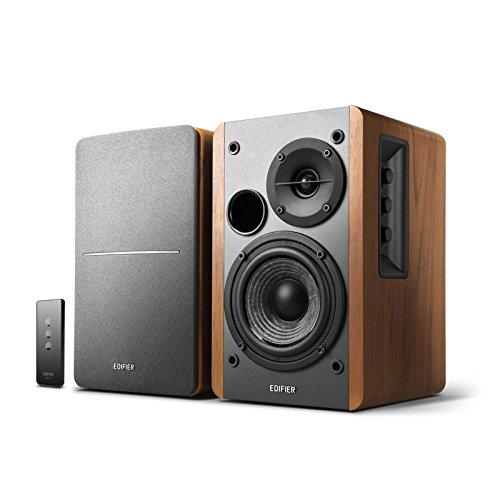
Edifier R1280T
Mentioned
Who Should Buy It
- Desktop listeners who want powered speakers for a computer or laptop
- Users with analog sources like a TV headphone jack, turntable with built-in preamp, or game console
- Small room listeners who prefer physical tone controls over apps
- Budget conscious buyers who do not need wireless or digital audio
Skip It If
- You need Bluetooth or Wi-Fi streaming from a phone or tablet
- You want strong sub bass or high volume output without adding a subwoofer
- You require optical, coaxial, or USB digital inputs for a TV or computer
We may earn a commission at no extra cost to you.
Last verified: October 2026

Audioengine A5+
Mentioned
Who Should Buy It
- Vinyl listeners with a turntable that has a phono preamp or line output
- Desktop users who want a compact powered speaker with analog AUX
- Home theater viewers with TVs that have RCA or 3.5mm audio out
- Buyers who value cabinet finish and a three year warranty
Skip It If
- You need Bluetooth or network streaming directly from a phone
- You want optical, USB or HDMI inputs for a modern TV
- You require a remote control or multiroom audio features
We may earn a commission at no extra cost to you.
Last verified: October 2026
Keep Reading
Related guides and picks on Mandrillis:
- Best Bookshelf Speakers Under 500 : powered and passive pairs
- Why Is My Subwoofer Making a Humming Noise? : ground loop fixes for subs
- Active vs Passive Speakers for Beginners : how powered speakers work
FAQs
About This Guide
Mandrillis Team
The Mandrillis editorial team researches and compares audio and music gear using manufacturer documentation, verified specs and real buyer feedback, so you can make a confident purchase without wading through marketing claims.
Read our full research methodology.