Studio Gear Review
Mackie DLZ Review: Adaptive Touchscreen Mixer for Podcasters
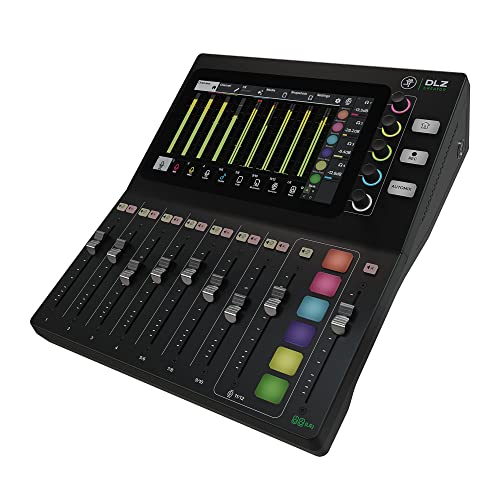
The Mackie DLZ Creator is an adaptive digital mixer for podcasting and streaming, built around a 10.1-inch touchscreen with Easy, Enhanced and Pro control modes. AutoMix manages levels for up to four microphones, recordings run to a computer over USB-C or straight to SD card, and four custom headphone mixes serve guests. It sits in the mid-range tier.
Our Verdict
Research Score 80/100The Mackie DLZ Creator approaches the podcast mixer from the direction of ease of use. The 10.1-inch touchscreen reconfigures itself through Easy, Enhanced and Pro modes, so a beginner and an experienced producer can share the same hardware, and AutoMix removes the most common multi-host problem by balancing up to four microphones automatically. Multitrack recording runs over USB-C or straight to SD card, and four customized headphone mixes keep guests comfortable. The listing publishes no preamp, converter, phantom power or output details, which is a real gap for a mid-range purchase, and no microphones or headphones are included. For creators who value an adaptive workflow over hardware faders, it is a compelling option. It scores 80 out of 100.
Editorial research score based on published specifications and documented features, not a customer rating or lab test.
Mackie
Mackie DLZ
Best for: Podcasters and streamers of any experience level who want a touchscreen mixer that manages levels automatically for up to four voices and records to SD card or USB-C.
Skip it if: You need published preamp gain and converter specifications, or you prefer physical faders over a touchscreen-based workflow.
Check Price on AmazonWe may earn a commission at no extra cost to you.
Listing verified: October 2026
Who Should Buy It
Buy it if
- New podcasters who want professional results without learning a mixer
- Multi-host shows that struggle with guests talking over each other
- Streamers who want multitrack capture to a computer over USB-C
- Experienced producers who will use Pro mode for full control
Skip it if
- You want hardware faders for live mixing
- You already own a console and only need a basic interface
- Published gain and noise figures are essential to your decision
Key Specifications
| Type | Adaptive digital mixer for podcasting and streaming with touchscreen and SD card recording |
| Inputs | Up to four microphones managed by AutoMix; total input count and connector types not published in listing |
| Outputs | Up to four customized headphone mixes; main and line outputs not published in listing |
| Preamps | Not published in listing |
| Resolution | Not published in listing |
| Phantom power | Not published in listing |
| Connection | USB-C to a computer for multitrack recording and streaming; SD card slot for standalone recording |
| Monitoring | Up to four customized headphone mixes for host and guests |
| Bundled software | Not published in listing |
| Included accessories | Not published in listing |
Overview
The Mackie DLZ Creator is an adaptive digital mixer built for podcasting, streaming and video content. Its defining idea is that the 10.1-inch touchscreen changes its control layout according to the user's skill level, with Easy, Enhanced and Pro modes. Mackie's pitch, summarized in the listing, is that users of all experience levels can get professional results quickly.
Alongside the adaptive interface, the DLZ Creator records and streams multitrack audio to a computer over USB-C or directly to an SD card, manages levels automatically for up to four microphones with AutoMix, and provides up to four customized headphone mixes. That combination places it in direct competition with the integrated podcast consoles from other brands.
The unit sits in the mid-range tier without microphones or headphones included. For a creator who already owns microphones, that keeps the entry cost lower than the bundled kits sold by competitors, though the listing leaves a number of technical specifications unstated.
Preamps and Sound Quality
Preamp specifications are not published in the listing. There is no gain figure, no noise figure and no mention of phantom power, which means the suitability of the DLZ Creator for low-output dynamic broadcast microphones cannot be confirmed from the listing alone. Mackie's Onyx preamps are well regarded on its analog mixers, but this listing does not name the preamp design.
What the listing does promise is that the three control modes adapt the interface without compromising sound quality. That statement implies the same signal path regardless of mode, with Easy mode hiding complexity rather than reducing performance. Sample rate and bit depth are not stated.
AutoMix is the feature most relevant to perceived sound quality on a multi-host show. By managing the levels of up to four microphones automatically, it reduces the bleed and level jumps that occur when several people speak at once, which the listing describes as a major help for multi-person podcasts and video shows.
Inputs, Outputs and Routing
The listing confirms support for up to four microphones under AutoMix and up to four headphone mixes, which together indicate a four-seat design. The total input count, the connector types and whether instruments or line sources are accepted are not published. Buyers who want to connect a phone, a second computer or a music player should confirm those inputs in the manufacturer documentation.
Outputs beyond the headphone mixes are not described. A main output for studio monitors or a PA is standard on this kind of device but is unconfirmed here. The four customized headphone mixes are a strong feature, since each participant can hear a different balance of voices and music.
Routing to recording destinations is flexible. Multitrack audio can go to a computer over USB-C for recording or streaming, or straight to an SD card for a self-contained session with no computer. The listing frames the SD card path as making the setup truly self-contained.
Features, Monitoring and Software
The three control modes are the signature feature. Easy mode presents a simplified touchscreen for beginners, Enhanced adds more control, and Pro exposes the full feature set for experienced producers. Because all three run on the same 10.1-inch display, a show can start in Easy mode and graduate to Pro as the host learns, without buying new hardware.
AutoMix handles level management for up to four microphones in real time. For hosts who have struggled with guests talking over each other, this is the feature that justifies the purchase, since it removes the need to ride faders during conversation. The listing does not detail the algorithm's parameters or whether it can be adjusted per channel.
Monitoring is covered by up to four customized headphone mixes, so the host and three guests each hear what they need. Bundled software and companion apps are not listed, and the listing does not mention a computer application for configuration. Included accessories are also not published.
- 10.1-inch touchscreen with Easy, Enhanced and Pro control modes
- AutoMix level management for up to four microphones
- Multitrack recording and streaming to a computer over USB-C
- Direct recording to SD card with no computer
- Up to four customized headphone mixes
Build, Design and Controls
The DLZ Creator is built around its 10.1-inch touchscreen, which replaces most of the physical knobs and faders found on a traditional mixer. This yields a clean desktop footprint and a layout that can change with the mode, but it also means that live adjustments happen on glass rather than on dedicated controls. Whether physical faders or encoders are present is not stated in the listing.
Chassis material, weight and dimensions are not published. Mackie has a long history of durable hardware, but this listing does not make construction claims. For a device that will live on a desk rather than travel, that is less critical than it would be for touring gear.
The adaptive design is as much a usability choice as a hardware one. Beginners are shielded from complexity, which reduces mistakes on air, while experienced users are not held back. That approach is unusual in audio hardware and is the clearest differentiator of the product.
Connectivity, Drivers and Latency
USB-C is the published computer connection, carrying multitrack audio for recording and streaming. Operating system support and driver requirements are not stated in the listing. The SD card slot provides the second recording path and removes the computer from the chain entirely when desired.
Latency figures are not published. As with other podcast consoles, monitoring is expected to happen inside the mixer through the headphone mixes rather than through the computer, so participants hear themselves without software delay. That architecture is the main reason a dedicated podcast mixer beats a basic interface for live conversation.
Bluetooth, network connectivity and phone connections are not mentioned in the listing. Creators who routinely bring in remote callers by phone should confirm how the DLZ Creator handles that before purchase. The connectivity score of 8 credits the dual USB-C and SD paths while noting the unpublished details.
Setup and Daily Use
Setup begins by choosing a control mode on the touchscreen. A new podcaster selects Easy mode, connects up to four microphones and headphones, and lets AutoMix handle the levels. An experienced producer selects Pro mode and configures each channel manually. In both cases recording can start on the SD card without touching a computer.
During a show the touchscreen is the control surface for levels, mutes and any sound effects or playback the mixer offers. With AutoMix active, the host can focus on the conversation rather than on the mix. Streaming over USB-C to a computer runs alongside local recording.
After the session the multitrack files on the SD card or the computer can be edited per voice. For creators who want a finished file, the mixed output can be used directly. The ability to grow from Easy to Pro mode means the workflow matures with the show rather than requiring a hardware upgrade.
Who Should Buy It
New podcasters who want professional results without learning mixer fundamentals are the clearest audience. Easy mode and AutoMix together remove the two biggest obstacles for beginners: confusing controls and uneven levels between speakers.
Multi-host shows with up to four voices benefit directly from AutoMix and the four headphone mixes. Streamers who want multitrack capture on a computer over USB-C while keeping an SD card backup are another strong fit. Experienced producers get a Pro mode that does not hide the controls they need.
Creators who prefer hardware faders for live mixing may find the touchscreen workflow less tactile. Buyers who need published preamp gain, phantom power and converter figures before deciding will not find them in this listing and should consult the manufacturer specifications.
Alternatives Worth Considering
The Rode RODECaster Pro II is the most direct competitor, with four combo inputs, published high-gain preamps, physical faders and hardware processing. It is sold in bundles with microphones and sits in the upper mid-range tier, so it costs more but documents its preamp performance in detail.
For a single host or a duo, a desktop interface such as the Focusrite Scarlett 2i2, Universal Audio Volt 2 or PreSonus AudioBox with one or two dynamic microphones costs far less. Those units lack AutoMix, touchscreens and SD recording but are perfectly capable for simple shows.
An analog USB mixer such as the Yamaha MG10XU offers physical knobs, onboard effects and stereo USB recording at a lower tier. It requires the host to manage levels manually and does not record multitrack over USB, which is exactly the work the DLZ Creator automates.
Verdict
The Mackie DLZ Creator solves the podcast mixer problem from the user's side rather than the engineer's. Adaptive control modes, AutoMix for four microphones, USB-C and SD card multitrack recording and four headphone mixes make it genuinely approachable for beginners while leaving room for professionals in Pro mode.
The listing's missing preamp, converter, phantom power and output details hold the score at 80 out of 100 and are worth resolving before purchase. For creators who already own microphones and want an easier path to a polished multi-host show, it is a strong mid-range option.
Strengths and Limitations
Strengths
- Three control modes (Easy, Enhanced, Pro) adapt the 10.1-inch touchscreen to the user's skill level
- AutoMix balances levels for up to four microphones automatically
- Multitrack recording and streaming over USB-C or straight to SD card
- Up to four customized headphone mixes for host and guests
- Self-contained operation with no computer required
Limitations
- Listing does not publish preamp specs, input count or phantom power
- Sample rate and bit depth are not stated
- Main outputs and physical connectors are not described
- No microphones or headphones included, unlike some podcast bundles
How We Scored It
Scores reflect published specifications, documented features and value against the alternatives below. They are editorial research scores, not laboratory measurements.
Alternatives to Consider

Yamaha DXR10MKII
Bands, DJs and venues that want a compact powered speaker with high output and onboard DSP, used as a main or a monitor with a separate mixer.
Read the Yamaha DXR10MKII review →
Yamaha EMX5 12-input
Community groups, schools, worship teams and solo performers who want one box that mixes 12 inputs and powers a pair of passive speakers without a separate amplifier rack.
Read the Yamaha EMX5 12-input review →
Mackie ProFX22v3 22-Channel
Bands, venues and streamers who need many high-gain preamps in an analog desk with 192 kHz USB recording and dual return mixes.
Read the Mackie ProFX22v3 22-Channel review →Questions Buyers Ask
Mackie DLZ
See the current listing, price and included accessories.
About This Review
Mandrillis Team
The Mandrillis editorial team researches and compares audio and music gear using manufacturer documentation, verified specs and real buyer feedback, so you can make a confident purchase without wading through marketing claims.
Read our full research methodology.