Studio Gear Review
Mackie Mix8 8-Channel Mixer Review: Compact Analog Workhorse
The Mackie Mix8 is a compact 8-channel analog mixer with 2 phantom-powered mic/line inputs, 2 stereo line inputs, 3-band EQ and a single aux send. This research review checks those claims against what the listing actually confirms, including the notable absence of any stated USB or computer connection.
Our Verdict
Research Score 54/100The Mackie Mix8 covers a clear, narrow job well on paper: 2 phantom-powered mic inputs, 2 stereo line inputs and 3-band EQ per channel in a small analog frame. Mackie's reputation for high-headroom, low-noise circuitry gives the listing's claims some credibility even without published gain or noise figures. The single aux send with stereo returns is a useful touch, letting an operator run one effect or monitor feed without extra hardware. What holds the score back is the absence of any stated computer connection, plus the missing build and dimension details. For a small band or podcast that never needs to touch a computer, it remains a sound, affordable choice.
Editorial research score based on published specifications and documented features, not a customer rating or lab test.

Mackie
Mackie Mix8 8-Channel Compact Mixer
Best for: Small bands, duo podcast setups or rehearsal rooms that need 2 clean mic inputs plus extra stereo line inputs in a purely analog mixing chain.
Skip it if: You plan to record directly to a computer, because the listing states no USB or digital connection, and capturing audio would require routing the output into a separate interface.
Check Price on AmazonWe may earn a commission at no extra cost to you.
Listing verified: November 2026
Who Should Buy It
Buy it if
- Small venues or rehearsal spaces needing 2 mic channels plus stereo line inputs
- Two-host podcast setups that also need a backing track or music input
- Buyers who want a simple analog mixer with no software to install
- Anyone who needs an aux send for a monitor wedge or outboard effects unit
Skip it if
- You need to record multitrack audio directly to a computer
- You need more than 2 simultaneous microphone inputs
- You require published noise and headroom specifications before buying
Key Specifications
| Type | 8-channel compact analog mixer; no USB or computer connection is stated in the listing |
| Inputs | 2 mic/line inputs plus 2 stereo 1/4 inch line inputs, for 8 channels total |
| Outputs | Not published in listing beyond the stereo 1/4 inch returns tied to the single aux send |
| Preamps | 2 mic/line preamps described as studio-level audio quality; no gain or noise figures published |
| Resolution | Not applicable, this is an analog mixer with no stated digital conversion |
| Phantom power | Phantom power is available on the 2 mic/line inputs for studio condenser microphones |
| Connection | Not published in listing; no USB, Bluetooth or computer connection is stated |
| Monitoring | Not published in listing |
| Bundled software | Not applicable, since no computer connection is stated |
| Included accessories | Not published in listing |
Overview
The Mackie Mix8 is a small format analog mixer built around 8 total channels. The listing describes 2 mic/line inputs with phantom power and 2 stereo 1/4 inch line inputs, all routed through a 3-band EQ and out through a single aux send with stereo returns. There is no mention anywhere in the feature bullets of a USB port, Bluetooth streaming or any computer connection.
Mackie markets the Mix series as a proven, high-headroom and low-noise design, language the brand has used consistently across its compact mixer lineup for years. On a unit this size, that reputation matters more than any single published number, since so few numbers are actually given here.
This review treats the listing as the only source of fact. Where Mackie's general design reputation is mentioned, it is offered as context rather than as a substitute for a missing specification, and every gap in the published data, including gain figures, noise figures and physical dimensions, is called out directly.
Preamps and Sound Quality
Two of the Mix8's 8 channels accept a microphone through mic/line inputs described as studio-level audio quality. Phantom power is confirmed on those same 2 inputs, which lets the mixer run condenser microphones for vocals, acoustic instruments or voiceover work without an external power supply.
No gain range, equivalent input noise or maximum headroom figure is published for these preamps. Mackie's broader marketing language for the Mix series leans on high headroom and low noise as general claims, and buyers report the compact Mix mixers as adequate for small-room use, though none of that substitutes for a measured specification.
With only 2 mic-capable channels out of 8, this is clearly a mixer built around a small number of live sources supplemented by several line-level inputs. Anyone needing more than 2 simultaneous microphones will need a larger mixer or an external preamp, since the Mix8's channel count does not scale that function.
Inputs, Outputs and Routing
The input layout splits cleanly into 2 mic/line channels and 2 stereo 1/4 inch line inputs, giving the Mix8 its 8 total input channels once the stereo pairs are counted individually. That split suits a setup with 2 live sources, such as 2 vocalists or 2 podcast hosts, alongside stereo sources like a laptop, keyboard or playback device.
Routing beyond the main mix is limited to a single aux send with stereo 1/4 inch returns, which is enough for one monitor feed or one outboard effects unit but not for more complex live setups needing multiple independent sends. The listing does not mention a control room output, a separate headphone bus or any subgroup routing.
Because no USB or digital output is stated, the only way audio leaves this mixer is through its analog outputs. Recording from the Mix8 would require connecting its main or aux output into a separate audio interface, a step worth planning for if any recording is part of the intended use.
Features, Monitoring and Software
Every channel on the Mix8 carries a 3-band EQ, which the listing describes as clean and precise tone shaping. That is a genuinely useful inclusion on a budget mixer, since 3-band EQ gives more tonal control than the simpler 2-band EQ found on some smaller mixers in the same family.
The single aux send with stereo returns functions as the mixer's only built-in routing feature beyond the main output. It can carry a reverb unit, a delay pedal or a monitor wedge feed, but operators needing 2 independent aux sends for separate monitor mixes will find this a hard limit.
No software, app or driver is applicable here, since the listing states no computer connection for the Mix8. Any discussion of bundled plugins or recording software simply does not apply to this analog mixer, which should factor into the buying decision for anyone expecting a digital feature set.
- 8 total channels: 2 mic/line plus 2 stereo 1/4 inch line inputs
- Phantom power on both mic/line inputs
- 3-band EQ on every channel
- 1 aux send with stereo 1/4 inch returns
- No USB or computer connection stated
Build, Design and Controls
The listing does not state the chassis material, weight or physical dimensions of the Mix8. Mackie's compact Mix series mixers have historically used a mix of metal and painted steel construction in similar form factors, though that cannot be confirmed for this specific unit from the data given here.
Control layout follows the standard small-mixer convention, with a gain or level control, EQ knobs, pan and overload indication described for the mic/line channels, and simpler level controls expected on the stereo line inputs. The listing specifically calls out overload indication as a feature, which helps an operator spot clipping before it reaches the main mix.
Because this is a compact 8-channel design, the physical footprint should be small enough for a desktop, a small stage rack or a podcast desk. Exact measurements are not published, so available space should be checked before ordering.
Connectivity, Drivers and Latency
There is no USB port, Bluetooth connection or any other computer link stated anywhere in the Mix8's feature bullets. This places it firmly in the analog-only category of mixers, distinct from USB-equipped models in the same general price bracket that can stream audio directly into recording software.
Because no digital connection exists, there is nothing to say about drivers, sample rates or latency for this unit. Any latency concerns that typically apply to USB interfaces simply do not arise with a purely analog signal path like this one.
Buyers who want to record what passes through the Mix8 need to route its main or aux outputs into a separate USB audio interface. That adds a second piece of hardware and a second signal chain to manage, which is worth budgeting for if recording is part of the plan.
Setup and Daily Use
Setting up the Mix8 is as simple as connecting microphones to the 2 mic/line inputs, patching stereo sources into the remaining channels, and dialing in levels and EQ before the show or session starts. There is no software to install and no driver to configure, which keeps the setup time short.
Day to day operation centers on the EQ and the single aux send, since those are the only tone-shaping and routing tools the mixer offers beyond basic level control. Operators running a monitor wedge or an outboard effect unit should plan to use that one aux send carefully, since there is no second send to fall back on.
Because overload indication is confirmed in the listing, watching those LEDs during a live session is the main way to avoid clipping on the mic/line channels. That is a small but practical daily habit for anyone running vocals or instruments through this mixer.
Who Should Buy It
The Mix8 suits a small band, a two-host podcast setup or a rehearsal room that needs exactly 2 microphone inputs plus a couple of stereo line sources, all handled without any computer involved. Its 3-band EQ and single aux send cover the basics that this kind of session actually needs.
Buyers who value simplicity over digital features will likely appreciate not having to think about drivers, software updates or USB compatibility at all. The tradeoff is that any recording ambitions require a second piece of hardware, which changes the total cost of the setup.
Those needing more than 2 mic inputs, more than one aux send, or any form of direct computer connection should treat the Mix8 as too limited for their use case. A larger or USB-equipped mixer would serve those needs better.
Alternatives Worth Considering
Buyers who specifically want USB streaming built into a small analog mixer should look at models like the Behringer XENYX 802S or 502S, which the listing data for this review shows include at least a stereo USB connection for streaming or basic recording. The Mix8 does not offer that path.
Within Mackie's own smaller mixer family, the 5-channel Mix5 trades one mic input and some line inputs for an even smaller footprint, which may suit buyers who only ever run a single microphone. Stepping down in channel count is a reasonable option if the Mix8's 8 channels are more than needed.
For buyers who do need to record to a computer, a dedicated 2-input USB audio interface such as the Behringer U-Phoria UMC204HD could be paired with this mixer's output or used instead of it entirely. Either route closes the recording gap the Mix8 leaves open.
Verdict
The Mackie Mix8 is a tightly focused analog mixer that does a small job cleanly: 2 phantom-powered mic inputs, 2 stereo line inputs, 3-band EQ per channel and a single aux send, all in a compact 8-channel frame. For a small band or a two-person podcast working entirely in the analog domain, that feature set is enough.
The listing leaves real gaps around build quality, physical dimensions and any gain or noise specifications, and it confirms no computer connection at all, which rules out direct recording without extra hardware. Those gaps, more than any flaw in the stated features, are what keep the score modest.
As an affordable, no-frills analog mixer for a narrow set of small-scale uses, the Mix8 is a reasonable buy. That holds true provided the lack of USB connectivity and the unpublished specifications are acceptable going in.
Strengths and Limitations
Strengths
- High-headroom, low-noise design according to the listing
- Phantom power on both mic/line inputs for condenser microphones
- 3-band EQ fitted to every channel
- 1 aux send with stereo 1/4 inch returns for effects or monitor use
- Compact 8-channel layout keeps the footprint small
Limitations
- No USB or computer connection is stated, so recording needs separate gear
- Only 2 of the 8 channels accept a microphone directly
- No published gain, noise or headroom figures
- Build material, weight and dimensions are not stated
How We Scored It
Scores reflect published specifications, documented features and value against the alternatives below. They are editorial research scores, not laboratory measurements.
Alternatives to Consider

Pioneer DJ XDJ-RX3
DJs who want club-standard standalone playback from USB with a large touchscreen and a familiar two-channel layout.
Read the Pioneer DJ XDJ-RX3 review →
Yamaha DM3-D 22
Small venues, houses of worship and production companies that want a compact 96 kHz digital console with Dante networking for stage boxes and multitrack recording.
Read the Yamaha DM3-D 22 review →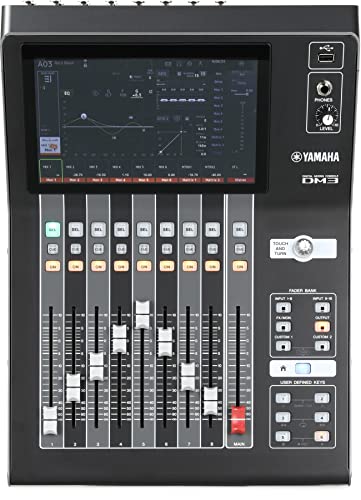
Yamaha DM3
Bands, small venues and project studios that want a compact 96 kHz digital console that doubles as an 18x18 USB recording interface.
Read the Yamaha DM3 review →Questions Buyers Ask
Mackie Mix8 8-Channel Compact Mixer
See the current listing, price and included accessories.
About This Review
Mandrillis Team
The Mandrillis editorial team researches and compares audio and music gear using manufacturer documentation, verified specs and real buyer feedback, so you can make a confident purchase without wading through marketing claims.
Read our full research methodology.