Studio Gear Review
PreSonus AudioBox 96 Review: Interface Plus Pads
The PreSonus AudioBox 96 bundle pairs two class-A mic preamps and zero-latency monitoring with 16 velocity-sensitive RGB pads and a perpetual Studio One Pro license. This research review checks that combination against the resolution and preamp gain figures the listing leaves unpublished.
Our Verdict
Research Score 74/100The PreSonus AudioBox 96 bundle covers two jobs at once: a two-input audio interface with class-A preamps and zero-latency hardware monitoring, and a 16-pad velocity- and pressure-sensitive MIDI controller for triggering loops, effects and virtual instruments. A perpetual Studio One Pro license and bus-powered USB operation round out a well-equipped package for the price tier stated. Resolution, exact preamp gain in decibels, and physical build details are not confirmed, each worth checking for a buyer with specific technical requirements. For a producer who wants to record a vocal or instrument and trigger pad-based parts from the same desk, this bundle answers more of the brief than a plain two-input interface would, supporting a score in the upper half of the budget range covered in this batch.
Editorial research score based on published specifications and documented features, not a customer rating or lab test.

PreSonus
PreSonus AudioBox USB 96 Studio Bundle
Best for: Home producers who want a two-input recording interface, a 16-pad trigger controller and a perpetual Studio One Pro license bundled together.
Skip it if: You need more than two simultaneous inputs, or confirmed resolution and preamp gain figures, before buying.
Check Price on AmazonWe may earn a commission at no extra cost to you.
Listing verified: November 2026
Who Should Buy It
Buy it if
- Beat makers and producers who want to trigger loops and virtual instruments from velocity-sensitive pads
- Vocalists and guitarists recording with a condenser microphone and an instrument on separate inputs
- Buyers who want a perpetual Studio One Pro license rather than a time-limited trial
- MIDI users who want to connect a synth or drum machine via dedicated MIDI In/Out
Skip it if
- You need more than two combo inputs for a larger recording session
- You require a published sample rate or bit depth figure before ordering
- You do not need pad-based triggering and want to avoid paying for it
Key Specifications
| Type | USB bus-powered audio interface bundle, including a 16-pad MIDI trigger controller |
| Inputs | 2 combo inputs with class-A mic preamps, also accepting line-level sources such as keyboards |
| Outputs | Balanced quarter-inch main outputs plus a high-volume headphone output |
| Preamps | 2 class-A mic preamps with plus 48V phantom power (gain in decibels not published in listing) |
| Resolution | Not published in listing |
| Phantom power | Plus 48V, available on both mic preamps |
| Connection | USB, bus-powered with no external power supply needed |
| Monitoring | Zero-latency hardware monitoring through an internal analog mixer |
| Bundled software | Studio One Pro perpetual license |
| Included accessories | 16 full-size, velocity- and pressure-sensitive RGB pads for triggering loops, effects and virtual instruments; USB cable; MIDI In/Out |
Overview
The PreSonus AudioBox 96 bundle combines two separate pieces of gear under one purchase: a two-input USB audio interface with class-A mic preamps, and a 16-pad MIDI trigger controller described in the listing as full-size and velocity- and pressure-sensitive with RGB lighting. That pairing suggests PreSonus is targeting a producer who both records live sources and triggers loops or virtual instruments.
Two combo inputs on the interface side carry class-A preamps with plus 48V phantom power, enough to record a condenser microphone and a line-level instrument at the same time. Zero-latency hardware monitoring through an internal analog mixer lets a performer hear themselves without the delay that software-only monitoring can introduce.
A perpetual Studio One Pro license is included, which the listing frames as professional recording software rather than a scaled-down trial version. Buyers report that a bundle combining recording hardware, a pad controller and a full recording suite represents significant value relative to buying each piece separately, even allowing for the specifications the listing leaves unstated. The price tier given for this listing is budget, which makes the breadth of the bundle notable against other low-cost interfaces in this batch that include no pad controller or software at all.
Preamps and Sound Quality
Two class-A mic preamps anchor the recording side of this bundle, each supplying plus 48V phantom power for condenser microphones. The listing does not publish a gain figure in decibels, so headroom cannot be compared numerically against named reference interfaces without further research.
Combo inputs accept both microphones and line-level sources such as keyboards, which gives some flexibility in how the two channels are used session to session. On paper, a class-A preamp design generally points toward a cleaner, lower-distortion signal path than cheaper transistor-based alternatives, though that remains a general design characteristic rather than a number confirmed in this listing.
Zero-latency hardware monitoring, achieved through an internal analog mixer, also affects perceived sound quality during tracking, since a performer hears an unprocessed, delay-free version of their own signal rather than a software-monitored version that can introduce audible lag on some systems. Buyers report that this kind of hardware monitoring is especially valuable for vocalists, who tend to notice even small amounts of monitoring delay more readily than instrumentalists.
Inputs, Outputs and Routing
Two combo inputs make up the entire recording input side, each able to accept a microphone or a line-level source. That is a modest count compared with some multi-channel interfaces in this batch, though it matches the needs of a solo producer recording one or two sources at a time.
On the output side, balanced quarter-inch main outputs connect to studio monitors, and a separately mentioned high-volume headphone output is described as letting a performer monitor their own performance loudly and clearly while recording, useful in a home environment without isolated monitoring.
MIDI In and Out round out the connection panel, letting a synth, drum machine or external controller connect directly, which complements the bundled pad controller for a more complete MIDI-based production setup within the same package. A producer running an external drum machine alongside the pad controller could route both into the same session without needing a separate MIDI interface.
Features, Monitoring and Software
The 16-pad RGB controller is the standout feature that separates this bundle from a plain two-input interface. Described as full-size and both velocity- and pressure-sensitive, it is built for triggering loops, effects and virtual instruments, which points toward beat-making and live performance use alongside straightforward recording.
Zero-latency hardware monitoring, already discussed, is listed as a feature in its own right, implemented through an internal analog mixer rather than relying on the computer's own monitoring path. That hardware-based approach removes one common source of frustration for new users setting up software monitoring for the first time.
Studio One Pro arrives as a perpetual license rather than a trial, giving a complete recording, editing and mixing environment alongside the hardware bundle. Together with the pad controller, this gives a new producer most of the pieces needed to both record and trigger parts without buying additional software.
- 16 velocity- and pressure-sensitive RGB pads
- Zero-latency hardware monitoring
- MIDI In/Out
- Studio One Pro perpetual license
- USB bus-powered operation
Build, Design and Controls
The listing does not state the chassis material, weight or dimensions for either the audio interface or the pad controller included in this bundle, leaving buyers without confirmed figures for planning a desk layout.
USB bus-powered operation is one build detail the listing does confirm, meaning no external power supply or wall wart is needed to run the interface from a computer, which simplifies cabling for a compact desk setup.
Control layout for the pad controller is described functionally, as velocity- and pressure-sensitive with RGB lighting across 16 full-size pads, though exact pad spacing, firmness or software mapping flexibility is not detailed beyond that description. Buyers coming from a different brand's pad controller should expect some adjustment time, since pad feel and software mapping conventions vary between manufacturers in ways this listing does not address.
Connectivity, Drivers and Latency
USB is the stated connection method for the interface, and the listing confirms bus-powered operation, meaning both audio data and power travel over the same cable to a connected computer.
Zero-latency hardware monitoring addresses one specific latency concern directly, letting a performer hear their own live input without a software-induced delay, even if the computer-side recording path has its own separate latency during playback.
The listing does not name a specific driver technology or state compatibility with particular operating system versions, so buyers on less common or older systems should confirm driver support independently before purchasing. For most recent Windows and Mac systems, a bus-powered class-compliant interface of this type is generally straightforward to install, though that general expectation is not itself a published guarantee from this specific listing.
Setup and Daily Use
Setup involves connecting the included USB cable, installing Studio One Pro, and configuring the pad controller for whichever loops or virtual instruments a producer plans to trigger. The listing does not detail a specific driver installation sequence, so timing will depend on the host operating system.
Daily use benefits from the combination of zero-latency monitoring for live tracking and the pad controller for performance-based production, letting a single desk handle both recording a vocal or instrument and triggering backing elements without swapping hardware. Over repeated sessions, a producer can save pad mappings and Studio One project templates, reducing the setup time needed each time a new idea needs capturing.
Who Should Buy It
The PreSonus AudioBox 96 bundle suits a home producer who wants to record a vocal or instrument and also trigger loops, samples or virtual instruments from a dedicated pad controller, rather than relying on a mouse and keyboard for that performance element.
It also fits a buyer who wants a complete starter package, interface, pad controller and full recording software, in one purchase, rather than assembling each piece separately from different brands. A beginner who has not yet settled on a single workflow benefits from having both a traditional recording path and a pad-triggering path available to experiment with from day one, without committing to either approach before knowing which one suits their creative process.
Alternatives Worth Considering
The PreSonus AudioBox iTwo, covered elsewhere in this batch, offers a similar two-input recording interface without the bundled pad controller, suited to a buyer who only needs straightforward recording and wants to save on cost rather than pay for triggering hardware they may not use.
The Focusrite Scarlett 2i2 is a commonly cited two-input alternative for buyers comparing straightforward recording interfaces without a bundled pad controller, though its exact specification numbers fall outside this listing's data.
A dedicated standalone pad controller paired with a separate two-input interface is another route for a buyer who wants to choose each component independently rather than accepting the fixed pairing in this bundle, though doing so generally costs more than buying the two together as PreSonus has packaged them here.
Verdict
The PreSonus AudioBox 96 bundle pairs a genuinely useful two-input interface, class-A preamps, phantom power and zero-latency monitoring, with a 16-pad RGB MIDI controller and a perpetual Studio One Pro license, covering both recording and performance-based production in one package.
Unpublished resolution, preamp gain and build details keep it from scoring at the very top of this batch, but the breadth of confirmed features supports a score in the upper half of the range covered here.
Strengths and Limitations
Strengths
- 2 class-A mic preamps with plus 48V phantom power
- Zero-latency hardware monitoring through an internal analog mixer
- 16 velocity- and pressure-sensitive RGB pads bundled for triggering loops and virtual instruments
- Studio One Pro included as a perpetual license
- USB bus-powered, with no external power supply or wall wart needed
- MIDI In/Out for connecting synths, drum machines or controllers
Limitations
- Resolution, meaning bit depth and sample rate, is not published in the listing
- Exact preamp gain in decibels is not stated
- Chassis material, weight and dimensions are not described
- Only 2 combo inputs, so no more than two simultaneous mic or line sources
How We Scored It
Scores reflect published specifications, documented features and value against the alternatives below. They are editorial research scores, not laboratory measurements.
Alternatives to Consider

Pioneer DJ XDJ-RX3
DJs who want club-standard standalone playback from USB with a large touchscreen and a familiar two-channel layout.
Read the Pioneer DJ XDJ-RX3 review →
Yamaha DM3-D 22
Small venues, houses of worship and production companies that want a compact 96 kHz digital console with Dante networking for stage boxes and multitrack recording.
Read the Yamaha DM3-D 22 review →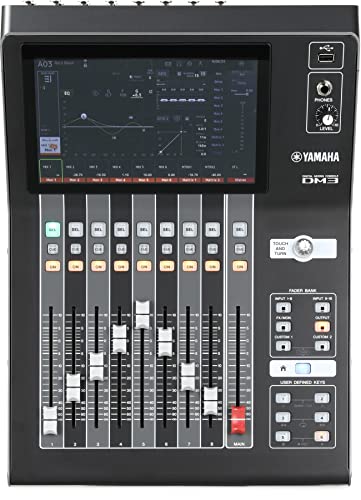
Yamaha DM3
Bands, small venues and project studios that want a compact 96 kHz digital console that doubles as an 18x18 USB recording interface.
Read the Yamaha DM3 review →Questions Buyers Ask
PreSonus AudioBox USB 96 Studio Bundle
See the current listing, price and included accessories.
About This Review
Mandrillis Team
The Mandrillis editorial team researches and compares audio and music gear using manufacturer documentation, verified specs and real buyer feedback, so you can make a confident purchase without wading through marketing claims.
Read our full research methodology.